Tooling
OpenAI Dots vs Meta Muse vs Grok Bot vs Gemini Spark: Which Always-On AI Agent in 2026
All four do the same trick. They differ on where you talk to them, what they cost, and how much of your life or your company you hand them.

OpenAI dots, Meta Muse, xAI’s Grok Bot and Google’s Gemini Spark are the same kind of product: an AI agent with its own cloud computer that keeps working after you close the app. The short answer on which to pick is simple. Muse is the best free personal agent if you live in the US or Canada and already use WhatsApp. Gemini Spark is the obvious choice if your work runs through Gmail and Google Docs. Grok Bot is the strongest for running several agents as a small team, and dots are built for people already paying for ChatGPT Pro or teams living in Slack and Microsoft Teams.
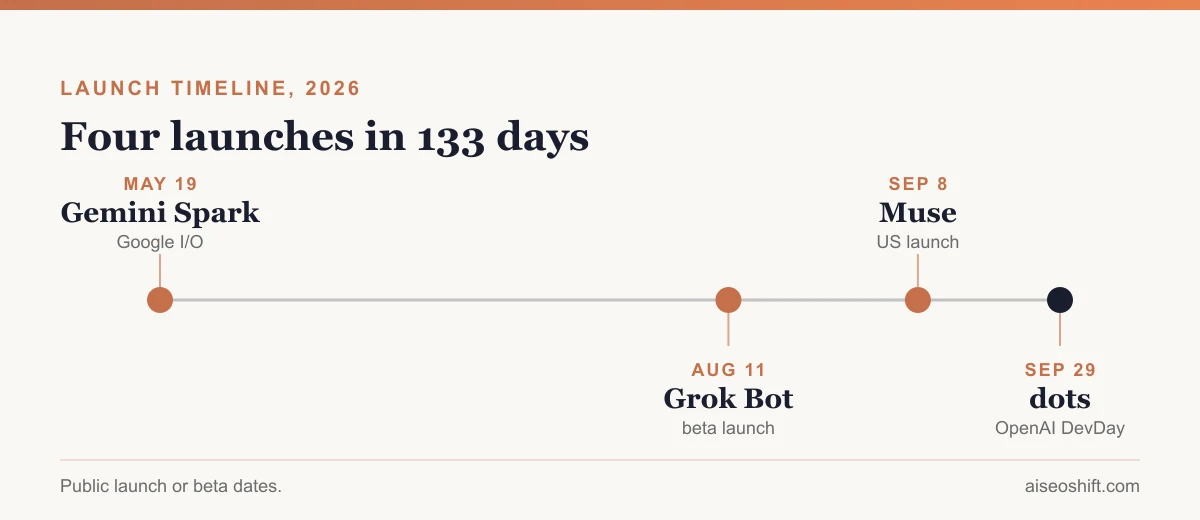
They launched within five months of each other. Google first, in May. OpenAI last, on September 29.
This is the new front in the AI race, and it moved fast.
What “always-on agent” actually means
A chatbot waits for you. These don’t.
You give one of these agents a goal, connect the apps it needs, and decide what it may do without asking. Then it goes off and works on a virtual machine in the cloud, clicking through websites, reading your inbox, filling in forms, and only coming back when it is finished or needs a yes from you. Your laptop can be closed. Your phone can be in a drawer.
That shared design is why the four look so alike on paper. Every one of them has a dedicated cloud computer, background execution, app connectors, and an approval gate before anything risky like a payment or a sent email. The real differences sit in four places: where you talk to it, what it costs, who it is built for, and where in the world you can get it.
The comparison at a glance
| OpenAI dots | Meta Muse | Grok Bot | Gemini Spark | |
|---|---|---|---|---|
| Launched | Sep 29, 2026 (DevDay) | Sep 8, 2026 | Aug 11, 2026 (beta) | May 19, 2026 (I/O) |
| Model | GPT-6 Astra | Muse Spark | Not disclosed | Gemini 3.5 + Antigravity |
| Where you reach it | ChatGPT, Slack, Teams (text and calls rolling out) | Muse app, WhatsApp, muse.ai | Grok Bot app (macOS, iOS), Slack for Team Bots | Dedicated Gmail address, Gemini, Chrome |
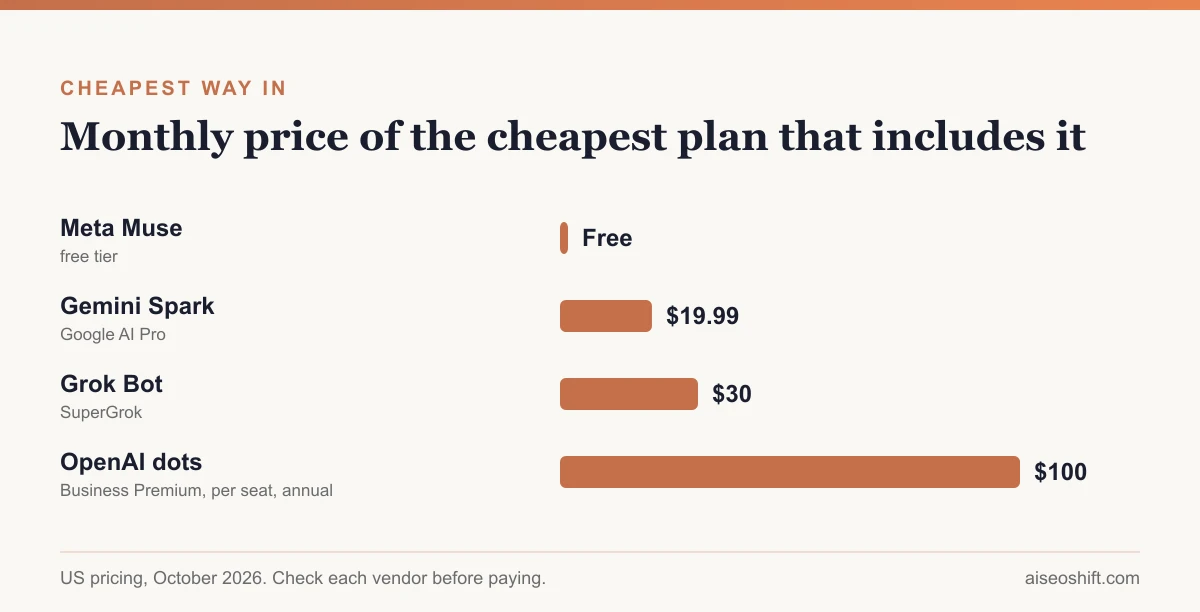
| Cheapest way in | ChatGPT Pro or Business Premium ($125/seat/mo, $100 annual) | Free | SuperGrok $30/mo or Cursor Pro | Google AI Pro $19.99/mo |
| Built for | ChatGPT power users, business teams | Personal life admin | Teams of agents, developers | Google Workspace users |
| Regions | Pro excludes EEA, UK, Switzerland | US and Canada | No regional limits announced | 160+ countries, excludes EEA, UK, Switzerland, Nigeria |
| Team features | Specialist dots, admin switch for workspaces | Muse for Small Business | Team Bots (public beta Sep 28) | Workspace context |
Now the detail behind each row.
Gemini Spark: the one that already lives in your inbox
Google got there first. Spark was announced at I/O on May 19, rolled out to Google AI Ultra subscribers in the US the following week, reached all US AI Pro subscribers on July 16, and has since opened to paid subscribers in more than 160 countries. The UK, the EEA, Switzerland and Nigeria are still left out.
The clever part is the front door. Spark gets its own Gmail address, so you hand it work the way you would forward something to an assistant: send an email. It reads context from Gmail, Docs and the rest of Workspace without setup, browses through Chrome, and runs on dedicated Google Cloud virtual machines. Google built it on Gemini 3.5 and its Antigravity agent harness, and it connects to outside tools through MCP, with more than 30 third-party apps at launch.
Price is the other draw. At $19.99 a month for AI Pro, Spark is the cheapest paid way into any agent on this list, and Ultra at $100 or $200 a month buys more usage. Our Gemini pricing breakdown covers what else each tier includes.
The catch: Spark is most useful when your life already runs on Google. If your company is on Outlook and Slack, half its advantage disappears.
Grok Bot: built to run a team of agents
xAI launched Grok Bot in beta on August 11 and framed it differently from everyone else. Not an assistant. A team of “AI teammates”, each with its own cloud computer, signing into the tools you already use and working across apps and inboxes.
The team idea is real, not marketing. You can stand up several bots with different jobs, a researcher, a writer and a chief of staff in xAI’s own example, put them in a group chat, and let them pass work to each other. On September 28 xAI added Team Bots in public beta: shared bots a whole team configures with the skills, plugins and credentials a role needs, then invites into a Slack channel.
Access started narrow. At launch Grok Bot came only with the most expensive SuperGrok and Cursor plans. On August 26 xAI widened it to every SuperGrok tier ($30, $100 Plus and $300 Heavy, per our Grok pricing guide) plus Cursor Pro, Pro+, Ultra and both Cursor Teams plans. The useful detail for heavy users: bot work comes with its own usage pool and does not eat into your normal Grok or Cursor limits.
Two gaps. xAI has not said which model runs Grok Bot, which makes it hard to judge from the outside. And it is still labeled beta, with larger company rollouts behind an enterprise waitlist.
Meta Muse: the free personal agent with the most users
Muse launched on September 8 in the US, opened to Canada on September 18, and became one of the most downloaded apps on the US App Store almost immediately. Sensor Tower estimated about 2.8 million downloads in its first two weeks.
The reason is simple. It’s free.
Meta says the free tier covers “most of what people need”, and TechCrunch reported paid Power and Maximum plans at $20 and $100 a month. Meta’s own post confirms paid plans exist without naming prices, so treat those two numbers as reported, not official. You need to be 18 or over.
Muse talks to you like a person in WhatsApp, the Muse app on iOS and Android, or on the web at muse.ai, with Meta’s AI glasses next. It runs on Muse Spark, Meta’s strongest model, inside a per-person virtual machine Meta calls Muse Secure VM.
It is also the most willing of the four to spend money. Muse pays through Link by Stripe using one-time virtual cards, with purchase protection and price-drop refunds, and Shop Pay support is on the way. Meta paired that with the most detailed safety story in the group: a separate “Sentinel” agent watches every outbound action, Muse never sees your passwords (it supports 1Password), every action leaves an audit trail, and you choose per app whether Muse can only read or can also act. Meta says Muse data stays out of its ad systems and that you can opt out of training.
On September 29 Meta added Muse for Small Business, with skills for reviewing ad performance, running campaigns and finding customers. That pushes Muse toward the same small-business ground Grok Bot and dots want.
The limit is obvious. Unless you are in the US or Canada, you can’t use it yet.
OpenAI dots: the latest arrival, aimed at paying ChatGPT users
OpenAI announced dots at DevDay on September 29. They are powered by GPT-6 Astra and come with a deliberately friendly look, little floating cartoon avatars, which TechCrunch compared directly to Muse.
Under the cartoons, dots are the most business-shaped of the four. You reach them in ChatGPT on desktop, web and mobile, and in Slack and Microsoft Teams, with texting and phone calls rolling out. They can reach more than 4,000 apps through OpenAI’s plugins and, with your permission, work on your own laptop. You can create specialist dots with their own identity, credentials and tools, and they can work together as a group.
The first dot comes free with ChatGPT Pro or Business Premium, which costs $125 per seat per month or $100 billed annually. For business workspaces an admin has to switch dots on. OpenAI says extra dots and more capacity will come later at prices it has not announced, and agent usage did not count against plan limits for the first month. Tasks a dot hands off to Codex still count as normal usage.
Safety follows the same pattern as the others, with OpenAI-specific names. An “auto-review” check runs before any action that touches an account or shares information, a monitoring system can pause or stop a dot, and proactive research runs read-only. Microsoft Agent 365 security controls are being added for companies that need them.
The region gap is the big one. Pro subscribers in the EEA, the UK and Switzerland are excluded, and early access was staggered, with some accounts waiting days.
Which one should you actually use?
Pick by where your day already happens. Not by benchmark.
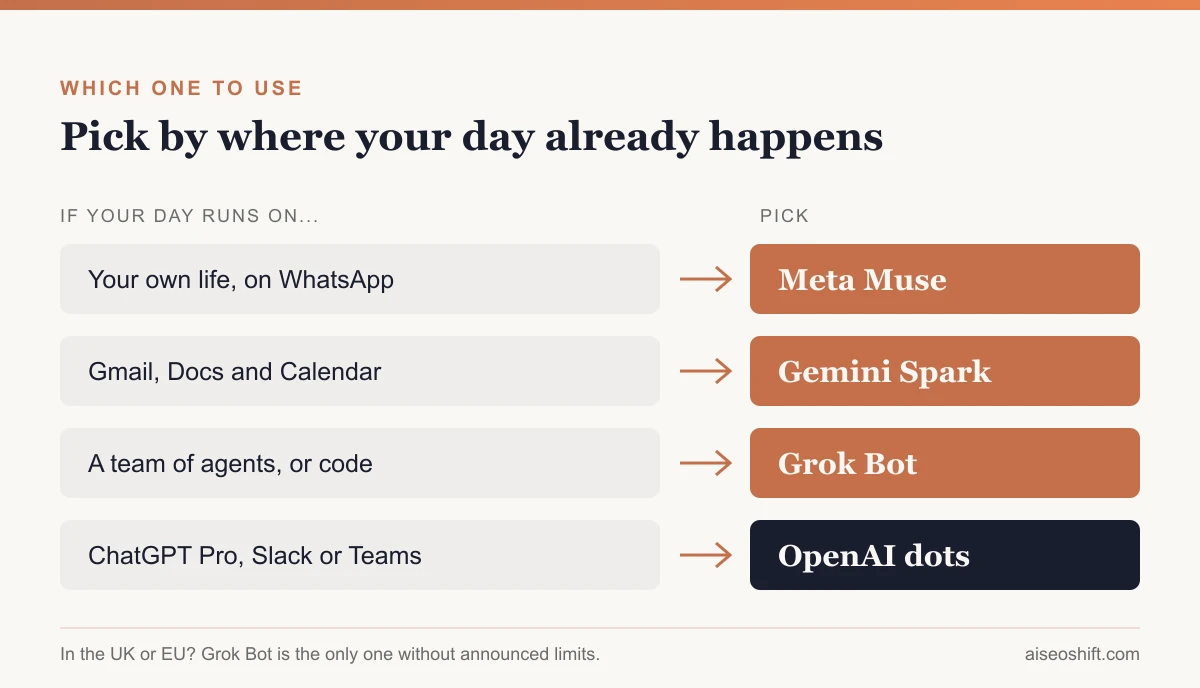
You want help with your own life and you are in the US or Canada. Start with Muse. It’s free, it works in WhatsApp, and it handles bookings, forms and shopping better than the others today. Nothing else on this list costs you nothing to try.
Your work runs on Gmail, Docs and Calendar. Gemini Spark. Emailing tasks to your agent is a natural habit, and $19.99 a month is the cheapest paid entry here. Its 160-country rollout is the widest one any of these companies has confirmed.
You want several agents working together, or you code. Grok Bot. The multi-bot group chat and Team Bots are the most developed team features right now, and the Cursor bundling makes sense if your developers already pay for Cursor.
You already pay for ChatGPT Pro, or your team lives in Slack and Teams. Dots. One is included in the plan you already have, it plugs into the chat tools your company uses, and the 4,000-app plugin reach is the widest. Business buyers should note the per-seat cost of Business Premium before rolling it out.
You are in the UK or EU. Grok Bot is the realistic option today, since xAI has published no regional restrictions. Dots on Pro, Spark and Muse all leave you out for now.
One honest warning applies to all four. Every company says these agents still make mistakes, and every one of them keeps a human approval step for anything that matters. Start with read-only access, give an agent one bounded job, and widen its permissions only after it has earned them.
The one coming next: Microsoft Copilot Autopilot
Microsoft announced Autopilot, formerly called Scout, on September 25 as part of a rebuilt Copilot. It is the same idea: an agent with its own identity, memory and computing environment that keeps working inside your company’s Microsoft 365 setup. It is in private preview, with wider access through Microsoft’s Frontier program, so there is nothing public to price or compare yet. If your company runs on Microsoft 365, it is worth watching before you commit to dots.
What this means for your website
This is the part most comparisons skip, and it matters if you run a business online.
These agents browse, compare and buy on behalf of real people. When someone tells Muse to find a dentist who takes their insurance, or asks a dot to shortlist three CRM vendors, the agent visits websites, reads them, and makes the call. Your page is no longer only read by a person. It is read by an agent deciding whether you make the shortlist.
That raises the bar for the basics. Prices, availability, opening hours and booking steps need to sit in plain HTML an agent can read, not inside images or behind a login. Forms need to work without tricks. Your robots.txt rules for AI crawlers decide whether agents can reach your pages at all. And the same work that gets you cited in AI answers, covered in how to get cited by AI search systems, is what gets you picked by an agent doing the shopping.
The agents are new. The rule isn’t: be the clearest, most trustworthy answer on the page.
The bottom line
Four labs, one idea, four different bets on where people will meet their agent. Google bet on the inbox. Meta bet on WhatsApp and a free tier. xAI bet on teams of bots. OpenAI bet on the ChatGPT subscription and the office chat tools.
For most people the answer comes down to two questions: which app do you already open fifty times a day, and does your country have access yet? Answer those and the choice mostly makes itself.
Prices and availability are as of October 7, 2026. All four products are changing weekly, so check each company’s own page before you pay.