Tooling
Best AI Lead Generation Tools in 2026: Compared and Ranked
Most lists of AI lead generation tools are written by the vendors on them. This one ranks nine by what each tool actually does, what it costs on its own pricing page, and who it fits.

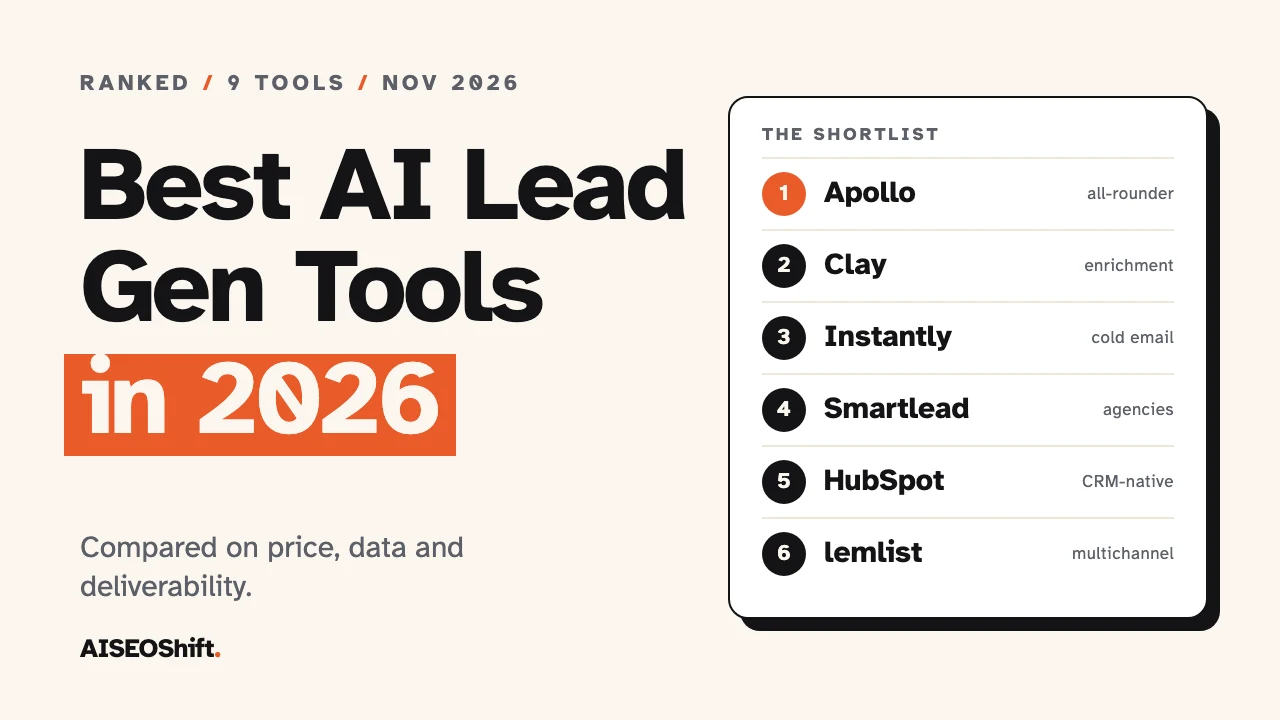
The short answer: start with Apollo if you want data and outreach in one tool, and note that it has a free plan. Pick Clay if you want to build custom data workflows. Pick Instantly if cold email at volume is the goal. The other six tools below fit narrower jobs. Every price and feature here comes from the vendor’s own pages, checked in November 2026.
In this article
- How we ranked these tools
- Comparison table
- The 9 best AI lead generation tools
- Which tool to pick by situation
- Why teams are buying these tools now
- Mistakes to avoid when buying
- FAQs
How we ranked these tools
This ranking is based on public sources: each vendor’s pricing page and product pages, opened in November 2026, plus the results that currently rank for “ai lead generation tools.” We did not run hands-on tests of every platform, and we have not used review-site scores to set the order. The order is our judgment of practical fit.
Five things set the order:
- Data or sending, and how much of each. A tool that finds contacts and sends mail beats one that does half the job, for most buyers.
- A real AI feature, not a label. We counted what the vendor itemizes, such as research agents, reply classification and AI-built buying groups.
- Price clarity. A published price scores higher than “book a demo.”
- A free plan or trial. You should be able to test fit before paying.
- Deliverability controls. Sending tools that give you mailbox rotation and verification rank above those that do not mention it.
Where a vendor’s page did not show a price, or showed two different ones, we say so in the entry rather than pick one.
One caution. Several of the top-ranking “best AI lead generation tools” pages are published by vendors that appear on their own lists. That is not a reason to distrust a tool, but it is a reason to test your shortlist on your own data.
Comparison table
| # | Tool | Best for | AI feature (as listed) | Starting price (as listed) | Free plan | Verified |
|---|---|---|---|---|---|---|
| 1 | Apollo | Solo sellers and small teams | AI features on Professional plan | See vendor site | Yes, no time limit | Nov 2026 |
| 2 | Clay | Custom enrichment workflows | Claygent research agent, waterfall enrichment | $167/mo (Launch) | Yes | Nov 2026 |
| 3 | Instantly | Cold email at volume | 450M+ lead database in credits | $47/mo | Not clearly stated | Nov 2026 |
| 4 | Smartlead | Agencies with many mailboxes | Unlimited email accounts on all plans | $39/mo | Free trial, no card | Nov 2026 |
| 5 | HubSpot Sales Hub | Teams already on HubSpot | Credit-powered AI agents | $7/seat/mo | Yes, up to 2 users | Nov 2026 |
| 6 | lemlist | Multichannel outreach | lemAgent, reply intent detection | $69/mo | 14-day trial | Nov 2026 |
| 7 | AiSDR | Hands-off AI outbound | AI-run research and sequences | $1.50 per person prospected | No trial, no card to sign up | Nov 2026 |
| 8 | ZoomInfo | Enterprise data and buying groups | AI buying groups, Copilot chat | Quote only | Trial on sales packages | Nov 2026 |
| 9 | 6sense | Enterprise ABM and intent | RevvyAI, AI email agents | Not published | No | Nov 2026 |
Prices are what each vendor’s page showed when we checked. Several pages show a monthly and an annual price without labeling which is which, so confirm the billing term before you buy.
The 9 best AI lead generation tools
1. Apollo
Best for: solo sellers and small teams that want contact data and outreach under one login.
What the AI does: Apollo’s pricing page puts AI features and call recording on the Professional plan. Email sequencing comes with every account, and one-click export covers up to 10,000 leads.
Limits: The free plan can connect Gmail accounts only. Credits are pooled across the team, unused credits expire each cycle, and the page does not print how many credits each plan carries. Credits are the thing you will run out of first.
Pricing: A free plan with no time limit. Paid tiers are Basic, Professional and a custom plan. Apollo’s page did not show dollar figures when we checked, and third-party guides disagree with each other, so read the live page.
Verdict: Start here unless you have a specific reason not to. The free plan alone is enough to learn whether outbound works for your offer.
2. Clay
Best for: people who want to build their own enrichment workflow rather than accept one vendor’s data.
What the AI does: Clay runs waterfall enrichment, which means it queries several data providers in order until one returns a verified result. It also includes Claygent, an AI agent that researches a company or person on the web, and lets you bring your own API keys.
Limits: The free plan caps tables at 200 rows and leaves out phone enrichment, job change signals and email campaigns. Clay is a data layer. Most teams pair it with a separate sending tool.
Pricing: Free at $0 with 500 actions and 100 data credits a month. Launch is listed at $167 a month and Growth at $446. The FAQ on the same page lists $185 and $495, so check the billing toggle.
Verdict: The best option when your list needs to be precise. Slower to set up than Apollo, and worth it for teams with a clear ideal customer profile.
3. Instantly
Best for: cold email at volume, with a lead database attached.
What the AI does: Instantly’s pricing page leans on its database, listed at 450M+ leads and billed in credits, and on its sending limits. It does not itemize AI features on that page, so judge it as sending infrastructure with lead search added.
Limits: Sending and lead credits are priced as separate plans, which makes the real monthly cost easy to underestimate. The page shows 125,000 emails a month for the Hypergrowth plan in one place and 100,000 in the comparison table. The free-trial terms are not stated clearly either.
Pricing: Outreach Growth is $47 a month, or $37.60 on yearly billing, for 5,000 emails and 1,000 uploaded contacts, with unlimited email accounts. Lead finder plans also start at $47 a month.
Verdict: A strong fit when the plan is to send a lot of cold email and you do not mind managing deliverability yourself.
4. Smartlead
Best for: agencies and anyone running many mailboxes across many clients.
What the AI does: The pricing page does not list AI features. What it offers is sending infrastructure: unlimited email accounts on every plan, and monthly caps on contacts, sends and verified emails.
Limits: Unlimited mailboxes is not the same as good deliverability. More inboxes only help if each one is warmed up and sending at a sane rate.
Pricing: Base is $39 a month ($32 on annual billing) for 2,000 contacts and 6,000 sends. Pro is $94 a month ($78 annual) for 30,000 contacts and 90,000 sends. Every plan has a free trial with no card, and annual billing saves 17%.
Verdict: Pick it over Instantly if you run outreach for several clients and care more about mailbox count than lead data.
5. HubSpot Sales Hub
Best for: teams whose pipeline already lives in HubSpot.
What the AI does: HubSpot’s Starter, Professional and Enterprise editions include HubSpot Credits, which power its AI agents. The pricing page names Customer, Prospecting and Data agents. Credits scale by edition, from 500 on Starter to 5,000 on Enterprise.
Limits: Professional carries a $1,500 one-time onboarding fee. The page lists two prices for Starter ($7 and $20) and for Professional ($90 and $100) without labeling the billing term.
Pricing: Free for up to two users. Starter starts at $7 per seat per month, Professional at $90, and Enterprise at $150.
Verdict: If your contacts and deals are already in HubSpot, adding its AI beats bolting on a second system. If they are not, it is a poor place to start a lead generation program.
6. lemlist
Best for: personalized outreach across email, LinkedIn, SMS and calls.
What the AI does: lemlist lists lemAgent, AI research on accounts and contacts, AI reply intent detection, AI out-of-office detection and AI-written replies. The 650M+ lead database is included on every plan.
Limits: Multichannel pricing is per user. Enrichment and buying-signal credits are add-ons, at $20 a month for 2,000 enrichment credits and $29 a month for 100 signals.
Pricing: Email is $69 a month, or $55 on yearly billing, with unlimited users. Multichannel is $109 a month, or $87 yearly, per user. There is a 14-day free trial.
Verdict: The best choice when personalization matters more than raw send volume.
7. AiSDR
Best for: teams that want an AI to run outbound with little daily involvement.
What the AI does: Per its pricing page, AiSDR handles research, list building and message writing, then runs email and LinkedIn sequences. It classifies replies in a unified inbox and enriches contacts across 20 data providers. It syncs both ways with HubSpot.
Limits: The page contradicts itself on minimum spend, saying campaigns start from $7.50 in one place and from $3 in another. Per-prospect pricing adds up: 1,000 prospects at $1.50 is $1,500. A fully managed service is listed at $2,500 a month.
Pricing: $1.50 per person prospected, pay as you go, with team plans priced on volume.
Verdict: Worth a small test if your bottleneck is time, not budget. Read what it sends before it sends it.
8. ZoomInfo
Best for: enterprise sales teams that need deep contact data and buying-group mapping.
What the AI does: ZoomInfo’s Professional package lists AI-written outreach and dialing insights. Advanced adds AI-generated buying groups and talking points. Enterprise adds AI account summaries, AI-built ideal customer profiles and a Copilot chat feature.
Limits: No prices are published. The page says cost depends on features, number of licenses and credit usage.
Pricing: Quote only, with free trials offered on the three sales packages.
Verdict: The standard answer when data coverage matters more than cost. Overbuilt for a team of three.
9. 6sense
Best for: account-based marketing teams that want to know who is researching their category.
What the AI does: 6sense describes a 1B+ intent network, AI prioritization lists with a stated reason behind each score, AI email agents and RevvyAI, a question-and-answer assistant for pipeline data. It also offers an MCP connection for AI tools.
Limits: No pricing and no free plan are shown. It is an account-based platform, so it assumes you already have a marketing and sales motion to feed.
Pricing: Not published.
Verdict: Relevant once you have a team and a target account list. Skip it before then.
Which tool to pick by situation
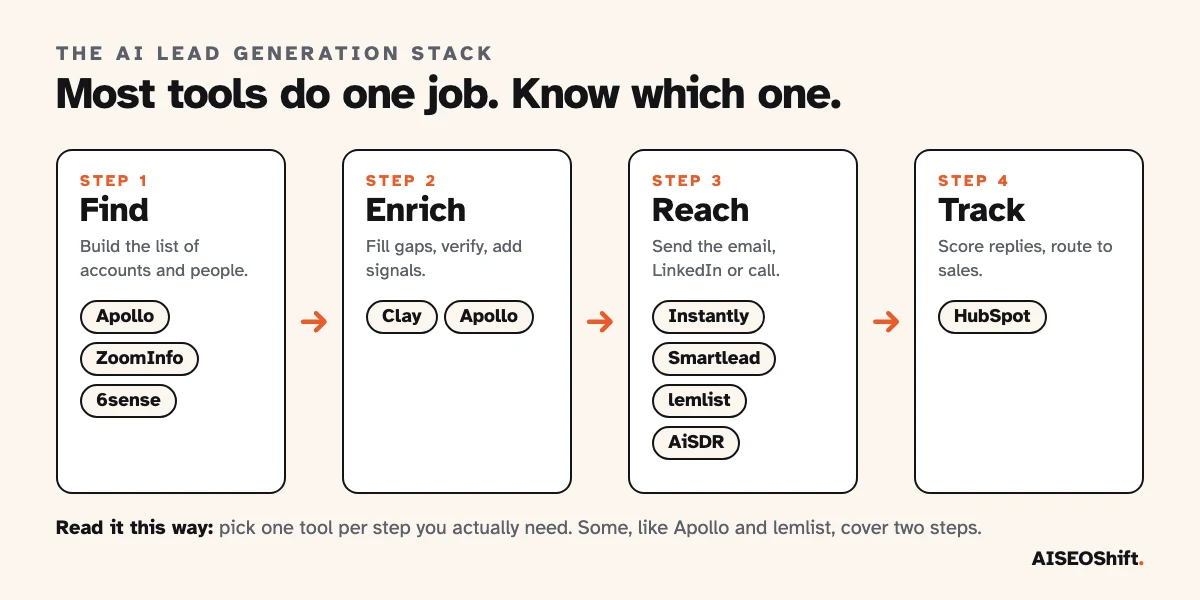
The right answer depends on team size and on which step of the stack you are missing.
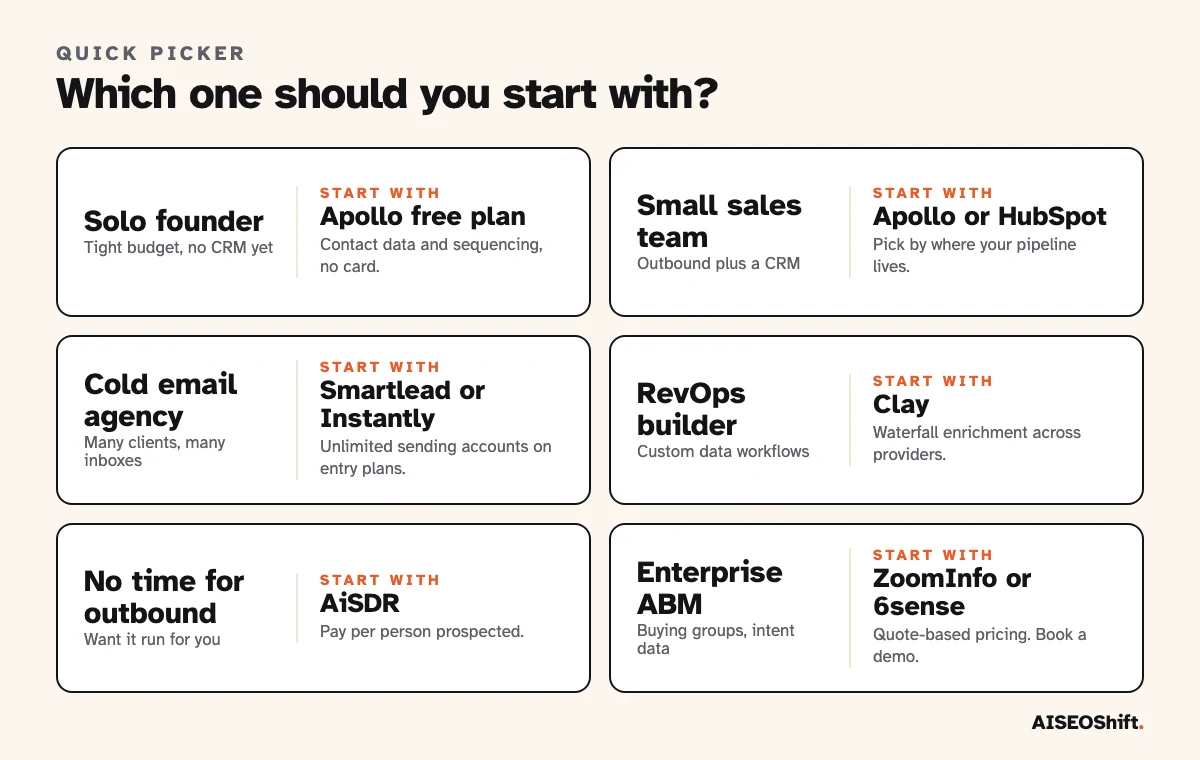
Solo founder. Apollo’s free plan, then add a sending tool only when you outgrow it. Do not buy an enterprise platform to send 50 emails a week.
Small team with a CRM. Choose by where your deals are tracked. HubSpot users should look at HubSpot first. Everyone else should compare Apollo with lemlist.
Agency. Smartlead or Instantly, because both put no cap on connected email accounts. Add Clay if you build lists to a custom brief.
Enterprise. ZoomInfo for data, 6sense for intent. Expect a demo cycle and a quote.
Why teams are buying these tools now
Adoption is already past the early stage. Salesforce’s State of Sales research, a double-anonymous survey of 4,050 sales professionals run in August and September 2025, found that 55% of sales professionals are using AI for prospecting, with another 38% planning to. The same report found top-performing sellers were 1.7 times more likely than underperformers to use prospecting AI agents for outreach.
Read that carefully. It shows that adoption is common and that top sellers use agents more. It does not show that agents cause the better results. Treat it as a reason to test a tool, not as proof any one tool will lift your numbers.
Mistakes to avoid when buying
Buying a list instead of a process. A purchased list of unverified contacts is the fastest way to burn a domain. Use enrichment and verification, and send only to people who match a clear profile. Our guide to cold email templates covers what to write once the list is clean.
Automating before you have a message that works. AI scales whatever you give it. If a human-written email gets no replies at 50 sends, 5,000 automated sends will not fix it. Test by hand first.
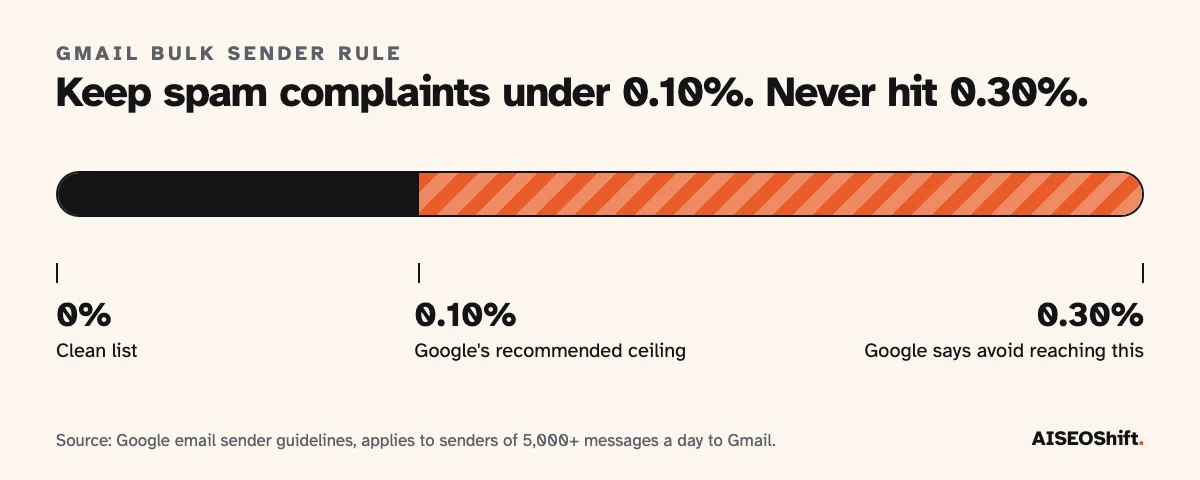
Ignoring the sender rules. Google’s guidelines require senders of more than 5,000 messages a day to Gmail to keep spam rates below 0.30%, with a recommended ceiling of 0.10%. They also require SPF, DKIM and DMARC, plus one-click unsubscribe on marketing messages. Google publishes the full requirements. Our piece on email deliverability walks through the setup.
Comparing seat prices and ignoring credits. Apollo, Clay and lemlist all meter usage in credits or actions. The plan price is the floor. Work out how many contacts you will enrich a month before you pick a tier.
Paying for three tools that overlap. If Apollo already finds and sends, you may not need a separate database. Map each tool to one step of the stack before you buy.
FAQs
What is the best AI lead generation tool overall?
For most teams, Apollo. It has a free plan with no time limit and covers contact data, email sequencing and AI features in one login. Clay is the better choice if you want to build a custom enrichment workflow, and Instantly or Smartlead fit teams whose main goal is cold email at volume.
Is there a free AI lead generation tool?
Yes. Apollo’s free plan has no time limit, Clay’s free plan includes 500 actions and 100 data credits a month, and HubSpot’s Sales Hub is free for up to two users. All three cap volume or hold back features, so a free plan is a way to test fit, not to run a full outbound program.
How much do AI lead generation tools cost?
Entry plans run from free to roughly $40 to $70 a month for sending-focused tools such as Smartlead, Instantly and lemlist. Enrichment platforms like Clay start higher once you need real volume, and enterprise platforms such as ZoomInfo and 6sense publish no prices and sell by quote. AiSDR charges $1.50 per person prospected.
Can AI lead generation replace an SDR?
It can replace parts of the job, such as list building, research and first-draft messaging. Tools like AiSDR sell a fully automated version. Human judgment still matters for who to target, what to promise and how to handle replies, and automated volume with no review is the fastest route to a damaged sending domain.
Is AI cold email legal?
The tool does not change the law. Rules such as CAN-SPAM in the US and GDPR in the EU apply to the message and the way you collected the contact, whether a person or an AI wrote it. Check the rules for each country you send to, and give every recipient a working way to opt out.
What is the difference between lead generation and lead enrichment?
Lead generation finds new people or accounts that might buy. Enrichment adds data to contacts you already have, such as verified emails, job titles and company details. Apollo does both. Clay is built mainly for enrichment.
Do AI lead generation tools hurt email deliverability?
They can. Gmail requires bulk senders, meaning 5,000 or more messages a day, to keep spam complaints below 0.30% and to support one-click unsubscribe. Sending fast from a new domain with an unverified list is how most teams break this.
Related reading
- Best AI tools for sales reps
- Best AI CRM tools for small business
- Best AI email marketing tools
- Cold email templates
- Email deliverability
References
- Salesforce, State of Sales report announcement
- Google, email sender guidelines
- Vendor pricing and product pages for Apollo, Clay, Instantly, Smartlead, HubSpot, lemlist, AiSDR, ZoomInfo and 6sense, checked November 2026.