Playbooks
Email Deliverability: SPF, DKIM, DMARC and the 2024 Bulk Sender Rules
Deliverability is not a mystery setting inside your email tool. It is three DNS records, a spam rate under 0.3%, and a list you actually clean.


Email deliverability is whether your messages reach the inbox, not whether your email platform says “sent.” Since February 2024, Google and Yahoo both enforce specific technical rules for bulk senders: authenticate with SPF, DKIM and DMARC, keep your spam complaint rate under 0.3%, and support one-click unsubscribe. Miss any of the three and messages start landing in spam or getting rejected outright, regardless of how good your subject line is.
This post explains the three authentication records in plain language, walks through exactly what Google and Yahoo require, and gives you a checklist to audit your own setup.
Key takeaways
- SPF, DKIM and DMARC are DNS records that prove your emails are actually from your domain. Without them, modern mailbox providers assume you might not be.
- Google and Yahoo’s bulk sender rules took effect February 1, 2024, and both require spam rates under 0.3%, with Google recommending under 0.1%.
- One-click unsubscribe, via the
List-UnsubscribeandList-Unsubscribe-Postheaders, is mandatory for marketing email at bulk sender volume on both providers.- A clean list beats a clever subject line. Sending to addresses that bounce or never open drags your reputation down for every message, not just that campaign.
- Google Postmaster Tools is free and is the only direct read you get on how Gmail scores your domain. Set it up before you have a problem, not after.
SPF, DKIM and DMARC, explained without the acronyms
Think of these three records as an ID check for your email.
SPF (Sender Policy Framework) is a list, published in your domain’s DNS, of which mail servers are allowed to send email claiming to be from you. When an email arrives, the receiving server checks: did this come from a server on the approved list? If not, that’s a red flag.
DKIM (DomainKeys Identified Mail) attaches a digital signature to each outgoing email. The receiving server checks that signature against a public key in your DNS. If the signature matches, the message wasn’t tampered with in transit, and it really did originate where it claims to.
DMARC (Domain-based Message Authentication, Reporting and Conformance) sits on top of both. It tells receiving servers what to do when a message fails SPF or DKIM checks (reject it, send it to spam, or let it through) and it sends you reports showing who is sending email using your domain, including anyone spoofing you.
| Record | What it checks | What it protects against | Where it lives |
|---|---|---|---|
| SPF | Is this server allowed to send for this domain? | Basic spoofing from unauthorized servers | TXT record in DNS |
| DKIM | Was this message signed by the real sender and left unaltered? | Message tampering, some spoofing | TXT record in DNS (per selector) |
| DMARC | What should happen when SPF or DKIM fails, and who’s sending as me? | Phishing, domain impersonation | TXT record in DNS (_dmarc subdomain) |
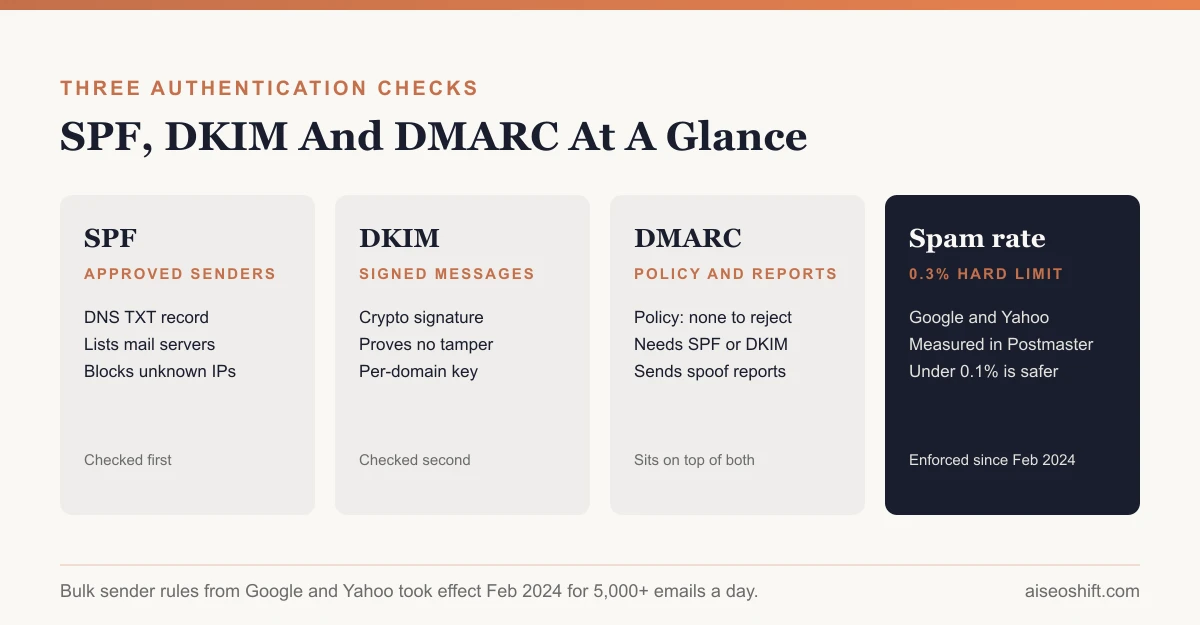
You need all three set up correctly, not one. Google’s own guidance for bulk senders is explicit that high-volume senders need SPF, DKIM and a published DMARC policy together, not any single one in isolation.
DMARC policies step up in three stages, and most teams should move through them in order rather than jumping straight to the strictest setting. p=none just monitors and reports, without blocking anything, which is the right starting point so you can see who’s sending as you before you risk blocking legitimate mail. p=quarantine sends failing messages to spam. p=reject blocks them outright. Jump to reject before you’ve confirmed every legitimate sending source (your email platform, your CRM, your transactional mail provider) passes SPF or DKIM, and you’ll block your own marketing emails along with any spoofed ones.
Google and Yahoo’s 2024 bulk sender rules
Both Google and Yahoo rolled out matching requirements effective February 1, 2024, for anyone sending more than 5,000 messages a day to their users. The rules converged because both companies were responding to the same spam and phishing problem, and a single shared standard is easier for the whole industry to implement than two different ones.
| Requirement | Yahoo | |
|---|---|---|
| Authentication | SPF and DKIM required; DMARC required for volume senders | SPF and DKIM required; valid DMARC policy (at least p=none) required |
| Spam rate threshold | Below 0.30% in Postmaster Tools; under 0.10% recommended | Below 0.30%, measured on mail delivered to the inbox |
| One-click unsubscribe | Required for marketing/subscribed mail, via List-Unsubscribe and List-Unsubscribe-Post headers | Required; RFC 8058 one-click method recommended |
| Unsubscribe honored within | Not separately specified beyond the one-click requirement | 2 days |
| Effective date | February 1, 2024 | February 2024 |
Two things worth noting if you’re under the 5,000-a-day threshold. First, the hard enforcement is aimed at bulk senders, so a small list technically isn’t held to the same bar. Second, most reputable email platforms (the kind you’d find in our best AI email marketing tools roundup) now require SPF and DKIM to send at all, regardless of your volume, because providers that don’t enforce it get blamed for other customers’ spam.
The one-click unsubscribe requirement is also a content decision, not just a technical one. If your welcome email sequence or ongoing newsletter makes unsubscribing hard to find, you’re both violating the spirit of the rule and increasing the odds someone hits “report spam” instead of “unsubscribe,” which hurts your spam rate directly.
List hygiene: the part people skip
A clean list is the deliverability lever most businesses under-invest in, because it feels like busywork instead of strategy.
- Remove hard bounces immediately. A hard bounce means the address doesn’t exist. Continuing to send to it signals a stale or purchased list, which is exactly what spam filters are built to catch.
- Suppress chronic non-openers. Someone who hasn’t opened anything in 6-12 months is dragging your engagement rate down on every send, which affects deliverability for your engaged subscribers too, since inbox providers judge reputation at the domain level.
- Never buy a list. Purchased and scraped lists have high spam complaint rates almost by definition, because the people on them never asked to hear from you. One bad send to a purchased list can damage a domain’s reputation for weeks. Cold outreach is a different discipline with its own deliverability math; our cold email templates post covers how to send 1-to-1 prospecting email without triggering the same bulk sender rules.
- Use double opt-in for anything beyond basic transactional mail. It’s a slower way to grow a list, but every subscriber on it actually wants the email, which is the single best predictor of a low complaint rate.
- Re-engagement before removal. Before suppressing someone, send one or two “are you still interested” emails. Some will re-engage. The rest you remove with confidence instead of guessing.
Warming up a new domain or IP
If you’re moving to a new sending domain, a dedicated IP, or a new email platform, don’t send your full volume on day one. Mailbox providers have no history with that domain yet, and a sudden spike of mail from an unknown sender looks exactly like a spam campaign starting up.
A reasonable approach: start with your most engaged segment (recent opens and clicks) at a fraction of normal volume, then increase gradually over 2-4 weeks as your spam rate and engagement stay healthy. Watch Postmaster Tools daily during this period, because a problem caught in week one is cheap to fix; a problem caught in week four, after it’s tanked your reputation, is not.
Monitoring with Google Postmaster Tools
Google Postmaster Tools is free, and it’s the only direct visibility Google gives senders into how Gmail actually scores their domain. Set it up by verifying your sending domain through a DNS record, and it reports:
- Spam rate, the metric both Google’s and Yahoo’s rules key off.
- Domain and IP reputation, shown as a tier rather than a raw number.
- Authentication results, confirming SPF and DKIM are passing as expected.
- Delivery errors, which flag technical problems before they show up as a drop in opens.
Check it weekly at minimum, and immediately after any big campaign send, a platform migration, or a list import. Most deliverability problems show up in Postmaster Tools before they show up in your open rate, because by the time opens drop, you’re likely already being filtered to spam for a meaningful share of recipients.
Say your open rate drops from 28% to 19% over two weeks with no change to your content or send time. That’s a deliverability symptom, not an engagement problem. Check Postmaster Tools first: if spam rate has climbed toward 0.3%, or reputation has dropped a tier, you’ve found the cause before you’ve wasted a week rewriting subject lines that were never the issue.
Common mistakes that tank deliverability
A few patterns show up repeatedly in deliverability postmortems:
- Sending a re-engagement campaign to the whole dead list at once. This spikes complaint rate and bounce rate on the same day, right when reputation monitoring is watching closest. Segment it, and send to small batches.
- Switching email platforms without re-authenticating DNS. A new platform often needs its own SPF include and DKIM selector. Skip that step and your authentication silently fails on every send from the new tool.
- Treating “delivered” as “inboxed.” Most platforms report delivery, not inbox placement. A message can be “delivered” straight to spam and your dashboard will still show it as a successful send.
- Ignoring feedback loop and bounce data from transactional email. Account notifications and receipts share the same sending domain’s reputation as marketing email in many setups. A broken transactional flow throwing bounces can drag down a newsletter sent from the same domain.
Deliverability checklist
| Item | Why it matters | Done |
|---|---|---|
| SPF record published and valid | Confirms authorized senders | |
| DKIM signing enabled for your sending domain | Confirms message integrity | |
DMARC record published (p=none minimum, moving to quarantine/reject) | Required by Google and Yahoo; enables spoofing reports | |
| Spam rate under 0.30% in Postmaster Tools | Hard requirement for bulk senders on both Google and Yahoo | |
| One-click unsubscribe headers implemented | Required for marketing mail at bulk volume | |
| Hard bounces removed automatically | Prevents sending to dead addresses | |
| Chronic non-openers suppressed or re-engaged | Protects domain-level reputation | |
| New domains/IPs warmed up gradually | Avoids reputation damage on day one | |
| Google Postmaster Tools verified and checked weekly | Only direct window into Gmail’s view of your domain |
The bottom line
Deliverability problems almost always trace back to one of three things: missing or misconfigured authentication, a spam rate that’s crept above 0.3%, or a list full of addresses that never wanted the email in the first place. Fix those three and most “my emails aren’t getting opened” problems turn out to be “my emails aren’t arriving” problems, solved.
Once delivery is solid, the content and timing choices that actually drive opens and repeat purchases, the kind we cover in customer retention strategies, have a chance to matter. Before that, they don’t.
Related guides
- Email Marketing Best Practices: 19 Rules Grouped by What They Fix
- Email Marketing for Small Business: A Step-by-Step Setup
- Abandoned Cart Email: A 3-Email Flow You Can Copy Today
- Email Segmentation: 10+ Segments You Can Build This Week