Playbooks
Email Segmentation: 10+ Segments You Can Build This Week
Segmentation isn't a feature you turn on once. It's a list of specific groups, each with a reason to exist and a message that only makes sense for them.

Email segmentation means splitting your list into groups based on behavior, lifecycle stage, purchase history or engagement, then sending each group a message built for them instead of one email to everyone. Mailchimp’s segmentation guide groups the common approaches into categories like demographics, behavioral data, engagement level and funnel stage, and the groups that actually move revenue are almost always behavioral or lifecycle-based, not just demographic.
Key takeaways
- Segmentation types fall into a few buckets: behavioral, lifecycle, RFM (recency/frequency/monetary), engagement, and zero-party data. Most lists need all five eventually.
- Start with three segments: new, engaged, and inactive. Don’t build fifteen segments before you’ve proven the first three work.
- RFM segmentation groups customers by how recently, how often and how much they buy, which surfaces your best customers and your at-risk ones without guessing.
- Zero-party data (what a customer tells you directly) is becoming more valuable as behavioral tracking gets harder to rely on.
- A segment without a distinct message attached isn’t really a segment. It’s just a filtered list nobody acts on.
The five types of segmentation, and when each one earns its place
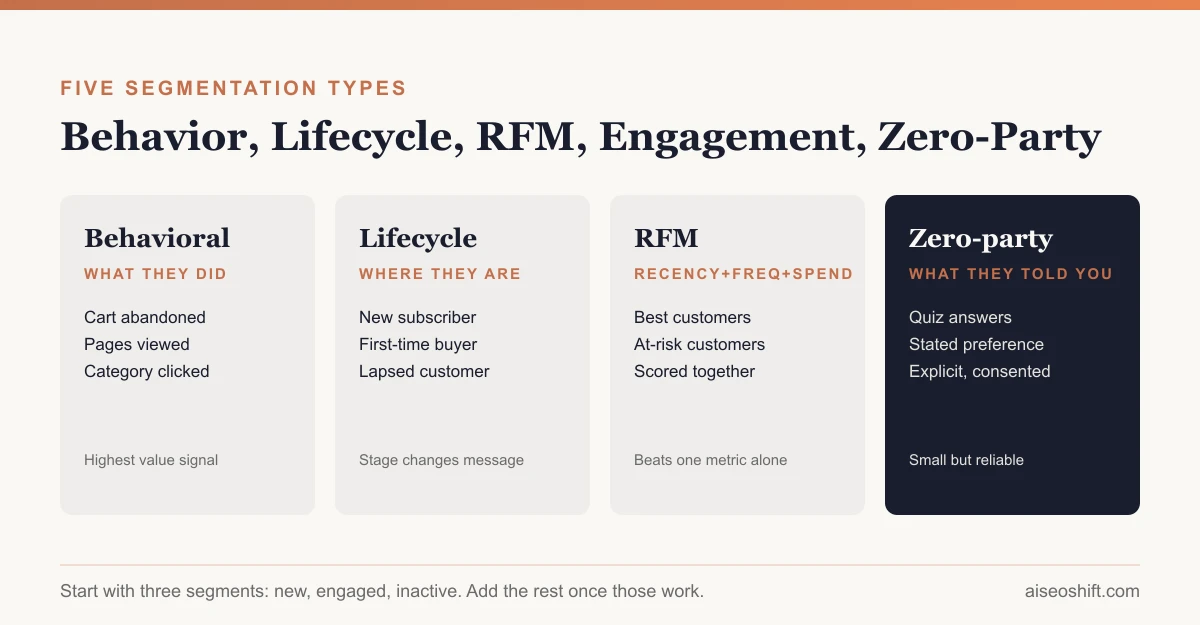
Behavioral. Based on what someone actually did: pages visited, products viewed, cart abandoned, emails clicked. Mailchimp’s framework lists purchase history, website visits, cart abandonment and product category interest as core behavioral signals. This is usually the highest-value segmentation type because it’s based on fact, not a guess about who someone is.
Lifecycle. Where someone sits in their relationship with your brand: new subscriber, first-time buyer, repeat customer, lapsed customer. Each stage needs a different message because the relationship is different. A welcome message makes sense for a new subscriber and makes no sense for someone who’s bought from you eleven times.
RFM (recency, frequency, monetary). A scoring model that groups customers by how recently they bought, how often, and how much they’ve spent, combined. It’s more useful than any single metric alone because a customer who spends a lot but hasn’t bought in eight months needs a different message than one who buys often at a low amount.
Engagement. How actively someone opens and clicks your emails: highly active, occasional, inactive. Per Mailchimp’s breakdown, this ranges from “highly active subscribers” through “occasional openers” to “inactive users,” and it matters as much for deliverability as for relevance, since mailbox providers watch engagement rate when deciding whether your email lands in the inbox or the spam folder.
Zero-party data. Information a customer tells you on purpose: a quiz answer, a stated preference, a selected interest category during signup. It’s explicit and consented, which makes it some of the most reliable segmentation data you have, even if the list collecting it is smaller than your full behavioral dataset.
Mailchimp’s framework also covers a few dimensions worth knowing even if they won’t be your first build: geographic segmentation (country, region, time zone, useful mainly for send-time optimization and regional offers), organization type for B2B lists (company size, industry), funnel stage (awareness, consideration, decision, retention), and shopping channel (in-store versus online, for brands with both). None of these replace behavioral or RFM segmentation, but they’re useful add-on filters once your core segments are working, especially funnel stage for B2B lists where a single email list often serves people at very different points in a long sales cycle.
10+ ready-to-build segments
Each of these is a specific group with specific logic, not a vague category. Build the logic once in your email platform’s segment builder and most of these update automatically as customers move in and out.
| # | Segment | Logic |
|---|---|---|
| 1 | New subscribers | Joined the list in the last 14 days, haven’t purchased |
| 2 | First-time buyers | Exactly one completed order, ever |
| 3 | Repeat customers | Two or more completed orders |
| 4 | VIP / best customers | Top 10% by total spend in the last 12 months (RFM: high frequency + high monetary) |
| 5 | At-risk customers | Previously frequent buyers with no purchase in 60-90 days (RFM: high past frequency, low recent recency) |
| 6 | Lapsed customers | No purchase or email engagement in 180+ days |
| 7 | Cart abandoners | Added to cart in the last 48 hours, no completed order |
| 8 | Browse abandoners | Viewed a product 2+ times, never added to cart |
| 9 | Highly engaged, non-buyers | Opens/clicks regularly, zero purchases, 60+ days on list |
| 10 | Category interest | Clicked or purchased within one specific product category 2+ times |
| 11 | Discount-sensitive | Only purchased when a discount code was applied, across purchase history |
| 12 | Zero-party preference match | Selected a specific interest or preference during signup or a quiz |
| 13 | Inactive subscribers | No opens in 90+ days, candidate for a re-engagement flow or list cleanup |
Segments 4 and 5 are the clearest example of why RFM beats single-metric segmentation. A “big spender” filter alone would miss that segment 5’s customers used to buy often and stopped, which is a different, more urgent problem than someone who’s always been an occasional buyer.
A worked example. Say your store has a customer who bought six times in the past year, spending $420 total, and her last order was four months ago. A frequency-only filter would flag her as a great customer and send her the same “thanks for being loyal” email as someone who bought six times in the past six weeks. An RFM view catches that her recency score has dropped even though frequency and monetary value are both strong, which puts her in the at-risk segment, not the VIP one. That’s a win-back email, not a loyalty thank-you.
Building this doesn’t require custom data science. Most ecommerce-focused email platforms calculate recency, frequency and monetary value automatically from order history and let you build segments on top of the scores directly in the segment builder, without exporting anything to a spreadsheet.
Common mistakes that flatten segmentation’s value
- Segmenting without a different message. If the VIP segment and the general list get the same email with a different subject line, the segment isn’t doing anything.
- Letting segments go stale. A “new subscriber” segment defined as “joined in the last 14 days” needs to actually drop people after 14 days, or it slowly turns into your whole list.
- Over-segmenting before you have the data to support it. A tiny list split into 13 segments means some segments have a handful of people in them, too small to learn anything from or to justify custom copy for.
- Treating engagement segmentation as permanent. Someone in your “inactive” segment today might re-engage after a win-back send. Rebuild the segment regularly, don’t set it once and leave it.
- Ignoring deliverability signals inside engagement data. A growing inactive segment isn’t just a lost-revenue problem, it’s a signal that’s dragging down your sender reputation for the whole list.
Where to actually start: three segments, not thirteen
Building all 13 segments above on day one is a good way to spend a month in your email platform’s segment builder and ship nothing. Start with three:
- New subscribers (segment 1): send a welcome sequence, not a generic newsletter. See our welcome email sequence guide for the flow itself.
- Engaged customers: your highly active openers and recent buyers combined. This group can handle more frequent sends and is your best audience for testing new content or offers.
- Inactive subscribers (segment 13): fewer sends, and eventually a re-engagement or sunset flow, since mailbox providers increasingly weigh engagement rate when deciding deliverability for your entire list, not just that segment.
Once those three are live and you’ve watched how your list actually behaves for a month or two, add RFM-based segments (4 and 5) and cart/browse abandonment (7 and 8), since those tend to have the clearest revenue impact of the remaining list. Resist the urge to build all 13 at once just because the logic is written down above. A segment only earns its place once you’ve written the message for it, not when it’s defined in the segment builder. For the technical side of making sure those campaigns land in the inbox once you’re sending differently to each group, see our email deliverability guide.
A segment-to-message table
| Segment | What changes in the message |
|---|---|
| New subscribers | Introduce the brand, set expectations, no hard sell yet |
| VIP / best customers | Early access, recognition, no generic discount codes |
| At-risk customers | Direct check-in, often a win-back offer, acknowledge the gap |
| Cart abandoners | Product-specific reminder, see our abandoned cart email flow |
| Highly engaged non-buyers | Address the likely objection (price, fit, trust) directly, since opens prove interest already exists |
| Inactive subscribers | Re-engagement ask or sunset warning, lower frequency going forward |
Why zero-party data is worth the extra step
Behavioral and RFM segmentation both infer intent from what someone did. Zero-party data skips the inference because the customer told you directly: “I’m shopping for a gift,” “I have sensitive skin,” “I’m interested in the women’s line, not the men’s.” A short preference quiz at signup, or a one-question survey to recent buyers, builds this dataset faster than most teams expect.
The tradeoff is scale. Not everyone will answer a quiz question, so this segment will always be smaller than your full behavioral dataset. Use it to sharpen messaging for the people who did answer, not as your only segmentation strategy.
A practical place to collect it: a single preference question on your signup form (not five), or a short quiz offered to existing subscribers with an incentive to complete it. One well-answered question beats a long form most people abandon halfway through, which just creates a new kind of abandonment problem inside your own list-building.
The bottom line
Email segmentation only works when each segment has a message that wouldn’t make sense for anyone else on the list. Start with three segments, new, engaged, inactive, prove they work, then layer in RFM and behavioral segments like cart abandonment and at-risk customers once you understand how your specific list actually behaves. Thirteen well-defined segments beat one giant list, but three working segments beat thirteen you built and never used.
If segmentation is the piece you’re missing from an otherwise solid list, it’s worth reading alongside our email marketing best practices overview and our customer retention strategies guide, since at-risk and VIP segments specifically exist to solve a retention problem, not just an email relevance problem.
Related guides
- 10 Copyable Cold Email Templates That Actually Work
- Email Marketing for Small Business: A Step-by-Step Setup
- Best AI Email Marketing Tools in 2026: Personalize, Automate, and Convert
- 15 Referral Program Ideas With Reward Structures That Work