Playbooks
Email Marketing Best Practices: 19 Rules Grouped by What They Fix
Most email marketing advice is a list with no reasons attached. Here is why each practice works, grouped by the problem it actually solves.

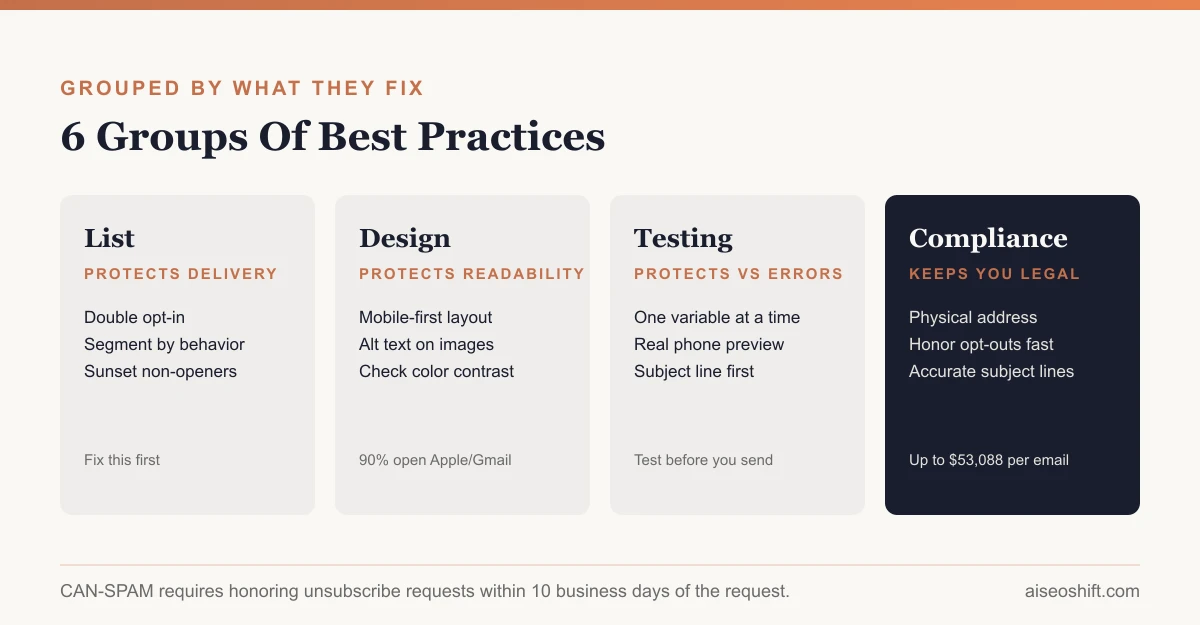
Email marketing best practices only matter if you know what each one fixes. A clean list protects deliverability. Mobile-first design protects readability on the device most people actually use. Testing protects you from a broken link going to ten thousand people. Below are 19 practices grouped by the problem they solve, not just a list to skim and forget.
Key takeaways
- Litmus’s July 2026 data shows Apple Mail (mostly iPhone/iPad) and Gmail together account for nearly 90% of email opens, which is the real argument for mobile-first design, not a guess.
- Mailchimp’s benchmark data (reported December 2023) puts average open rate across all industries at 35.63% and ecommerce specifically at 29.81%; use these as a rough baseline, not a target, since your own list’s history matters more.
- Group practices by what they fix: list quality protects deliverability, design protects readability, testing protects against embarrassing mistakes, compliance protects you legally.
- CAN-SPAM requires honoring opt-outs within 10 business days and penalties run up to $53,088 per violating email, so the unsubscribe link isn’t optional polish.
- Accessibility (alt text, contrast, readable font size) isn’t a nice-to-have add-on. A meaningful share of your list is reading on a phone in bright light or using assistive tech, and bad contrast loses them before the message even registers.
List practices
1. Build the list with permission, not purchases. A purchased or scraped list has people on it who never asked for your email, and their complaint rate will be high almost by definition. One bad send from a purchased list can damage deliverability for every future send, as covered in our email deliverability guide.
2. Use double opt-in for anything beyond transactional mail. It’s slower growth, but every subscriber on a double opt-in list actually confirmed they want to hear from you, which keeps your complaint rate low from day one.
3. Segment by behavior, not just demographics. “Opened the last 3 emails” is a more useful segment than “signed up in March,” because it predicts engagement instead of just describing history.
4. Sunset chronically inactive subscribers. Someone who hasn’t opened anything in 6-12 months is dragging your engagement metrics down, which mailbox providers read as a reputation signal for your whole domain, not just that segment.
Say a $40 skincare brand has 20,000 subscribers but only 6,000 have opened anything in the last six months. Sending the full list every week means 14,000 recipients who are statistically likely to ignore, delete or mark the message as spam, every single send. Moving that inactive group to a separate, slower re-engagement sequence protects the sending reputation that the active 6,000 depend on.
Content practices
5. Write subject lines that describe the email, not tease it. “Your order shipped” outperforms “Guess what just happened” for almost every use case, because it sets correct expectations and avoids looking like clickbait to spam filters and humans alike.
6. Use the preview text intentionally. It’s the second thing people read after the subject line, and if you leave it blank, the email client fills it with whatever text happens to come first in your HTML, usually “View this email in your browser,” which wastes the best real estate you have.
7. One email, one call to action. Say an ecommerce brand sends a newsletter promoting a new product, a blog post and a sale simultaneously. All three competing for attention usually means none of them convert well. Pick the one thing you want the reader to do.
8. Personalize beyond the first name. Name personalization is table stakes now and barely moves anything on its own. Personalizing by purchase history, browsing behavior or lifecycle stage (a welcome email sequence message versus a loyal-customer message) does more work.
Design practices
9. Design mobile-first. Litmus’s July 2026 market share data shows Apple Mail at 62.26% of tracked opens and Gmail at 27.03%, meaning the large majority of your audience is opening on a phone or a mobile-first Gmail interface. Build the single-column layout first, then verify it still reads well on a wide desktop client.
10. Keep the primary CTA button visible without scrolling on mobile. If someone has to scroll past three sections to find the button, most won’t.
11. Write real alt text for every image. If images are blocked, which happens by default in several clients, alt text is the only thing standing between your message and a blank box. “Image” or a blank alt="" on a hero banner means a screen reader user, or anyone on a slow connection, gets nothing where your main message was supposed to be.
12. Check color contrast, not just brand aesthetics. Light gray text on white looks clean in a design mockup and is close to unreadable in bright sunlight on a phone screen, which is where a lot of email actually gets read. Keep body text at 14px or larger, and don’t rely on color alone to signal something important, like marking a discounted price in red with no other label. Someone with color blindness gets the same price in the same font with no visual cue that it changed.
13. Keep the layout single-column. Multi-column layouts built for a desktop monitor tend to collapse awkwardly or require horizontal scrolling on a phone. A single, stacked column renders predictably across almost every client without extra work.
Timing practices
14. Test send times against your own list’s history, not a generic “best time” chart. Every “best time to send email” study is an average across thousands of lists with different audiences, industries and time zones. Your own open-rate-by-hour data, even from six months of sends, beats a generic benchmark.
15. Respect time zones for multi-region lists. An email that lands at 9am for half your list and 2am for the other half isn’t being sent at “9am,” it’s being sent at two different, uncontrolled times.
16. Match frequency to the value you’re actually delivering. More frequent sending only works if there’s more genuinely useful content to fill it. Padding out a weekly schedule with filler content raises unsubscribe rate faster than cutting back would.
Automation and testing practices
17. Separate triggered automation from one-off blasts in your reporting. A welcome sequence or abandoned-cart flow runs continuously and its metrics behave differently from a single newsletter blast. Blending them into one dashboard number hides what’s actually working.
18. A/B test one variable at a time, starting with the subject line. Subject line has the largest single effect on whether an email gets opened at all, so it’s the most useful place to start testing before you move on to content or send time. Change the subject line and the button copy in the same test and you’ll have a winner with no idea which change caused it.
19. Send yourself a real test before every send, on a real phone. Preview panes in your email platform lie about how a layout actually renders. A test sent to your own inbox, opened on the device most of your list uses, catches broken images and misaligned buttons that a desktop preview misses entirely.
A simple subject line test template: run the same email to two halves of a segment, one with “Your cart is waiting” and one with “15% off expires tonight.” Keep everything else, send time, content, image, identical. Whichever wins becomes next month’s default, and you test the next variable, such as the preview text, against that new baseline rather than starting from scratch.
Compliance: the part that isn’t optional
The CAN-SPAM Act sets the legal floor for commercial email in the US, and it’s enforceable with real penalties, not just a best-practice suggestion. The FTC’s compliance guide requires:
- Accurate “From,” “To” and routing information that identifies who actually sent the message.
- A subject line that doesn’t misrepresent the email’s content.
- Clear identification as an advertisement, where applicable.
- Your valid physical postal address in the message.
- A working opt-out mechanism that stays functional for at least 30 days after sending.
- Honoring opt-out requests within 10 business days.
Penalties run up to $53,088 per violating email, and multiple parties involved in sending a campaign can each be held liable. Pair this with the one-click unsubscribe technical requirement covered in our email deliverability guide, since the two rules reinforce each other: make opting out easy and fast, both legally and technically.
None of this is theoretical paperwork. A missing physical address or a subject line that oversells the content is a CAN-SPAM violation whether or not anyone complains, and it’s the kind of detail that’s easy to fix once and then template into every future campaign so you never have to think about it again.
Do this, not that
| Do | Don’t |
|---|---|
| Write a subject line that describes the content | Write a subject line designed to trick someone into opening |
| Use double opt-in for list growth | Buy or scrape a list |
| One clear call to action per email | Three competing offers in one send |
| Design mobile-first, test on desktop second | Design on a wide monitor and assume mobile will be fine |
| Test send time against your own list’s data | Copy a generic “best time to send” chart |
| Alt text on every image | Images with no alt text and no fallback message |
| Honor unsubscribes within days | Make unsubscribing require multiple clicks or a login |
| A/B test one variable at a time | Change subject, content and design simultaneously and guess which mattered |
The bottom line
None of these 17 practices work in isolation, and most of the common failures trace back to skipping list hygiene or compliance because they feel like overhead instead of marketing. Fix the list first. Then design and content improvements actually have a clean list to prove themselves on, instead of getting blamed for a deliverability problem they didn’t cause.
If deliverability itself is the open question, start with our email deliverability guide before tweaking subject lines. And if retention, not just opens, is the real goal, see customer retention strategies for how email fits into the bigger lifecycle picture.
Pick three practices from this list that you’re not currently doing, fix those this month, and measure before adding more. Nineteen changes at once tells you nothing about which one worked.
Related guides
- Best AI Email Marketing Tools in 2026: Personalize, Automate, and Convert
- Email Marketing for Small Business: A Step-by-Step Setup
- 10 Copyable Cold Email Templates That Actually Work
- Black Friday Marketing Ideas for 2026 (Full Timeline Inside)