Tooling
Best B2B Outreach Tools in 2026: Compared and Ranked
B2B outreach is a channel decision before it is a tool decision. This ranking sorts nine tools by where they send, what they automate and what each one costs on its own pricing page.

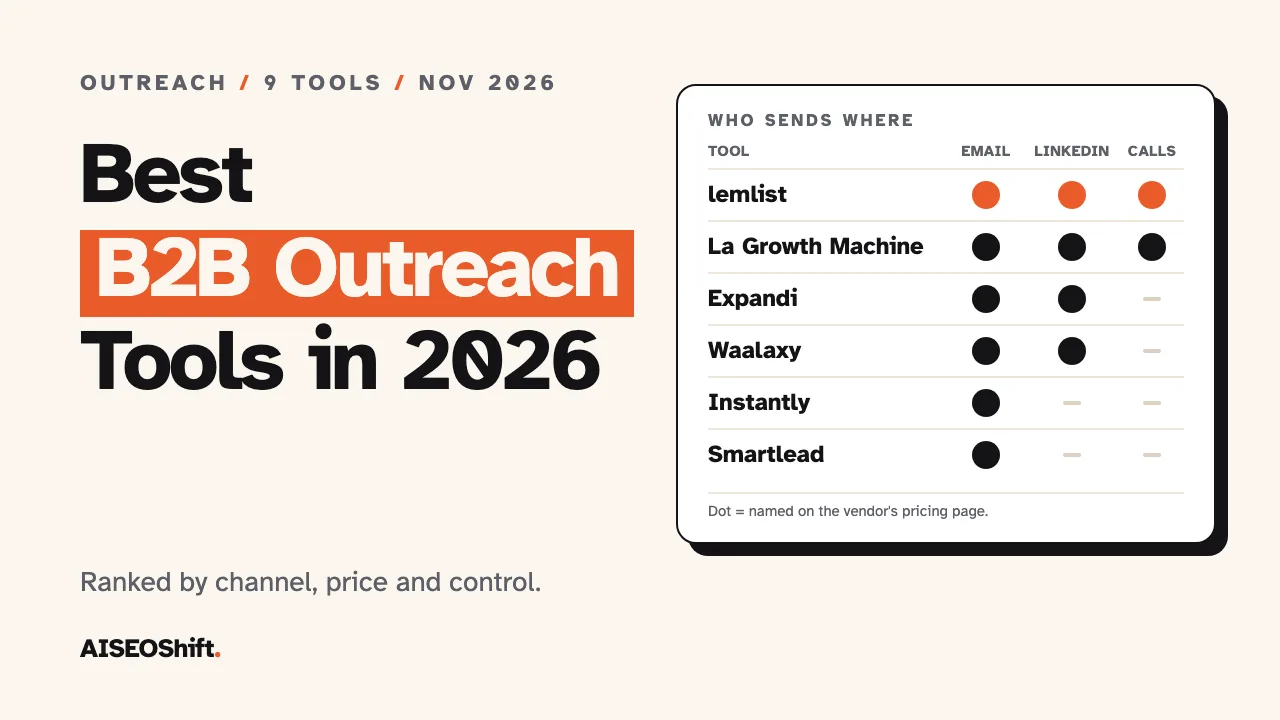
The short answer: start with Apollo if you want contact data and email sequences in one login, and note that it has a free plan. Pick lemlist if you want email, LinkedIn and calls in a single sequence. Pick Instantly or Smartlead if all you do is email at volume. Outreach and Salesloft are for large teams that buy by quote. Every price and feature below comes from the vendor’s own pages, checked in November 2026, and several of those pages contradict themselves. The entries say where.
In this article
- What B2B outreach is and which channels matter
- How we ranked these tools
- Comparison table
- The 9 best B2B outreach tools
- Which tool to pick by situation
- Rules to check before you send
- Mistakes to avoid when buying
- FAQs
What B2B outreach is and which channels matter
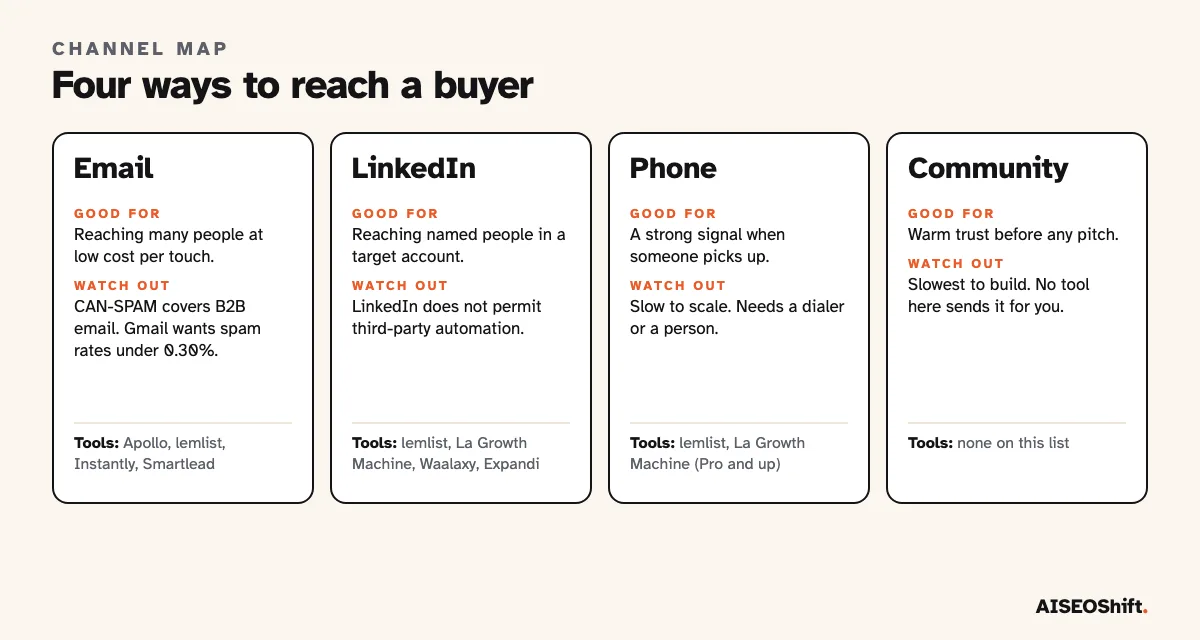
B2B outreach means contacting people at other companies to start a sales conversation, usually before they have asked to hear from you. It is a numbers game played with a small number of channels, and each channel has a different cost and a different way of going wrong.
Email. The cheapest touch and the easiest to scale. It is also regulated: the FTC’s CAN-SPAM guide states that the law makes no exception for business-to-business email.
LinkedIn. Connection requests and messages to named people. Automating it is against LinkedIn’s rules, which matters enough that it gets its own section below.
Phone. The slowest to scale and the strongest signal when someone picks up. Only a few tools here treat calls as a sequence step.
Community and warm introductions. Replies in a group, a mention after an event, a friend of a friend. No tool on this list sends these for you, and they often beat the other three.
Why buy a tool at all? Time. Salesforce’s State of Sales research, a double-anonymous survey of 4,050 sales professionals run in August and September 2025, found that sellers spend nearly one full day of their workweek on prospecting, and 48% say they lack the bandwidth to do adequate cold outreach.
That is a survey of what sellers report. It shows the pain, not that any tool fixes it. We covered the data-and-enrichment side of the stack in our AI lead generation tools ranking. This post is about the sending side: what goes out, on which channel, and how it is sequenced.
How we ranked these tools
This ranking is based on public sources: each vendor’s pricing and product pages, opened in November 2026, plus the pages that currently rank for “best b2b outreach tools.” We did not run hands-on tests, and we did not use review-site scores. The order is our judgment of practical fit for a buyer who has not chosen yet.
Five things set the order:
- Channel coverage. A tool that runs email and LinkedIn in one sequence beats one that does a single channel, for most buyers.
- Sequence control. Conditions, branching and clear step logic, where the vendor describes them.
- Price clarity. A published price scores higher than “request pricing.”
- A free plan or trial. You should be able to test fit before you pay.
- Safety controls. Mailbox warm-up and verification for email, limit controls for LinkedIn.
Most pages that rank for this query are written by vendors that sell outreach software and appear on their own lists. That does not make their picks wrong. It does mean you should treat any ranking, ours included, as a shortlist to test on your own contacts.
Comparison table
| # | Tool | Channels on the pricing page | Best for | AI features (as listed) | Starting price (as listed) | Free plan or trial | Verified |
|---|---|---|---|---|---|---|---|
| 1 | Apollo | Email sequences | Solo sellers and small teams | AI features on Professional | See vendor site | Free plan, no time limit | Nov 2026 |
| 2 | lemlist | Email, LinkedIn, SMS, calls | Multichannel sequences | lemAgent, reply intent detection | $69/mo email, $109/mo multichannel | 14-day trial | Nov 2026 |
| 3 | Instantly | High-volume cold email | AI Sales Agent, AI Reply Agent | $47/mo | Not clearly stated | Nov 2026 | |
| 4 | Smartlead | Agencies with many mailboxes | AI warmups, AI copy service | $39/mo | Free trial, length not stated | Nov 2026 | |
| 5 | La Growth Machine | LinkedIn, email, calls, X | LinkedIn-led sequences | AI writing assistant, voice messages | 60 euros/mo per identity | 14-day trial, no card | Nov 2026 |
| 6 | Waalaxy | LinkedIn, email (Business plan) | Budget LinkedIn outreach | None named in plans | 19 euros/user/mo | 14-day trial | Nov 2026 |
| 7 | Expandi | LinkedIn, email follow-ups | Cloud-based LinkedIn automation | None named in plans | $99/mo | 7-day trial | Nov 2026 |
| 8 | Outreach | Multichannel sequences | Large sales teams | Omni, Research and Personalization agents | Quote only | Demo only | Nov 2026 |
| 9 | Salesloft | Cadence | Large sales teams | AI Agents, Signals | Quote only | None mentioned | Nov 2026 |
Prices are what each vendor’s page showed when we checked. Several pages show a monthly and a yearly price without saying which term applies, so confirm the billing term before you buy.
The 9 best B2B outreach tools
1. Apollo
Best for: one person or a small team that wants contacts and email sequences without paying for two products.
What the AI does: Apollo’s pricing FAQ puts AI features, higher credit limits and call recording on the Professional plan, and describes Basic as email sequencing with core integrations. The page also links a Parallel Dialer.
Limits: On the free plan you can connect Gmail accounts only. Credits are pooled across the team, granted at the start of each billing cycle and not rolled over. Downgrades take effect immediately with no refund for unused time. The page prints no credit amounts.
Pricing: A free plan with no time limit, then Basic, Professional and a custom plan. The page we opened showed no dollar figures, and third-party guides disagree with each other, so read the live page.
Verdict: Use the free plan to find out whether your contact data is any good before you pay for anything else. It is the lowest-risk first step on this list.
2. lemlist
Best for: sequences that mix email, LinkedIn, SMS and calls and need to feel personal.
What the AI does: lemlist lists lemAgent, signal, enrichment and messaging agents, AI reply intent detection, out-of-office detection and AI-personalized LinkedIn voice notes. The comparison table does not make clear which plan includes each feature.
Limits: The pricing page disagrees with itself in places. The FAQ promises a 14-day trial while a banner says 30 days. The Email plan is capped at 50,000 emails a month while the table shows unlimited. Enrichment and buying-signal credits are separate add-ons.
Pricing: Email is $69 a month, or $55 on the yearly tab. Multichannel is $109 a month, or $87 yearly, with 5 senders per user. WhatsApp is an add-on.
Verdict: The strongest pick if you want one sequence to cover more than one channel. Test the trial against the Multichannel plan, because the Email plan is just email.
3. Instantly
Best for: sending cold email at high volume from many inboxes.
What the AI does: The pricing page names an AI Sales Agent, an AI Reply Agent, an AI Email Writer and a web researcher agent. It mentions no LinkedIn or calling.
Limits: The page is the messiest in this group. The Hypergrowth outreach plan shows $358 a month on its card and $97 in the comparison section, and its email cap appears as both 125,000 and 100,000. There is no free plan listed even though the signup says no card is required.
Pricing: The Growth outreach plan is $47 a month, or $37.60 yearly, for 5,000 emails and 1,000 uploaded contacts. Lead credits are billed as separate plans.
Verdict: Good for an email-only motion. Because the pricing page is inconsistent, ask for the exact plan and term in writing before you commit to a higher tier.
4. Smartlead
Best for: agencies that run outreach for several clients and need a lot of mailboxes.
What the AI does: The plan cards name no AI features. Metadata mentions AI warm-ups, and the SmartServices pages describe AI-personalized copy.
Limits: The FAQ says every plan includes unlimited email accounts, yet SmartSenders mailboxes are priced separately, with one example at $4.5 a mailbox a month. The comparison table lists $59 for Base and Pro, which contradicts the $39 and $94 on the cards. LinkedIn and multichannel are not mentioned.
Pricing: Base is $39 a month ($32 on annual billing) for 2,000 contacts and 6,000 sends. Pro is $94 ($78) for 30,000 contacts and 90,000 sends. Smart is $174 ($144) and Prime is $379 ($315). All plans carry a free trial with no card, with no length stated.
Verdict: Pick it over Instantly when client count matters more than lead data. Check what a mailbox costs once you add the add-ons.
5. La Growth Machine
Best for: sequences that lead with LinkedIn and follow up by email.
What the AI does: The plans include an AI writing assistant and AI-generated voice messages, and the page promotes an MCP server for running campaigns from Claude or ChatGPT. It does not say which tier includes the MCP server.
Limits: Pricing is per identity, so a three-person team pays three times. The FAQ says enrichment is unlimited while the plans cap it at 250, 400 and 1,000 leads a month. The Agency plan requires at least 6 identities. The page does not label the billing term.
Pricing: Basic is 60 euros per identity a month (LinkedIn and email, up to 3 identities). Pro is 120 euros (adds calls and rotating inboxes). Ultimate is also listed at 120 euros and adds X. The 14-day trial needs no card, covers one identity and leaves out custom sequences.
Verdict: A good fit for a solo seller or a small team whose buyers live on LinkedIn. It is also the tool most likely to put your LinkedIn account in front of LinkedIn’s automation rules.
6. Waalaxy
Best for: the lowest-cost way to automate LinkedIn invitations and follow-ups.
What the AI does: The plan cards name no AI features. A link to a separate AI page appears, with nothing described in the plans.
Limits: Email sequences and multichannel campaigns sit on the Business plan only. The Pro plan caps LinkedIn invitations at 300 a month. The FAQ mentions an Enterprise plan for teams of five or more that does not appear in the cards. The page does not say which billing term the prices use.
Pricing: Pro is 19 euros per user a month, Advanced is 49 and Business is 69. Advanced raises invitations to 800 a month and adds API and Zapier access. Business adds 500 email finder credits. Every plan has a 14-day free trial.
Verdict: Cheap and simple, and a reasonable way to find out whether LinkedIn works for your offer. Do not assume the entry plan covers email.
7. Expandi
Best for: teams that want LinkedIn automation running in the cloud with safety controls built in.
What the AI does: The pricing page names no AI features in the plans. It promotes Expandi MCP, a way to run outreach from an AI assistant, without tying it to a plan.
Limits: There is one public plan. Annual billing is described as both 20% off and “2 months free,” and those two are not the same discount. The agency tier is shown with a struck-through price even though it is sold by quote. Image and video personalization cost extra.
Pricing: $99 a month, or $79 on annual billing. A 7-day trial gives access to all features.
Verdict: Its selling point is the setup around the account: a dedicated country-based IP address, auto warm-up and adjustable limits. Those reduce the risk of detection. They do not remove the policy risk.
8. Outreach
Best for: sales organizations with many reps that want sequences, coaching and forecasting in one platform.
What the AI does: Outreach’s packages list Omni, Research, Revenue and Personalization agents, with AI credits metered by package: 10,000 for Essentials up to 100,000 for Pro. The page says credits are deducted per action at amounts it does not publish.
Limits: No prices anywhere. Every package says “Request pricing” and the only trial path is a demo. Multichannel sequences are listed from the Core package up. The domain now redirects from outreach.io to outreach.ai.
Pricing: Seat-based plus consumption-based AI credits, by quote. The page says there are no platform fees and support is included.
Verdict: A fit once you have a sales team and a process to put in it. A small team will pay for coaching and forecasting features it will not use.
9. Salesloft
Best for: established sales teams already running cadences at scale.
What the AI does: The pricing page lists AI Agents, MCP, context-aware AI and Signals alongside products named Cadence, Conversation Intelligence, Deals and Rhythm.
Limits: The page publishes no prices and no editions, and the only action is booking a conversation. It now lists Clari Forecast products too, so the product line is wider than a sequencing tool. It does not say whether email, calls and LinkedIn steps are included in each package.
Pricing: Not published. Talk to sales.
Verdict: The right kind of tool for the wrong size of team if you have fewer than a dozen reps. Ask for a per-seat figure and a list of what is excluded before the second call.
Which tool to pick by situation
The right answer depends on the channel you sell through and on how many people will log in.
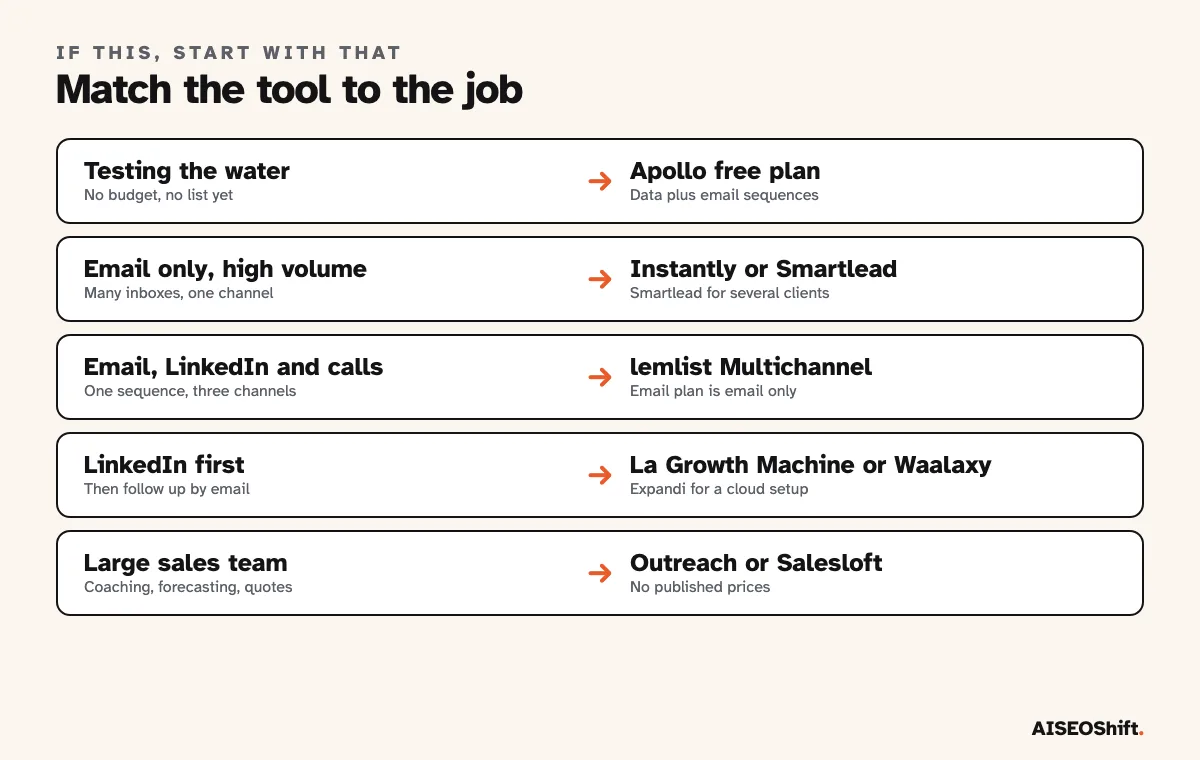
Testing the water. Apollo’s free plan. Do not pay for sending infrastructure until a manual batch of 50 gets replies.
Email only, high volume. Instantly or Smartlead. Smartlead if you serve several clients, Instantly if the lead database matters more.
Email, LinkedIn and calls in one flow. lemlist on its Multichannel plan.
LinkedIn first. La Growth Machine for LinkedIn-then-email, Waalaxy on a tight budget, Expandi if you want the cloud and safety setup. Read the next section before you connect your account.
Enterprise. Outreach or Salesloft, and plan for a demo cycle and a quote.
Rules to check before you send
LinkedIn. LinkedIn’s help centre says it does not permit third-party software that scrapes the site or automates activity on it, and that members who use such tools risk having their accounts restricted or shut down. Tools can also stop working without notice. Four tools on this list automate LinkedIn. Use a tool for it if you accept that risk, and do not use an account you cannot afford to lose.
Email law. CAN-SPAM requires accurate sender details, a non-deceptive subject line, a valid physical postal address and a working opt-out honored within 10 business days. Each violating email can carry a penalty of up to $53,088. B2B email gets no exemption.
Mailbox rules. Google asks senders of more than 5,000 messages a day to Gmail to keep spam rates under 0.10% and never reach 0.30%, with SPF, DKIM, DMARC and one-click unsubscribe in place. The full requirements are on Google’s support site. Our guide to email deliverability covers the setup.
Mistakes to avoid when buying
Buying for a channel you will not use. A multichannel plan costs more per seat. If your sequence is three emails, pay for email.
Comparing prices with different billing terms. lemlist shows $69 and $55 for the same plan, depending on the tab. Waalaxy and La Growth Machine do not label the term at all. Ask which one a figure refers to.
Counting seats instead of identities. La Growth Machine charges per identity and Waalaxy per user. A five-person team costs five times the headline price.
Automating a sequence before you have tested one by hand. More steps do not fix a weak offer. Write the first email and the first LinkedIn note yourself, send 50, and read the replies.
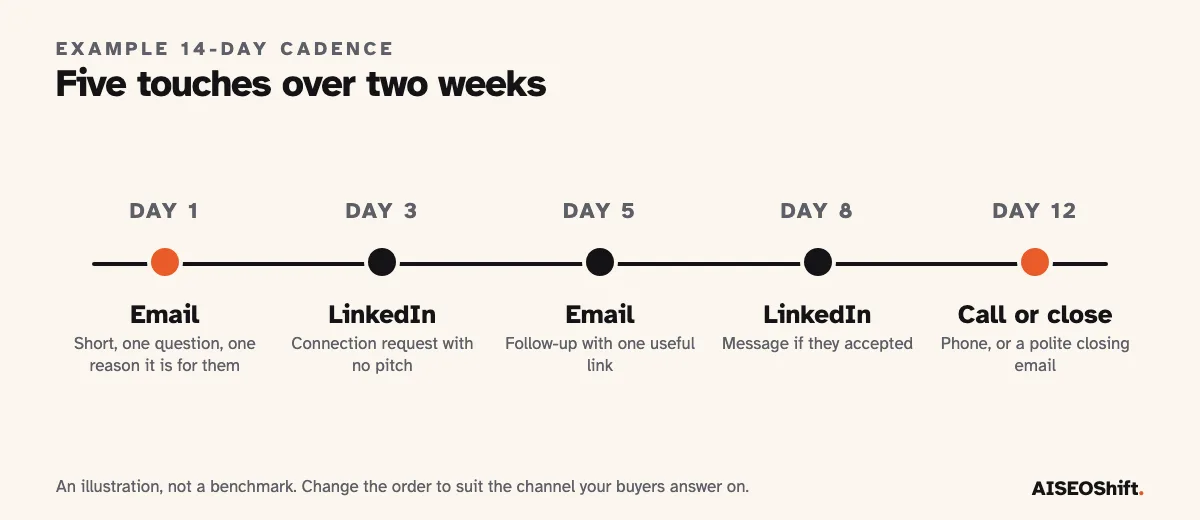
Judging a sequence on opens. Count replies and booked calls. Opens are noisy and tell you little about intent.
Our notes on cold email templates cover what to write once the tool is chosen.
FAQs
What is B2B outreach?
B2B outreach is contacting people at other companies to start a sales or partnership conversation, usually before they have asked to hear from you. The main channels are email, LinkedIn, phone and warm introductions through a community or a mutual contact.
What is the best B2B outreach tool overall?
For most small teams, Apollo, because its free plan has no time limit and it combines contact data with email sequences. lemlist is the better fit if you want email, LinkedIn and calls inside one sequence. Teams that only send email at volume should compare Instantly and Smartlead.
Is there a free B2B outreach tool?
Apollo has a free plan with no time limit, though it can connect Gmail accounts only. lemlist, La Growth Machine and Waalaxy offer 14-day trials, and Expandi offers 7 days. Smartlead says all plans include a free trial with no card but does not state the length.
Is LinkedIn automation allowed?
Not by LinkedIn. Its help centre says it does not permit third-party software that automates activity on the site, and members who use it risk having their accounts restricted or shut down. Four tools on this list automate LinkedIn, so you accept that risk with your own account when you use them.
Is B2B cold email legal?
In the US, the CAN-SPAM Act applies to B2B email. The FTC says the law makes no exception for business-to-business email, and each violating message can carry a penalty of up to $53,088. Other countries have their own rules, so check each market you send to.
How much do B2B outreach tools cost?
Entry plans on this list run from about 19 euros a user a month for Waalaxy to roughly $39 to $69 a month for email-first tools such as Smartlead, Instantly and lemlist. Outreach and Salesloft publish no prices and sell by quote.
Should I start with email or LinkedIn?
Start where your buyers already answer. Send 50 messages by hand on each channel first and compare replies. Email scales further and is easier to measure, while LinkedIn reaches named people but puts your personal account at risk if you automate it.
Related reading
- AI lead generation tools, compared and ranked
- Best AI tools for sales reps
- Best AI sales tools
- Cold email templates
- Email deliverability
- LinkedIn marketing strategy
References
- Salesforce, State of Sales report announcement
- FTC, CAN-SPAM Act compliance guide for business
- LinkedIn Help, prohibited software and extensions
- Google, email sender guidelines
- Vendor pricing and product pages for Apollo, lemlist, Instantly, Smartlead, La Growth Machine, Waalaxy, Expandi, Outreach and Salesloft, checked November 2026.