Playbooks
Crawl Budget: What It Is and Who Should Care
Google will tell you outright that crawl budget is not a problem for most sites. Here's the exact threshold where that stops being true, and how to read the Crawl Stats report once it does.


Crawl budget is the number of URLs on your site Google is both willing and able to crawl in a given stretch of time. It’s made of two parts: how much crawling your server can handle without strain, and how much crawling Google actually wants to do based on your site’s size and how often it changes. Most sites never bump into this ceiling. Google says so directly.
Key takeaways
- Google’s own threshold: this matters for sites with “a million or more unique pages” updated weekly, or 10,000+ pages updated daily. Below that, don’t spend time on it.
- Crawl capacity limit (what your server can take) and crawl demand (what Google wants to crawl) are separate concepts that combine into your effective budget.
- Check the Crawl Stats report in Search Console under Settings, not the Performance report, this is a different dataset entirely.
- Waste sources: duplicate URLs from faceted navigation, soft 404s, infinite spaces, long redirect chains, and slow server response times.
- Blocking a URL in robots.txt does not instantly free up crawl budget. Google’s guidance notes blocked URLs can remain in the crawl queue for a while regardless.
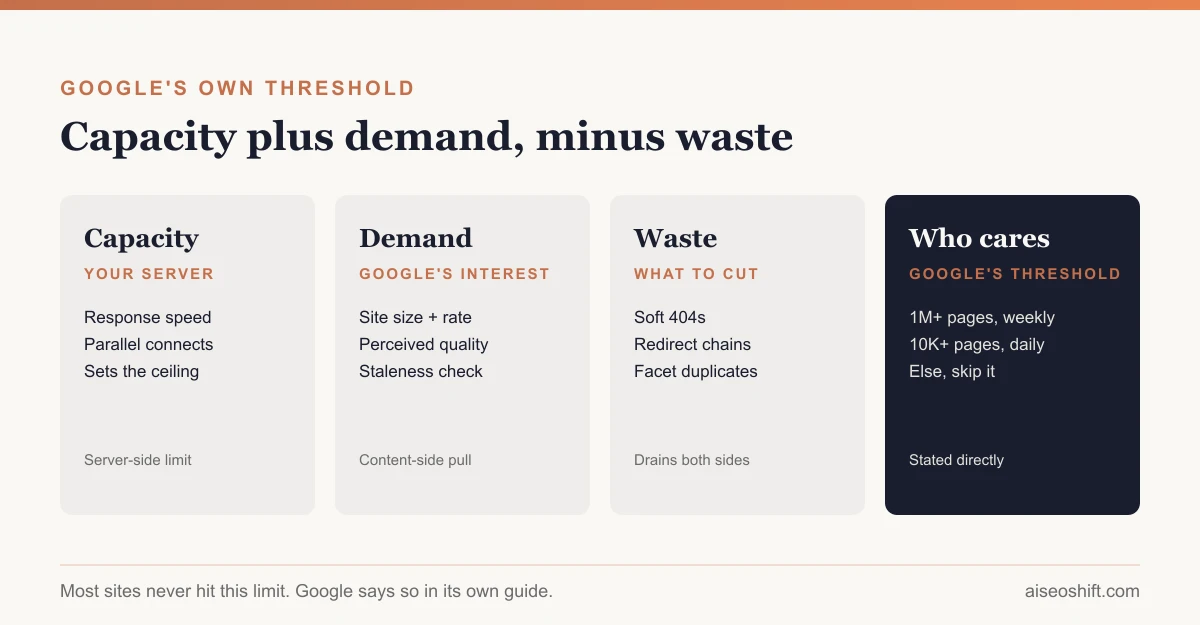
Crawl capacity limit and crawl demand
Google’s large site owner’s guide to managing crawl budget breaks the concept into two pieces, and conflating them is the most common mistake people make writing about this topic.
Crawl capacity limit is about your server, not your content. It’s the maximum connection time and parallel requests Google allocates without degrading your site’s performance, and it adjusts based on how your server responds. A fast, healthy server earns more crawl capacity. A server that starts timing out or slowing down under load gets throttled back automatically.
Crawl demand is about Google’s interest in your content. It depends on the site’s “perceived inventory,” its popularity, and how stale Google believes the existing index of it has become. A site that rarely changes doesn’t need frequent recrawling regardless of how much capacity its server could technically handle. A news site publishing hourly earns high crawl demand because Google has a reason to keep coming back.
Your actual crawl budget is the overlap of what your server can sustain and what Google wants to check on. Fixing only one side doesn’t help if the other is the actual constraint.
Who actually needs to care
This is the part Google is unusually blunt about. The guide states its target audience directly:
- Large sites, defined as “1 million+ unique pages,” with content that changes “moderately often (once a week).”
- Medium or larger sites, “10,000+ unique pages,” where content changes “very rapidly” on a daily basis.
- Any site where a significant share of pages show up as “Discovered - currently not indexed” in Search Console, which is a direct symptom of Google wanting to crawl more than it currently is.
If your site is a few hundred or a few thousand pages updated occasionally, this isn’t where your time should go. Google crawls small, well-structured sites efficiently as a matter of course. Chasing crawl budget optimization on a 300-page site is solving a problem you don’t have while index bloat or keyword cannibalization are far more likely to be the actual cause of a traffic problem on a site that size.
Reading the Crawl Stats report
Search Console’s Crawl Stats report lives under Settings, separate from the Performance report most people check daily.
- Open Settings > Crawl Stats and look at the three headline numbers: total crawl requests, total download size, and average response time, each over the last 90 days.
- Check Host status. Green means “no significant availability issues.” Yellow means an issue was detected but more than a week ago. Red means a significant crawl availability issue happened in the last week, which is worth investigating before anything else, since server problems throttle your capacity limit directly.
- Look at the “By response” breakdown. This groups requests by status code. A large or growing share of 4xx or 5xx responses relative to 200s is a waste signal, Google is spending crawl requests on errors instead of content.
- Check “By purpose”: Discovery vs. Refresh. Discovery is Google finding new URLs, Refresh is it recrawling known ones. A site that’s mostly Discovery on URLs you didn’t intend to publish (parameter variants, old archive patterns) is burning budget on the wrong things.
- Check “By Googlebot type.” Smartphone crawling should dominate for most sites in 2026, since Google crawls primarily with its mobile user agent. A surprising split here can point to a technical issue serving different content to different crawler types.
- Compare trend lines over time, not just the current snapshot. A climbing request count paired with a flat indexed-page count is the clearest sign that crawl activity isn’t translating into useful indexing, meaning something downstream is wasting the visits Google is making.
If you’re still unsure whether your indexed footprint matches what Google is actually crawling, running a quick pass with one of the indexing and crawl diagnostic tools alongside Search Console confirms the scale before you spend engineering time on a fix.
What wastes it, and the fixes
Google’s crawl budget guide names specific waste sources directly, and each has a defined fix rather than a vague “clean up your site” suggestion.
| Waste source | What it looks like | Fix |
|---|---|---|
| Duplicate content from faceted navigation | Thousands of filter/sort URL combinations for the same inventory | Canonical tags to the clean URL; block the pattern in robots.txt if the variants add no value at all |
| Soft 404s | A page returns a normal 200 status but the content is effectively empty or “not found” | Return a real 404 or 410 status code so Google stops recrawling it expecting content |
| Infinite spaces | Endless calendar pages, auto-generated date archives, infinite pagination | Cap the generated range, noindex deep pagination, or block the pattern entirely |
| Long redirect chains | URL A redirects to B redirects to C before landing on the real page | Collapse to a single redirect straight to the final URL |
| Slow server response times | High average response time in the Crawl Stats report | Improve hosting, caching, or server-side performance; this directly raises your crawl capacity limit |
| Low-value/unnecessary pages | Session-specific URLs, printer-friendly duplicates, tracking parameter variants | Consolidate or remove; don’t rely on robots.txt alone since blocked URLs can still sit in the crawl queue |
Google also recommends proactive signals rather than just blocking waste: use 304 Not Modified responses for unchanged pages so Google doesn’t have to redownload content it already has, and keep your XML sitemap current with accurate <lastmod> dates so Google can prioritize what’s genuinely new.
A worked example
Say you run a marketplace site with 2.3 million product listing pages, comfortably past Google’s million-page threshold, and listings get added or go out of stock daily.
You check Crawl Stats and see total crawl requests climbing month over month, but your Page indexing report’s indexed count has been flat for two quarters. That’s the mismatch: Google is working harder but not indexing more of what you’d want indexed.
Digging into the “By purpose” breakdown, Discovery crawling is unusually high relative to Refresh, meaning Google keeps finding what looks like new URLs rather than recrawling known listings. The cause turns out to be a faceted search feature generating a unique, crawlable URL for every combination of category, price range, and brand filter, millions of them, each technically “new” to Googlebot.
The fix: add rel="canonical" from every filtered URL back to its parent category page, and block the most extreme filter combinations (three or more facets at once) in robots.txt, since those have effectively zero chance of ever being a search landing page anyone wants. Within a crawl cycle or two, Discovery requests drop and Refresh requests on actual product pages, the ones that change when stock status updates, start climbing instead.
The bottom line
Crawl budget is a real constraint, but Google has told you plainly who it applies to: sites past a million pages updating weekly, or past 10,000 pages updating daily. If you’re smaller than that, the Crawl Stats report is worth a glance but rarely the lever to pull. If you are that large, the fix is never “ask Google to crawl more.” It’s finding what’s wasting the crawl capacity and demand you already have, duplicate parameter URLs, soft 404s, slow responses, broken redirect chains, and clearing that out so the budget you’ve got goes toward pages worth indexing in the first place.
Related guides
- 10 SEO Terms Every Marketer Should Know in 2026 (Explained Simply)
- What Is Information Gain Optimization (IGO)?
- Striking Distance Keywords: Find and Fix Them in GSC
- Passage Ranking: How Google Ranks One Section of Your Page (2026)