Playbooks
Index Bloat: What It Is and How to Fix It
Your sitemap says 400 pages. Search Console says Google indexed 1,100. The gap is index bloat, and it's quietly diluting the pages you actually want to rank.


Index bloat is when Google has indexed far more pages on your site than are actually worth showing in search results, things like faceted navigation combinations, internal search result pages, or old tag archives that got indexed by accident and never got cleaned up. The fix is matching what’s indexed to what’s actually valuable, not just blocking crawlers and hoping.
Key takeaways
- Compare your sitemap’s URL count against the Page indexing report’s indexed total. A big gap is the first signal.
- Common sources: URL parameters, tag/category archives, pagination, internal search results, and thin auto-generated pages.
- noindex removes a page from results. robots.txt only blocks crawling, it does not keep a page out of Google if something else links to it.
- Never combine noindex with a robots.txt disallow on the same URL. Google can’t read the noindex tag on a page it’s not allowed to crawl.
- For pages with zero value, delete and return a 404 or 410 rather than leaving them live and blocked.
Indexed vs. valuable: the gap that matters
Every site has some gap between “pages Google has indexed” and “pages someone would actually want to land on.” A healthy gap is small. Index bloat is when that gap is large enough to be doing damage: diluting which pages look authoritative, wasting crawl attention on sites big enough for that to matter, and in some cases creating duplicate or near-duplicate content signals that confuse which URL should rank for a given query.
It’s a different problem from keyword cannibalization, though the two often show up on the same site. Cannibalization is two good pages competing for one query. Index bloat is hundreds of pages that shouldn’t be competing for anything.
Where it comes from
A handful of patterns account for almost all index bloat:
- URL parameters. Sort order, filter combinations, session IDs, and tracking parameters (
?sort=price&color=blue&ref=nav) generate near-infinite URL variants of the same underlying page. - Tag and archive pages. WordPress and most CMS platforms auto-generate a page for every tag and category, often with thin, overlapping content pulled from the same posts.
- Pagination. Page 2, 3, 4 of a listing, each indexed separately with little unique content of its own.
- Thin or low-value pages. Auto-generated author pages on a single-author blog, empty location pages in a franchise template, placeholder pages nobody filled in.
- Internal search results pages. If your site’s search function generates a crawlable, linkable URL for every query someone types, each one can get indexed, and there are effectively unlimited combinations.
None of these are “wrong” to have on your site. They’re wrong to have indexed in bulk with no gatekeeping.
How to detect it
- Open Search Console’s Page indexing report. Note the total count under “Indexed.” This is Google’s own number of URLs it’s actually returning in results.
- Count the URLs in your sitemap. Your sitemap should only list canonical, genuinely valuable URLs. Google’s own sitemap guidance says to “include the URLs in your sitemap that you want to see in Google’s search results,” since Google generally shows canonical URLs for ranking.
- Compare the two numbers. If Search Console’s indexed count is meaningfully higher than your sitemap count, the excess is likely bloat, assuming your sitemap is accurate and current.
- Check the exclusion reasons in the same report. The Page indexing report breaks out categories like “Duplicate without user-selected canonical,” “Alternate page with proper canonical tag,” and “Crawled - currently not indexed.” A large bucket of duplicates is a direct pointer at parameter or pagination bloat.
- Run a site: search.
site:yourdomain.com inurl:?orsite:yourdomain.com/tag/will surface exactly which low-value URL patterns Google has indexed, so you’re not guessing at the source. - Sample 15-20 of the extra URLs manually. Open them. If most are parameter duplicates, thin tag pages, or auto-generated pages with no real content, you’ve confirmed the diagnosis, not just the symptom.
How to fix it
Pick the right tool for each source. These aren’t interchangeable, and Google’s documentation is specific about why.
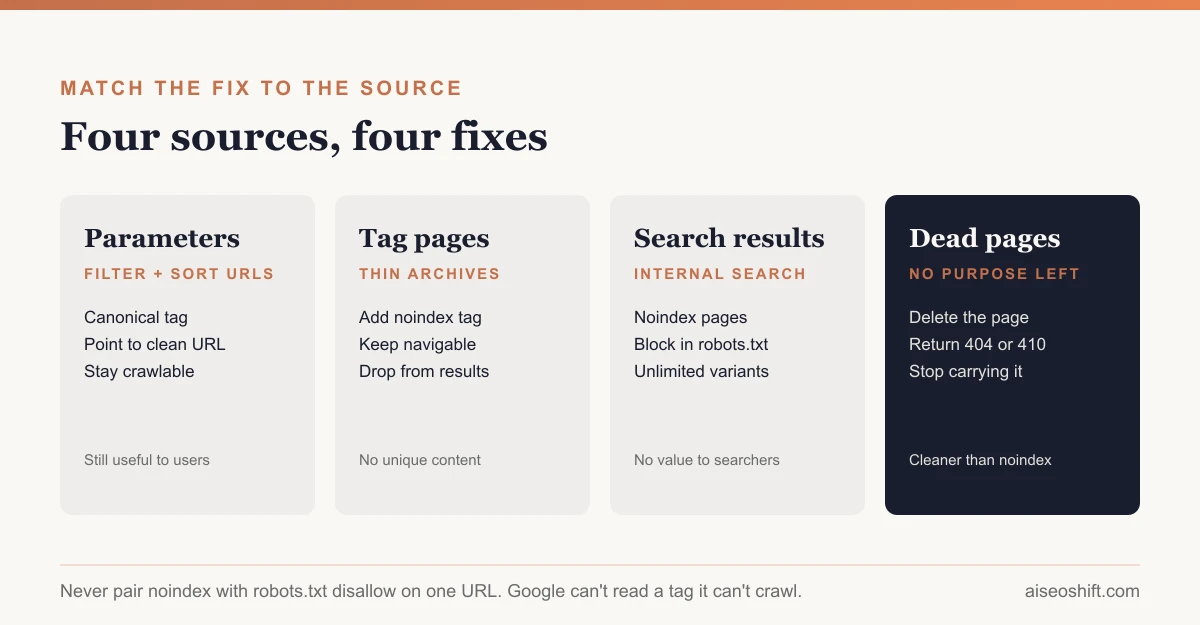
| Source of bloat | Fix | Why this one |
|---|---|---|
| URL parameters creating duplicates | rel="canonical" pointing to the clean URL | Canonical tags are, per Google, “a strong signal that the specified URL should become canonical,” without blocking the variant from being crawled at all. |
| Tag/archive pages with thin, overlapping content | noindex meta tag | Removes the page from search results while still letting users and crawlers navigate it for site structure. |
| Pagination | Self-referencing canonicals on each page, or consolidate into a “view all” where practical | Keeps each page indexable on its own merits without creating duplicate-title problems. |
| Internal search results pages | noindex, and consider blocking the pattern in robots.txt too for crawl efficiency on large sites | These pages have no value to a searcher who didn’t run the search themselves. |
| Pages that serve no purpose at all | Delete, return 404 or 410 | Google’s crawl budget guidance explicitly recommends a “404 or 410 status code for permanently removed pages” over leaving them live and blocked. |
The one combination to avoid: noindex plus robots.txt disallow on the same URL. Google is explicit about this. If a page is “disallowed from crawling through the robots.txt file, then any information about indexing or serving rules will not be found and will therefore be ignored,” because Google never gets to see the noindex tag in the first place. Use one or the other, not both, on a given URL.
A worked example
Say you run an online furniture store with 600 real product and category pages. You check the Page indexing report and Google has indexed 3,200 URLs.
You sample the overage. Most of it breaks into three buckets: 1,800 are color and size filter combinations on category pages (/sofas?color=gray&size=large), 900 are tag archive pages generated by the CMS for every material and style keyword, and 500 are old pagination pages for a blog that’s been dormant for a year.
The fix: canonical tags on every filtered URL pointing back to the clean category page, since those filters are genuinely useful to a shopper and shouldn’t be blocked from crawling, just consolidated for indexing. Noindex on the tag archive pages, since they add nothing a category page doesn’t already cover better. For the dormant blog’s old pagination, you consolidate the blog into fewer, denser pages and let the excess pagination 404 naturally as the old posts get merged.
Three months later, Google’s indexed count has dropped toward something closer to 650, and the 600 pages that actually matter stop competing with 2,600 that never should have been live.
The bottom line
Index bloat isn’t about indexing less for its own sake. It’s about making Google’s index of your site match what you’d actually hand someone if they asked “what’s on this site worth reading.” Find the gap by comparing your sitemap to the Page indexing report, confirm the source by sampling actual URLs, and match the fix to the cause: canonical for duplicates you still want crawlable, noindex for pages that should stay navigable but invisible in search, robots.txt only for crawl efficiency (never as a substitute for noindex), and deletion for anything with no remaining purpose. If you haven’t run a full content audit in a while, index bloat is usually the fastest thing it turns up, and a quick pass with any of the better indexing and crawl tools will confirm the scale before you commit to a cleanup plan.
Related guides
- 10 SEO Terms Every Marketer Should Know in 2026 (Explained Simply)
- Crawl Budget: What It Is and Who Should Care
- What Is Information Gain Optimization (IGO)?
- Striking Distance Keywords: Find and Fix Them in GSC
References
- Search Console Help: Page indexing report
- Google Search Central: robots.txt introduction and limitations
- Google Search Central: Robots meta tag, noindex, and X-Robots-Tag
- Google Search Central: Consolidate duplicate URLs
- Google Search Central: Build and submit a sitemap
- Google Search Central: Large site owner’s guide to managing crawl budget
- Google Search Central: Remove information from Google