Playbooks
Keyword Cannibalization: How to Find and Fix It
Two of your pages are fighting Google for the same search, and neither one is winning cleanly. Here's how to find the pairs that are actually hurting you and the four ways to fix each kind.

Keyword cannibalization is when two or more pages on your own site target the same search query, and Google ends up splitting its ranking signal between them instead of giving either one full credit. The fix is almost never “write more content.” It’s deciding which page should win and making the others stop competing with it.
Key takeaways
- Check the Performance report’s Pages tab for a single query. Two or more of your own URLs with real impressions is the signal.
- Different intent for the same words isn’t cannibalization. A category page and a buying guide can share a keyword and both deserve to exist.
- Merge with a 301 when pages are truly duplicate in intent. Use a canonical tag when you need to keep both URLs live for users.
- De-optimizing the weaker page (changing its title, H1, and primary focus) is often faster than a merge and less risky.
- For AI search, consolidation matters more than ranking position. One clear source is easier to cite than three overlapping ones.
How to find it in Search Console
You don’t need a crawler or a paid tool for the first pass. Google Search Console’s Performance report already has the data, you’re just looking at it from the wrong tab most of the time.
- Open Performance > Search results.
- Click the Queries tab and find a query that matters to your business, ideally one where your ranking has been flat or sliding.
- Click into that query. The report now filters to just that search term.
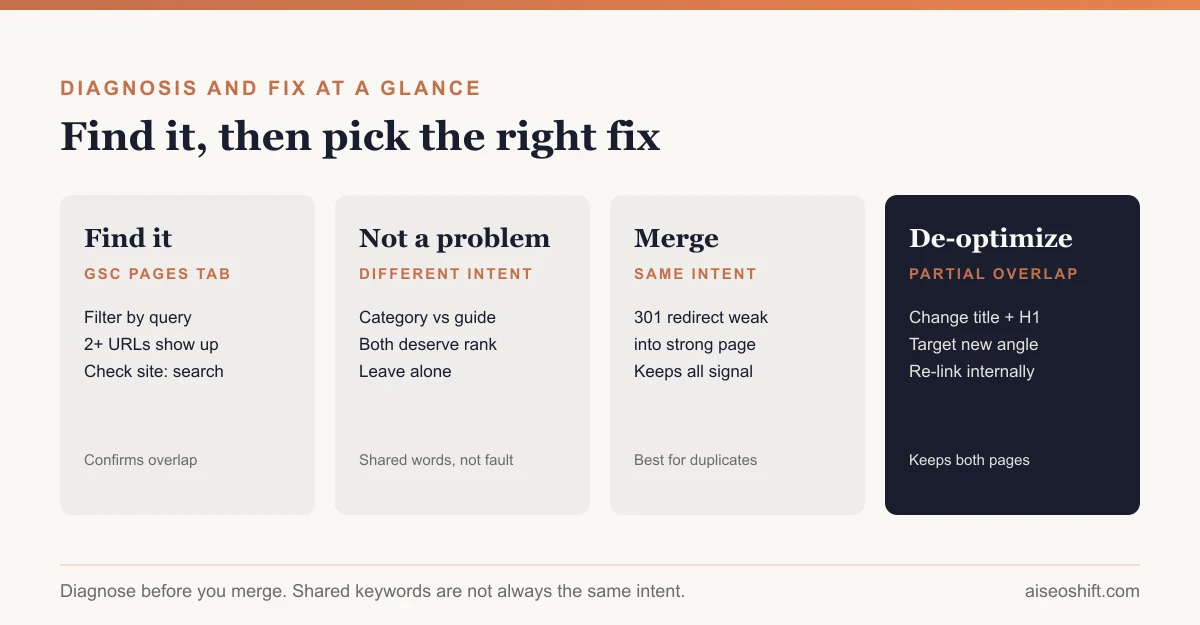
- Switch to the Pages tab. This is the part people skip. With the query filter still active, the Pages tab shows every URL on your site that got an impression for that exact query.
- Look at the list. One URL with the lion’s share of impressions and clicks is normal. Two or three URLs each picking up a meaningful, overlapping slice is a cannibalization candidate.
- Confirm it live. Run a
site:yourdomain.com "exact phrase"search in Google. If the URL Google actually shows in results keeps flipping between two of your pages across searches or over a few days, that’s external confirmation, not just a Search Console artifact.
Google’s own metric definitions matter here. Average position is “a relative ranking of the position of your link on Google, where 1 is the topmost position, 2 is the next position, and so on,” and clicks and impressions are counted per link shown. When a query shows two of your URLs each with a middling position and neither ever cracking your best historical rank for that term, that’s the pattern. One strong page beats two mediocre ones almost every time.
A second, cruder check: search the exact keyword in an incognito window and scroll past position one. If you see a second result from your own domain anywhere on page one, you’ve confirmed it without touching Search Console at all.
When it’s NOT a problem
This is where most self-diagnosed “cannibalization” turns out to be nothing.
Two pages ranking for the same words is fine when they answer different questions. A running shoe brand’s /running-shoes category page and its /best-running-shoes-for-flat-feet guide both legitimately contain the phrase “running shoes.” One is a transactional page for someone ready to browse inventory. The other is an informational page for someone with a specific problem who isn’t ready to buy yet. Google can and should rank both, for different queries, even though the words overlap.
The test isn’t “do these pages share a keyword.” It’s “would a single page serve the searcher better than two.” If the answer is no, because the searcher’s actual need differs depending on which exact query they typed, leave both pages alone. Trying to merge them destroys a page that was doing its job and didn’t need fixing.
Real cannibalization shows up as two pages trying to answer the identical question, usually because they were written months apart by different people who didn’t check what already existed, or because a site restructure left an old page live next to its replacement.
How to fix it
Match the fix to the actual cause. These aren’t interchangeable.
| Situation | Fix | Why |
|---|---|---|
| Two pages, same intent, one clearly weaker | 301 redirect the weak page into the strong one | Consolidates all backlinks and ranking signal onto one URL. Google treats a redirect as a strong signal for which URL should be canonical. |
| Two pages, same intent, both need to stay live (e.g. one is linked from an app, or has its own backlinks you don’t want to lose as a redirect target) | rel=“canonical” pointing to the preferred URL | Tells Google which version to show without deleting either page. Still a strong signal per Google’s own guidance. |
| Pages overlap partially, both have some unique value | De-optimize the weaker page | Change its title tag, H1, and primary heading to target an adjacent but distinct angle. Stops the competition at the source. |
| Old page ranks instead of the newer, better one | Internal links | Point your site’s internal links at the page you want to win. Internal link weight is one of the few signals entirely under your control. |
A fifth option that’s underused: just delete the weaker page and let Google 404 it, if it genuinely adds nothing. Not every old post needs to be preserved via redirect. If it has no backlinks and no unique angle, removing it is cleaner than carrying a redirect forever.
A worked example
Say you run a project management SaaS and you publish a blog. Two years ago someone wrote “Gantt chart software,” a 1,400-word listicle. Eight months ago, a different writer, who didn’t check the archive, wrote “best Gantt chart tools,” a 2,200-word guide with a comparison table.
Both target the same query. Both answer the same intent: someone deciding which Gantt chart tool to buy. In Search Console, the Pages tab for “gantt chart software” shows the old post at position 14 with 40 monthly impressions and the new post at position 9 with 210 impressions. Neither has ever broken into the top five, even though the newer post is genuinely better.
The fix: 301 redirect the old listicle into the new guide. Carry over anything from the old post’s title or intro that was actually earning clicks (sometimes an older page has phrasing that matches search intent better even if the content is thinner). Update internal links across the site that pointed to the old URL. Within a few weeks, the consolidated page usually climbs because it now holds the backlink and click history of both URLs instead of splitting it.
If instead the old post had carved out a specific angle, say it was the only one that covered free and open-source tools, you’d de-optimize it toward “free Gantt chart software” instead of merging, and let both pages exist with distinct jobs.
The bottom line
Keyword cannibalization isn’t a penalty, Google doesn’t flag it or dock you for it directly. It’s a self-inflicted dilution: two of your own pages splitting the ranking signal that one page could have held entirely. Find it with the Pages tab filtered to a single query, confirm it’s real overlap and not just shared vocabulary, then pick the fix that matches the cause: merge, canonicalize, de-optimize, or re-link. Skipping the diagnosis step and merging everything that shares a word is how you accidentally delete a page that was never actually competing with anything.
This matters more, not less, as AI search grows. A chatbot or AI Overview answering a question from your site picks one source. Information gain and extractability both favor the site with one clear, well-scoped answer over the site that makes the model choose between three versions of the same thing. If you haven’t run a broader content audit recently, cannibalization pairs are usually the first thing it surfaces, and building future content around topic clusters instead of one-off posts is what prevents the next round of overlap before it starts.
Related guides
- 10 SEO Terms Every Marketer Should Know in 2026 (Explained Simply)
- Index Bloat: What It Is and How to Fix It
- Crawl Budget: What It Is and Who Should Care
- What Is Information Gain Optimization (IGO)?