Playbooks
Striking Distance Keywords: Find and Fix Them in GSC
Your page two rankings are closer to page one than they look. Here's how to find the queries worth the push and the specific fixes that move them.

Striking distance keywords are search queries where your page already ranks, usually somewhere between position 11 and 20, close enough to page one that a focused improvement can push them onto it. They matter because almost nobody clicks a page two result, so a query sitting at position 14 is functionally invisible even though Google has already decided your page deserves to be in the conversation.
Key takeaways
- Striking distance usually means positions 11-20 (page two), though some tools widen it to 4-20 to include page-one queries still losing most of the clicks to the results above them.
- Search Console has no native filter for a position range. Export the Queries table and sort by Position in a spreadsheet.
- Prioritize by impressions first, not current rank. A query at position 18 with 2,000 monthly impressions beats one at position 12 with 40.
- The fixes that actually move striking distance keywords are content refreshes, intent alignment, internal links with descriptive anchors, and title/H1 changes, not just “add more words.”
- Re-check position every 2-4 weeks after a fix. Google needs to recrawl and re-evaluate before anything moves.
The two definitions, and which one to use
Most people who say “striking distance keywords” mean positions 11 through 20. That is page two of Google’s results, and it is the cleanest definition because it maps to something concrete: your page is one algorithmic nudge away from a results page that actually gets opened.
A smaller group of SEO tools, including some rank trackers’ built-in reports, define striking distance more loosely as positions 4 through 20. The logic there is different. It is not about the page-one/page-two line, it is about the gap between “ranking” and “winning the click.” A query sitting at position 6 has already lost most of its potential traffic to the five results above it, so treating it the same as a position-16 query is not unreasonable from a pure opportunity-cost view.
Use whichever definition matches what you’re trying to fix. If you’re triaging a big site and want a punch list of pages that need the least work for the clearest win, 11-20 is tighter and easier to act on. If you’re doing a full content audit and want to catch pages that are technically on page one but still underperforming, widen it to 4-20.
This piece uses 11-20 as the primary definition, since that’s the one most people are searching for, and calls out where the wider definition changes the approach.
Why this matters more in 2026, including for AI search
The core logic hasn’t changed: a page you already rank for is cheaper to improve than a page you’d have to build from nothing. What’s changed is what you’re competing for once you cross into page one.
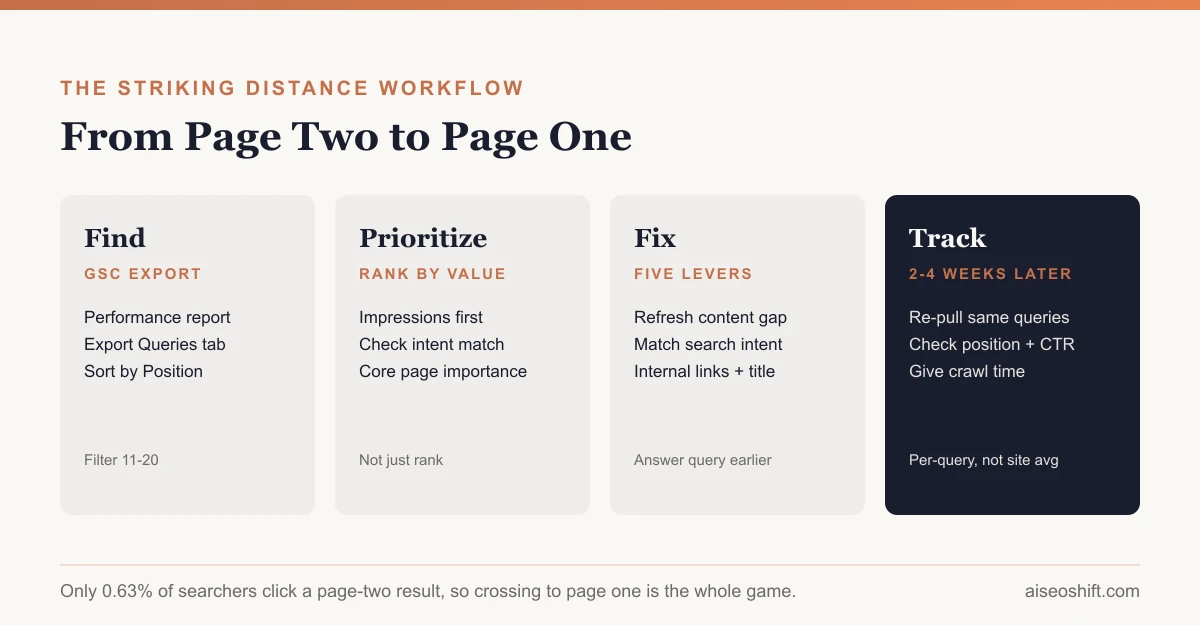
According to a 2025 analysis of roughly 4 million Google search results, the top 3 organic results capture 54.4% of all clicks, and only 0.63% of searchers click anything on page two at all. That second number is the whole argument for why striking distance work exists. A page ranking 14th for a query with real search volume is, for practical purposes, getting none of that volume. Moving it to position 8 doesn’t just improve a number on a dashboard, it’s the difference between a page nobody sees and a page that starts earning clicks.
The AI search layer adds a second reason to care. Google’s AI Overviews and AI Mode draw their source pages from the same underlying index and ranking signals as classic organic results, not a separate pool, so a page that’s too weak to crack page one organically is also unlikely to get pulled into an AI-generated answer for that query. Checking your Search Console average position data against AI Overview appearances is one way to see whether a striking distance page is already showing up in both surfaces at once. Striking distance pages are frequently the ones closest to clearing that bar on both fronts, which makes them a reasonable place to concentrate effort if you’re short on time and trying to improve both organic rankings and AI citation odds with the same work.
How to find striking distance keywords in Search Console
Search Console doesn’t have a one-click “show me striking distance” button. Here’s the actual workflow.
- Open the Performance report. In Search Console, go to Performance, then Search results.
- Set the date range. Use the last 3 months for a stable view, or the last 28 days if you want to catch something that changed recently. Avoid very short windows, position data is noisy at low query volume.
- Make sure the right metrics are showing. You want Clicks, Impressions, CTR, and Average position all checked above the table. Average position is the one you’ll filter on.
- Open the Queries tab in the table below the chart. This lists every query that triggered an impression for your site, with its average position.
- Export the table. Use the export option above the table to download it (Search Console offers the full table, not just the current page of results shown on screen). This step matters because the on-screen table doesn’t let you filter by a position range, and the export does, once it’s in a spreadsheet.
- Filter the spreadsheet for Position between 11 and 20. Sort or filter the Position column. If you’re using the wider definition, filter for 4 through 20 instead.
- Repeat by page instead of by query if you want to find specific URLs with multiple striking distance queries stacking up, rather than one query at a time. The Pages tab plus a query filter gets you there, but it’s slower; most people just work from the query-level export and map queries back to ranking pages afterward.
- Save this export with a date in the filename. You’ll want to compare against it in a few weeks.
Prioritizing what to fix first
A mature site can easily turn up 200+ striking distance queries. Fixing all of them in order of ranking position is the wrong instinct. Rank position tells you how far a query has to travel, not whether the trip is worth taking.
Sort by impressions first. A query at position 18 with 3,000 monthly impressions is a bigger opportunity than one at position 12 with 50 impressions, even though the second one looks “closer.” Impressions are your proxy for real search volume and they’re already sitting in the same export.
Then filter by intent match. Pull up the actual query text and ask whether the page that’s ranking for it is the right page to be ranking. Sometimes a striking distance query is attached to a page that answers a slightly different question than what’s being searched, which is a content and targeting problem, not a “needs more backlinks” problem. If the intent is wrong, no amount of on-page polish will close the gap, because you’d be optimizing the wrong page for the query.
Then look at commercial relevance. A query tied to a page that converts or supports a core topic cluster deserves attention before a tangential one, even at similar impression counts.
| Signal | What to check | Why it matters |
|---|---|---|
| Impressions | Export column, sorted descending | Proxy for real demand; a small position gain on a high-impression query means more clicks than the same gain on a low one |
| Intent match | Does the ranking page actually answer the query as written? | Wrong-intent pages won’t close the gap no matter how much content you add |
| Click gap | Compare current CTR to what top-3 results for similar queries get | Shows how much is actually on the table if the fix works |
| Page importance | Is this page part of a core topic cluster or a conversion path? | Determines whether the fix is worth prioritizing over others with similar scores |
| Fix effort | Content refresh vs. new section vs. internal link push | Cheap fixes with decent upside should usually go first |
The fixes that actually move these keywords
Refresh the content, specifically. Not a reword. Check what’s currently outranking you and look for the gap: a missing subtopic, outdated information, a question the top results answer that yours doesn’t. A content refresh aimed at a specific identified gap works far better than a general “make it longer” pass.
Match the intent precisely. If the query is informational and your page is structured like a product pitch, or vice versa, fix the framing before anything else. This is the single most common reason a page stalls at position 13 forever.
Add internal links with descriptive anchor text. Pages that are one click from your highest-authority pages, with anchor text that states what the linked page is about rather than “learn more” or “click here,” tend to see the clearest movement. This is also one of the cheapest fixes on the list, since it doesn’t require touching the target page’s content at all. If your internal linking is inconsistent site-wide, cross-linking is worth fixing as a standing practice, not just a one-off patch.
Align the title tag and H1 with the actual query. If the query uses a phrase your title doesn’t contain in any form, that’s often enough to explain a chunk of the gap. Where you place keywords in the title and the first paragraph still matters for this specific fix, even though it has little to do with keyword density elsewhere on the page.
Move the direct answer earlier on the page. If the query is answerable in one or two sentences, and your page buries that answer three sections down, move it up. Pages that make searchers (and crawlers) hunt for the answer lose to pages that lead with it, especially for queries with any answer-engine behavior attached.
A worked example
Say you run a blog for a project management SaaS tool, and your export shows this query:
“how to prioritize tasks when everything feels urgent” ranks at position 16, with 1,400 monthly impressions and a 0.4% CTR.
You pull up the page that’s ranking for it. It’s an old post titled “5 Productivity Tips for Busy Teams” that mentions task prioritization in one paragraph near the bottom. The query’s actual intent is narrower and more specific than the page’s framing.
The fix: rewrite the title and H1 to directly match the query’s phrasing, restructure the post so the “everything feels urgent” scenario is the first thing addressed rather than tip #4, and add two internal links from your higher-traffic “how to run a daily standup” and “task management for small teams” posts, using anchor text like “how to prioritize when every task feels urgent” rather than “read more.”
Four weeks later, you re-pull the export. If the fix worked, that query should show up closer to position 8-10, with impressions holding steady or climbing (better rankings typically increase impressions too, since you start showing for related query variations) and CTR improving because the title now matches what was searched.
Tracking results without fooling yourself
Pull the same query-level export every 2-4 weeks and compare Position, Impressions, and CTR for the specific queries you fixed, not your whole site average. Site-wide averages hide individual wins and losses.
Give it time before judging. Google needs to recrawl the page, and ranking changes for a given query can lag the crawl by days to weeks. Checking three days after a fix and concluding it didn’t work is the most common way to misjudge your own effort.
Watch for a query moving the wrong way, too. If a fix pushes one query up but another one on the same page drops, you may have shifted the page’s relevance toward a different search intent than you intended. That’s useful information, not just noise to ignore.
The bottom line
Striking distance keywords are the cheapest meaningful wins available to most established sites, because the hard part, getting Google to consider your page relevant at all, has already happened. The work left is sharpening intent match, closing content gaps against whoever currently outranks you, and making sure your internal linking and titles aren’t quietly working against you. Sort by impressions, fix the highest-opportunity pages first, and give each fix real time to show up in the data before moving to the next one.
Related reading
This post is part of a series on SEO terms worth knowing in 2026:
Related guides
- 10 SEO Terms Every Marketer Should Know in 2026 (Explained Simply)
- Passage Ranking: How Google Ranks One Section of Your Page (2026)
- Entity Salience: What It Means and How to Improve It
- Query Fan-Out: How Google’s AI Mode Actually Searches