Playbooks
Checkout Optimization: Fix the 10 Things That Kill Sales
Most checkout abandonment is not indecision. It is friction you put there yourself, and most of it is fixable in a sprint, not a redesign.

Checkout optimization means removing the friction between “add to cart” and “order confirmed,” and it works because most of that friction is self-inflicted. Baymard Institute, which has run the longest-running checkout usability research program in ecommerce, puts the average documented cart abandonment rate at 70.22% across 50 studies. Most of that isn’t lost interest. It’s cost surprises, forced logins, and forms nobody needed to ask for.
The fix list below is ranked by how much abandonment each item actually causes, not by what’s trendy to add to a checkout.
Key takeaways
- Unexpected costs cause roughly 40% of abandonment among shoppers with real buying intent. Show total cost, including shipping, before the final page.
- Forced account creation drives about 18% of preventable abandonment. Guest checkout should be the default, not an option buried under a login form.
- A checkout with fewer, smarter form fields (autofill, combined name field, no redundant confirm-email box) consistently beats a checkout with more trust badges.
- Digital wallets remove typing and trust friction in one tap. Offer at least one.
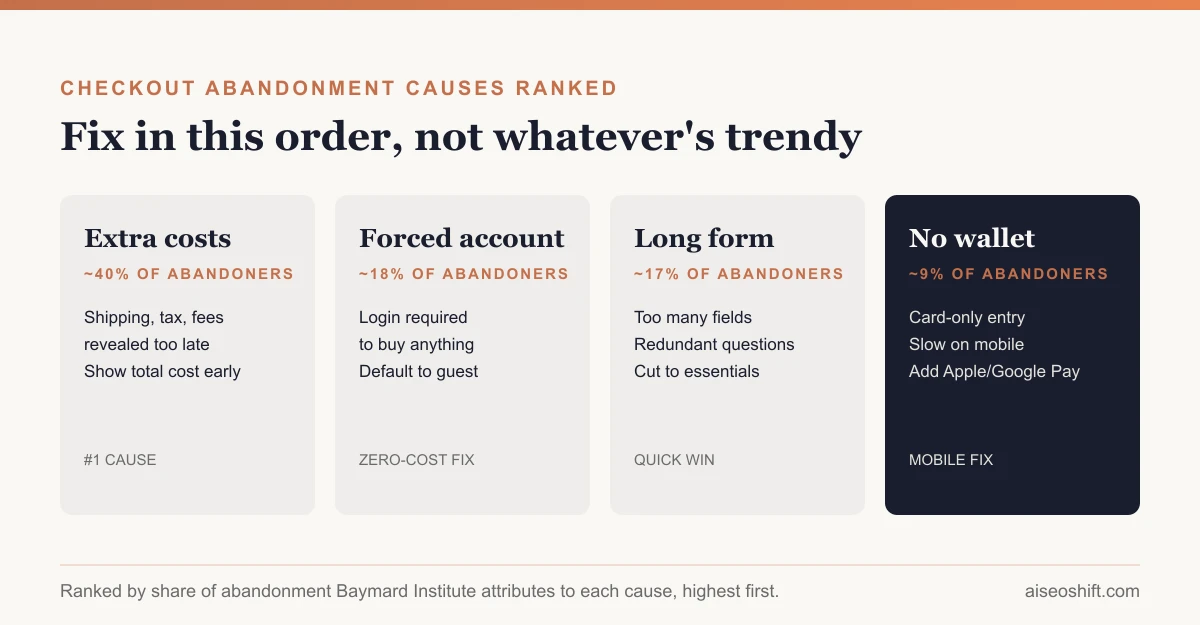
- Fix in this order: cost transparency, guest checkout, form length, trust signals, payment options. Decorative changes come last.
Why carts get abandoned: the data, ranked
Baymard’s research separates “just browsing” abandonment (real, but not fixable by UX) from abandonment caused by friction in the checkout itself. Among shoppers with buying intent who still left, the reasons break down like this:
| Cause | Share of abandonment | What it actually means |
|---|---|---|
| Extra costs too high | ~40% | Shipping, tax, or fees revealed only at the final step |
| Delivery too slow | ~20% | No fast option, or delivery date buried until checkout |
| Don’t trust site with card info | ~19% | Weak visual trust signals, unfamiliar payment page design |
| Forced account creation | ~18% | No guest checkout option |
| Checkout too long/complicated | ~17% | Too many steps or fields relative to order complexity |
| Couldn’t see total order cost upfront | ~12% | No running total visible before the last page |
| Website errors or crashes | ~17% | Bugs, slow loads, broken validation |
| Insufficient payment methods | ~9% | No wallet, no buy-now-pay-later, card only |
Notice what’s missing from the top of that list: “not enough urgency” and “needs more trust badges.” The things most checkout tools sell you (countdown timers, scarcity banners) rank below the things that actually cost you the sale, which are structural.
Fix 1: Show the real total before the last step
Shipping and tax sticker shock is the single largest abandonment driver in Baymard’s data, and it’s almost entirely self-inflicted. If shipping cost is calculated by zip code or weight, show an estimated range on the product page or cart page, not just at the final confirmation screen. If you offer free shipping over a threshold, say so where the customer is deciding whether to add one more item, not after they’ve already committed to checking out.
Say you run a $40 skincare brand. If a customer gets to the last page and discovers $8.99 in shipping and $3.20 in tax on a $40 order, that’s a 30% price increase they didn’t plan for. Move that math earlier and you remove the single biggest cause of exits.
Fix 2: Default to guest checkout
Forced account creation is friction with no payoff for the customer, only for you. Offer guest checkout as the visible default button, and offer account creation as a single click after the order is placed (“Save these details for next time?”). You still get the email address and purchase history. You just stop making it a prerequisite to buy.
Fix 3: Cut the form down to what the order needs
Baymard’s audits repeatedly find checkouts asking for fields the order doesn’t require: a separate “confirm email” box, company name on a consumer order, a phone number with no stated purpose. Three concrete moves:
- Combine first and last name into one field unless you have a specific reason not to.
- Autofill city and state from zip/postal code instead of asking for all three.
- Drop any field you can’t name a use for. If support can’t tell you why “company name” is required, remove it.
Fix 4: Add real trust signals where people are looking
Security concern isn’t solved by stacking logos. It’s solved by matching what a shopper expects to see at the moment they’re handing over a card number: a recognizable payment processor logo, HTTPS visibly in the address bar, and a checkout page that doesn’t look visually different in design quality from the rest of your site. A checkout page that suddenly looks cheaper or less polished than the product pages reads as risk, even if the backend is identical.
Fix 5: Offer at least one wallet option
Apple Pay, Google Pay, PayPal, or Shop Pay remove two friction points simultaneously: manual data entry and the “do I trust this site with my card” decision, because the shopper is authenticating with a provider they already trust. If your checkout only accepts typed card numbers, you’re asking every mobile shopper to hand-type 16+ digits on a phone keyboard. That’s a self-inflicted mobile tax, and Baymard’s mobile abandonment numbers run well above desktop for exactly this kind of reason.
Fix 6: Make delivery timing visible early
“Too slow” ranks above “don’t trust the site” in Baymard’s list. If you can offer a delivery date estimate on the product page (even a range, like “arrives Nov 6-9”), do it before the customer has invested time filling out a cart. Finding out delivery is slow on the final page, after filling in an address, feels like a bait-and-switch even when it isn’t one.
Mobile checkout gets hit twice
Baymard’s device-level data shows mobile abandonment running well above desktop, and it’s not because mobile shoppers are less serious. It’s because every friction point above gets worse on a small screen. Typing a 16-digit card number on a phone keyboard takes longer and produces more typos than on desktop. A form with 11 fields that feels merely annoying on a laptop becomes a scroll-and-tap marathon on mobile. And trust signals that read fine at desktop size, like a small lock icon next to a logo, often shrink to invisible on a 375px viewport.
Three mobile-specific checks worth running separately from your desktop audit:
- Can someone complete checkout one-handed, thumb only, without zooming?
- Does the keyboard that pops up match the field (numeric keypad for card and zip, email keyboard for email)?
- Is the wallet button (Apple Pay / Google Pay) above the fold on the payment step, not buried under a card form?
Common mistakes that undo good fixes
A few patterns show up repeatedly in checkout audits, and they’re worth naming because they look like progress while quietly adding friction back:
- Adding a newsletter opt-in checkbox mid-checkout. It’s a marketing win and a conversion tax at the same time. Move it to the post-purchase confirmation page instead.
- Adding upsells before the payment step. An upsell that delays “pay now” by even one extra screen reintroduces the exact friction you just removed. Put upsells on the cart page, not inside checkout.
- Redesigning the checkout for looks before fixing the cost-reveal problem. A better-looking checkout with the same late shipping-cost surprise will not move the abandonment number much. Fix the structural issues first; polish after.
- Running A/B tests on button color while the real problem is a required account. Low-effort tests feel productive but won’t move a number that’s being held down by a structural issue.
A worked example
Say you run a $65 average-order-value home goods store. Your checkout currently requires an account, shows shipping cost only on the final page, and has 12 form fields spread across three screens. Monthly checkout starts: 2,000. Current completion rate: 24% (480 orders), roughly in line with Baymard’s average.
If you make guest checkout the default, show a shipping estimate on the cart page, and cut the form to 7 fields, you’re addressing roughly three of Baymard’s top five causes at once. You won’t get to 100% completion, nobody does, but even a move from 24% to 30% completion on the same 2,000 monthly checkout starts is 120 additional orders a month, with zero increase in traffic or ad spend. That’s the case for fixing checkout before fixing anything upstream of it: the people are already there, already intending to buy.
A pre-launch checklist
Run this against your current checkout before shipping any redesign:
| Check | Why it matters | Fixed? |
|---|---|---|
| Shipping cost shown before final step | #1 cause of abandonment | |
| Guest checkout available as default | #4 cause, zero cost to fix | |
| Delivery estimate shown pre-checkout | Prevents late-stage surprise | |
| Form has no unnecessary fields | Faster completion, fewer drop-offs | |
| At least one digital wallet offered | Removes typing + trust friction simultaneously | |
| Total cost visible before last page | Removes “can’t calculate total” complaint | |
| Checkout page visually matches site trust level | Fixes “don’t trust this site” without new badges | |
| Error messages are specific, not generic | Reduces “form error, give up” exits | |
| Progress indicator shows how many steps remain | Reduces perceived length | |
| Abandoned cart email triggers within 1 hour | Recovers intent-driven exits after the fact |
What to do after the fixes ship
Checkout fixes aren’t “ship and forget.” Track completion rate by step, not just overall conversion rate, so you know which page in the funnel is still leaking. The marketing KPIs worth watching here are step-by-step drop-off and average order value, not just top-line conversion rate, because a checkout fix can raise completion while quietly lowering AOV if you also removed a legitimate upsell step.
For the orders that still abandon, an abandoned cart email sequence recovers a meaningful share of intent-driven exits; pairing email marketing built for a small catalog with a tool like Klaviyo rather than a generic ESP matters here because cart-trigger automation is the whole point. And once completion rate moves, tie it back to media spend: a 5-point lift in checkout completion changes what counts as a good ROAS for every campaign currently pointed at that store, because the same ad spend now converts more of the clicks it was already buying.
The bottom line
Checkout optimization is not a design project. It’s a friction-removal project, and the friction is ranked, documented, and the same across most ecommerce categories: cost surprises first, forced accounts second, form length third, trust and payment options after that. Fix in that order. Skip the countdown timer until you’ve fixed the shipping cost reveal; it won’t move the number nearly as much.
Related guides
- Best Trending Product Research Tools in 2026: 14 Ways to Find Products Before They Peak
- ChatGPT Merchant Setup: How to Get Your Products Into ChatGPT Shopping (2026 Guide)
- Black Friday Marketing Ideas for 2026 (Full Timeline Inside)
- Ecommerce Conversion Rate: Benchmarks and How to Read Them