Playbooks
Ecommerce Conversion Rate: Benchmarks and How to Read Them
The 'average' ecommerce conversion rate is anywhere from 1.4% to over 5%, depending on which benchmark report you read. Here is the formula, what actually moves it, and real sourced numbers by device and category.


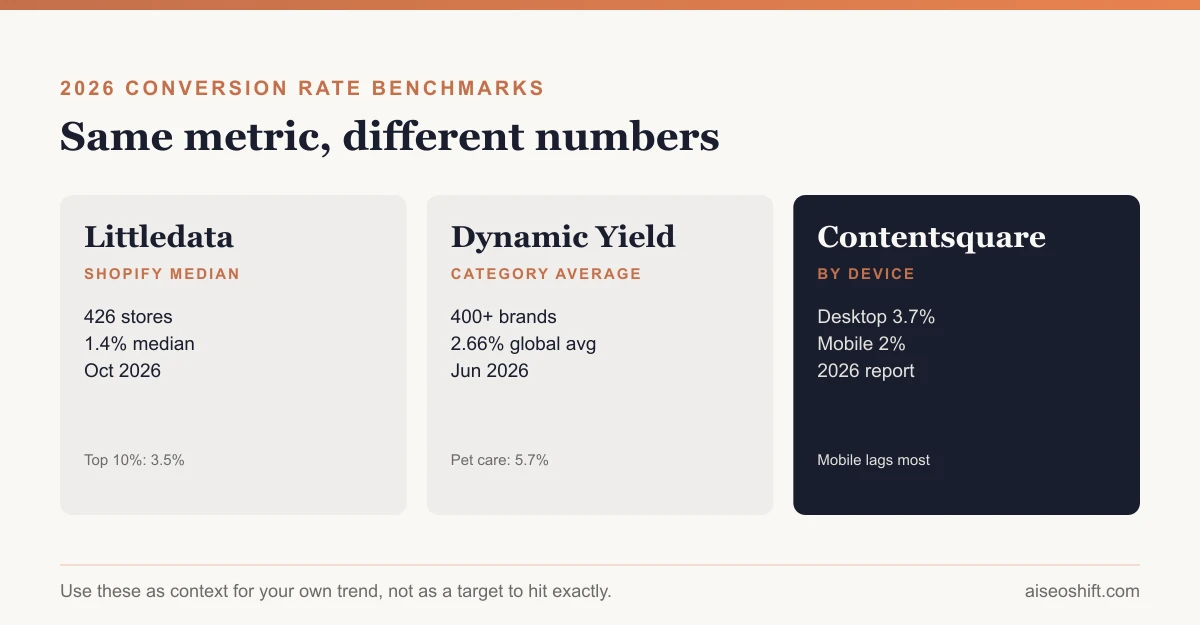
Ecommerce conversion rate is the share of site visitors who complete a purchase, and the honest answer to “what’s a good one” is that it depends which report you’re reading. Littledata’s own 2026 data puts the median at 1.4% across hundreds of Shopify stores. Dynamic Yield’s category breakdown, cited by Shopify, shows some categories averaging over 5%. Both are real, sourced numbers. Neither is wrong. They’re measuring different things.
Key takeaways
- Conversion rate = orders ÷ sessions × 100. Simple formula, but device, traffic source, and industry all change what a “normal” result looks like.
- Littledata’s October 2026 data shows a median conversion rate of 1.4% across 426 Shopify stores, with the top 10% of stores converting at 3.5% or better.
- Desktop consistently outconverts mobile. Contentsquare’s 2026 benchmark report, cited by Shopify, puts desktop at 3.7% versus 2% on mobile.
- Category matters more than almost anything else. Dynamic Yield’s industry data, also cited by Shopify, shows pet care converting near 5.7% and luxury/jewelry under 1%, which tells you comparing your rate across categories is close to meaningless.
- Fix checkout friction before chasing more traffic. It’s usually the cheapest lever and the one most stores leave untouched.
The formula, and where it gets reported differently
The core formula is simple: conversion rate = (orders ÷ sessions) × 100. If your store had 12,000 sessions last month and shipped 240 orders, that’s a 2% conversion rate.
Where it gets murky is in what counts as a “session” and whether the calculation runs per-session or per-visitor. A single shopper who visits three times before buying counts as three sessions in a per-session calculation but one visitor in a per-visitor one, which produces a lower rate under the session method. Most major analytics platforms, including GA4 and Shopify’s own reporting, default to a session-based calculation, but it’s worth confirming before you compare your number against someone else’s.
What actually moves conversion rate
A handful of factors explain most of the variance between stores in the same category:
- Traffic source and intent. A visitor arriving from a branded search for your product name converts at a completely different rate than one from a cold social ad. Blending both into one number hides which one you should fix.
- Price point and purchase type. Impulse-friendly, low-consideration products convert at higher rates than considered purchases like furniture or fine jewelry, which is most of why category benchmarks spread so widely.
- Device. Checkout friction compounds on small screens: more form fields feel like more work, autofill breaks more often, and page weight hits harder on mobile connections.
- Page speed. Slow product and checkout pages lose shoppers before they ever see a price. This is the same underlying mechanic covered in Core Web Vitals research, and it applies just as much to a checkout flow as to a blog post.
- Checkout friction. Forced account creation, hidden shipping costs revealed late, and too many form fields are the most common, most fixable causes of cart abandonment.
- Trust signals. Reviews, clear return policy, and recognizable payment badges matter more for new-to-brand traffic than for repeat buyers who already trust you.
- Seasonality. Conversion rate during a planned sale period is not comparable to a baseline month, because the traffic mix and intent both shift.
Benchmarks, with sources and dates
Use this table as context for your own number, not as a target to hit exactly. Figures come from different methodologies and sample sets, which is the whole point of the next section.
| Source | Period | What it measured | Figures |
|---|---|---|---|
| Littledata | 90-day window, Jul 6-Oct 3, 2026; calculated Oct 7, 2026 | Median conversion rate, 426 Shopify stores | Overall median 1.4%; bottom 10% of stores 0.3%; top 20% 2.7%; top 10% 3.5% |
| Littledata | Same period | By category (Shopify stores) | Beauty & skincare 2.8%; health & supplements 2.5%; food & beverage 2.3%; fashion & apparel 1.3%; home & furniture 0.9% |
| Dynamic Yield (via Shopify) | Reported June 2026 | By category, 400+ brands analyzed | Pet care & vet services 5.7%; beauty & personal care 5.32%; food & beverage 4.58%; fashion/accessories/apparel 2.77%; consumer goods 1.76%; home & furniture 1.29%; luxury & jewelry 0.63% |
| Dynamic Yield (via Shopify) | Reported June 2026 | Global average across sampled brands | 2.66% |
| Contentsquare 2026 Digital Experience Benchmark Report (via Shopify) | 2026 | By device | Desktop 3.7%; mobile 2% |
| Statista (via Shopify) | Q1 2026 | Global ecommerce visits converting to purchase | 1.4% |
Why the averages don’t agree, and why that’s fine
Look at the spread: Littledata’s median is 1.4%. Statista’s Q1 2026 figure is also 1.4%. Dynamic Yield’s global average is 2.66%, and several of its categories sit well above that. None of these contradict each other, because they’re not measuring the same population the same way.
Median versus mean is the first split. A median tells you the midpoint store; a mean gets pulled upward by a smaller number of very high-converting stores, which is likely part of why Dynamic Yield’s average lands higher than Littledata’s median. Sample composition is the second split: Littledata’s data comes specifically from Shopify stores, while Dynamic Yield and Contentsquare sample across their own client bases, which skew toward larger, more optimized enterprise sites that have already fixed the easy problems.
The practical takeaway: don’t adopt someone else’s published average as your target. Use your own category’s range as a rough sanity check, and measure your own trend over time. A store moving from 1.1% to 1.6% over two quarters has real signal. A store sitting exactly at “the industry average” doesn’t tell you much at all, since the industry average depends entirely on whose report you grabbed it from.
Mistakes stores make when benchmarking
Comparing apples-to-oranges categories. A furniture store comparing itself to a beauty brand’s conversion rate is comparing a $900 considered purchase to a $25 impulse buy. The gap in the benchmark table above between home & furniture (0.9-1.29%) and beauty (2.8-5.32%) isn’t a performance gap, it’s a category gap.
Averaging across devices and calling it one number. A blended 1.8% could mean a healthy 3% on desktop dragged down by a broken 0.5% mobile checkout, or a mediocre 1.8% everywhere. Those require completely different fixes, and you can’t tell which one you have without splitting the data first.
Chasing a benchmark during a sale period. Conversion rate during Black Friday or a flash sale reflects discount-driven intent, not your baseline funnel health. Comparing a November spike to an “industry average” calculated across a full year overstates how well your normal funnel performs.
Ignoring new versus returning visitors. Returning customers convert dramatically higher than first-time visitors almost everywhere, because trust is already established. A store with a high repeat-purchase share will show a stronger blended conversion rate than a newer store with mostly cold traffic, even with an identical checkout experience.
Treating a single month as a trend. Traffic mix, promotions and even the day of the week your month happens to land on can shift conversion rate by half a point or more. Look at a rolling 90-day window, which is also why Littledata’s own benchmark uses one, before deciding a change in your funnel actually worked.
How to actually improve it
Work in this rough order, since each layer compounds on the one before it:
- Fix checkout first. Enable guest checkout, show shipping costs before the final step, and cut form fields to what’s strictly necessary. This recovers demand you already paid to generate, which makes it the highest-ROI fix available to most stores. Our full checkout optimization guide covers this in detail.
- Close the mobile gap specifically. Don’t just “make it responsive.” Test the actual checkout flow on a mid-range phone on a real mobile connection, not a desktop browser resized smaller.
- Add trust signals at the decision point, not just on an About page nobody visits. Reviews near the add-to-cart button, a visible return policy near the price, and recognizable payment logos at checkout all do real work.
- Segment your own conversion rate by traffic source before optimizing blindly. If paid social traffic converts at a third of your organic rate, that’s a targeting or landing page problem, not a site-wide one, and tracking it properly ties straight back into your broader marketing attribution setup.
- Watch conversion rate alongside customer acquisition cost and what counts as a good ROAS for your business, not in isolation. A rising conversion rate funded by worse margins or costlier traffic isn’t actually a win.
- Don’t stop at the first purchase. A healthy conversion rate on new visitors matters less if nobody comes back. Pair this work with your customer retention strategy, since repeat buyers convert at meaningfully higher rates than first-time visitors almost everywhere.
A worked example
Say you run a $45 candle brand doing 15,000 sessions and 225 orders a month, a 1.5% conversion rate, right around the Littledata median for a comparable category. Splitting sessions by device shows 9,000 desktop sessions converting at 2.1% and 6,000 mobile sessions converting at 0.6%, well below even the lower end of the Contentsquare mobile benchmark. That gap is the signal: mobile checkout is losing people desktop checkout isn’t. Before spending another dollar on traffic, that specific flow is worth fixing, since even getting mobile to the benchmark 2% would add roughly 84 orders a month at the current traffic level, with no new spend.
Splitting further by traffic source might show paid social sessions converting at 0.4% against an organic search rate of 2.3%. That doesn’t necessarily mean the paid campaign is failing. It can just as easily mean the landing page those ads point to doesn’t match what the ad promised, which is a landing page problem wearing a traffic problem’s clothes. The fix is almost never “spend less on social.” It’s “send that traffic somewhere built to close the specific pitch the ad made.”
The bottom line
There is no single correct ecommerce conversion rate to benchmark against, and any post that hands you one flat number without a source and a date is asking you to trust a figure it can’t actually back up. Littledata’s 1.4% median, Dynamic Yield’s category spread, and Contentsquare’s device gap are all real and all useful, used as context rather than targets. Track your own number by device and traffic source, over time, and spend your first optimization effort on checkout friction before you spend another dollar acquiring traffic you’re currently losing at the finish line.
Related guides
- How to Improve Conversion Rate: A Prioritized Process
- Landing Page Best Practices: What Actually Converts
- Best Trending Product Research Tools in 2026: 14 Ways to Find Products Before They Peak
- LinkedIn Marketing Strategy: Pages, Posting and Ads That Work