Playbooks
Landing Page Best Practices: What Actually Converts
Most landing pages fail for the same handful of reasons: mismatched message, too many goals, slow load, and a form that asks for more than the page earned. Here's the structure, backed by Core Web Vitals data, and a checklist to run before you launch.

A landing page has one job: get the specific visitor who just clicked a specific link to take one specific action. Most landing pages fail at this not because the design is ugly, but because they try to do three jobs at once, load too slowly, or promise something the page itself doesn’t deliver on. Fix those three things before touching color or copywriting.
Key takeaways
- Message match matters more than headline cleverness. The page has to visibly continue the sentence the ad, email or search result started.
- One goal per page. Every additional competing call to action lowers the odds any single one gets taken.
- Core Web Vitals aren’t a developer-only concern: Google’s thresholds are LCP under 2.5s, INP under 200ms, and CLS under 0.1, and a slow landing page loses visitors before they see your offer.
- Form length should match what the offer has earned. Ask for an email for a free guide. Ask for more only when the visitor expects to give more.
- Test one variable at a time. A page that changes five things between versions can’t tell you which one moved the result.
Message match: continue the sentence the click started
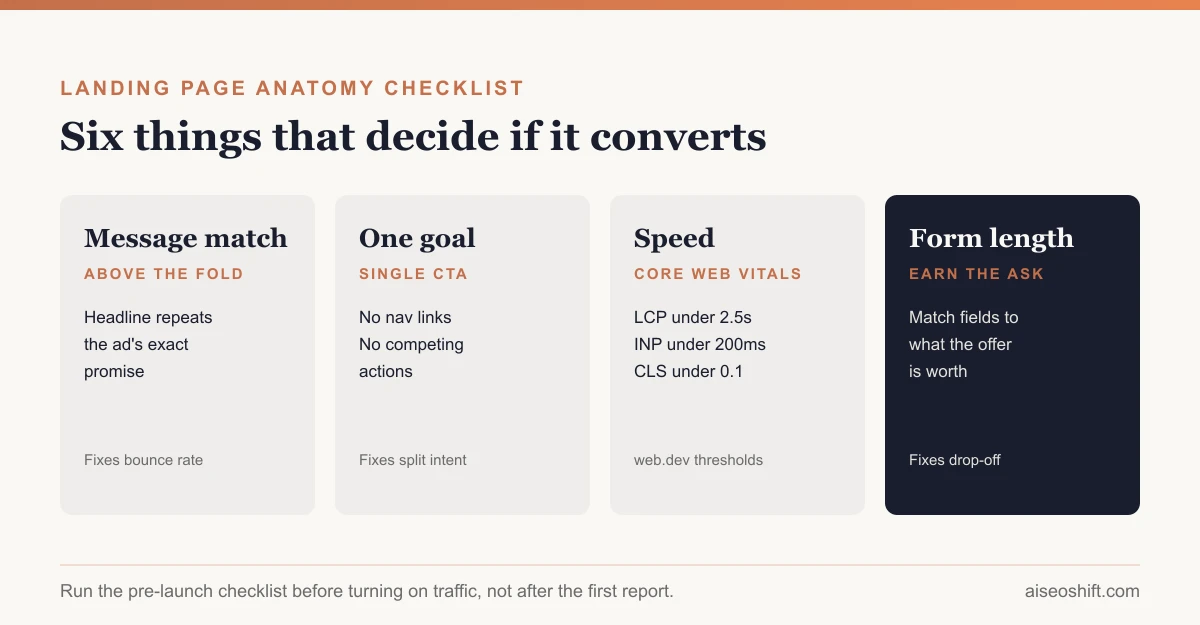
If an ad says “50% off your first order,” the landing page headline should say something close to that, immediately, above the fold. Not “Welcome to our store.” Not a generic value proposition. The exact promise that got the click.
This applies across every entry point, not just paid ads. A visitor arriving from a Google search for “project management software for agencies” should land on a headline that uses language close to that search, not a generic “The Future of Work” headline that makes them wonder if they clicked the wrong result. Mismatch is the single most common reason a page with decent traffic converts at a fraction of what it should.
One goal per page
A landing page with a demo request button, a pricing link, a newsletter signup and a live chat widget is a landing page with no goal, because it’s asking the visitor to make a decision about which decision to make before they’ve even engaged with the content. Pick one action. Every other link on the page, including site navigation, should either support that one action or be removed.
This is also why dedicated landing pages consistently outperform sending paid traffic to a homepage. A homepage has to serve returning customers, job seekers, press and five other audiences at once. A landing page only has to serve the person who just clicked that one link.
Above-the-fold structure
What a visitor sees before scrolling decides whether they scroll at all. A reliable structure, in order:
- Headline that matches the click, using the same language as the entry point.
- Subheadline that adds the one detail the headline didn’t have room for (price, timeframe, who it’s for).
- A visual that shows the actual product or outcome, not generic stock photography of people pointing at laptops.
- One clear call to action, visible without scrolling, in a color that doesn’t appear anywhere else on the page.
Everything else, proof, details, objection handling, earns the scroll. It doesn’t need to fit above the fold.
Proof, placed where doubt actually happens
Testimonials and trust signals work best positioned at the exact point a visitor would naturally hesitate, not bunched into one “Reviews” section at the bottom nobody reaches. A pricing page benefits from proof right next to the price. A page asking for an email benefits from a privacy reassurance right next to the form. Generic logos of “companies we’ve worked with” do less work than one specific, believable detail close to the decision point.
Form length: ask for what the offer earned
Every field is a small withdrawal of trust. A form should ask for exactly as much as the offer justifies and nothing more.
| Offer type | Reasonable form length | Why |
|---|---|---|
| Free guide, checklist, template | Email only, maybe first name | Low commitment ask, low commitment offer |
| Webinar or newsletter signup | Email, name | Slightly higher intent, still low friction |
| Free trial signup | Email, name, sometimes company | Product usage itself becomes the qualifier |
| Demo or sales call request | Name, email, company, phone, a qualifying question | Visitor expects a human follow-up, so more fields feel appropriate |
| Ecommerce checkout | Shipping and payment only, no account required | Every extra field here directly costs completed orders, see our guide to checkout optimization |
If a form feels long for what it’s asking in return, cut fields before you try to make the form “feel shorter” with design tricks. The actual field count is what matters, not the visual trick.
Speed: Core Web Vitals aren’t optional
Google’s Core Web Vitals, per its own web.dev guidance, define the thresholds a page needs to hit for a good experience, measured at the 75th percentile of real visits across mobile and desktop: Largest Contentful Paint (LCP) within 2.5 seconds, Interaction to Next Paint (INP) at 200 milliseconds or less, and Cumulative Layout Shift (CLS) at 0.1 or less. INP replaced the older First Input Delay metric and became a stable Core Web Vital in 2024.
A landing page that misses these thresholds is losing visitors before your headline, proof or offer get a chance to work. The most common landing-page-specific causes: a huge hero image or autoplay video that blocks LCP, a page builder loading unnecessary scripts that delay interactivity, and ads or popups that inject late and shift layout, which tanks CLS. None of these are hard fixes. All of them get ignored because they live in a page builder’s defaults rather than in the copy anyone’s actively reviewing.
Mobile: not a smaller desktop page
Test the actual flow on an actual phone, not a resized browser window. Tap targets need real spacing, forms need appropriate mobile keyboards (email fields should trigger the @ symbol, phone fields the numeric pad), and anything that requires hovering to reveal information simply doesn’t work on a touchscreen. If your landing page traffic is majority mobile, which it is for most paid social campaigns, design the mobile version first and treat desktop as the adaptation, not the other way around.
Testing: change one thing, not everything
A/B testing a landing page only tells you something if exactly one variable differs between versions. Change the headline and the hero image and the CTA color in the same test, and a win tells you nothing about which change actually caused it.
Test in rough order of expected impact. Headline and message match tend to move results the most, because they affect whether a visitor engages at all. CTA copy and placement come next. Form length and minor visual changes usually move results the least, though “usually” is exactly why you still test rather than assume.
Resist calling a test early. A result that looks like a 20% lift after 50 visits per variant is noise more often than signal; most landing page tests need hundreds of conversions per variant, not visitors, before the difference is reliable. If your traffic volume can’t get you there in a reasonable timeframe, a test isn’t the right tool yet. Fix the obvious structural problems first, message match, one goal, page speed, and save split testing for refining a page that’s already fundamentally sound.
Anatomy of a landing page that converts
| Section | Job | What breaks if it’s missing or wrong |
|---|---|---|
| Headline | Match the click, state the offer | Visitor isn’t sure they’re in the right place, leaves immediately |
| Subheadline | Add the one supporting detail | Offer feels vague, visitor hesitates before reading further |
| Hero visual | Show the real product or outcome | Generic stock photography signals a generic, untrustworthy page |
| Primary CTA | One clear next action | Multiple competing CTAs split intent and lower overall conversion |
| Proof | Reduce doubt at the moment it occurs | Visitor’s hesitation never gets addressed, they quietly leave |
| Form | Collect only what the offer earned | Every unnecessary field is a visitor who closes the tab instead |
| Speed | Let the above actually get seen | A slow LCP means some visitors never see the headline at all |
Pre-launch checklist
Copy this before you turn on traffic:
- Headline matches the exact promise in the ad, email or search result that will drive traffic here
- Page has exactly one primary call to action, repeated at most two or three times down the page
- Site navigation is removed or minimized so it doesn’t compete with the one goal
- Proof (testimonial, stat, guarantee) sits near the point of hesitation, not only at the bottom
- Form fields match what the offer has earned, nothing asked “just in case”
- LCP tested under 2.5 seconds, INP under 200ms, CLS under 0.1, on a throttled mobile connection, not just your office wifi
- Tap targets and form inputs tested on an actual phone, not a resized desktop browser
- Only one variable differs from your current best-performing page, if this is a test
A worked example
Say a $300/month project management tool runs a search ad for “project management software for agencies” and sends the click to its generic homepage. The homepage headline reads “Work Management for Every Team,” which doesn’t acknowledge “agencies” at all, and it links out to six other sections including careers and an investor page. Rebuilding this as a dedicated landing page means a headline that says “Project Management Built for Agencies,” one CTA (“Start a 14-day trial,” no credit card), proof from the kind of client an agency would recognize as similar to itself, and a signup form asking only for email and company size. Nothing else changes about the product. The rebuild is pure message match, goal focus and form discipline, and it’s the version worth testing against the homepage before concluding the ad itself isn’t working.
The bottom line
A landing page that converts well is rarely the result of clever copywriting tricks. It’s the result of matching the message that earned the click, giving the visitor exactly one thing to decide, loading fast enough that the offer is actually seen, and asking for only as much as the offer has earned. Get those four right and the rest, headline polish, color choices, micro-animations, is optimization at the margins. Get them wrong and no amount of polish fixes it.
If the traffic you’re sending to this page is paid, make sure you’re measuring the result properly before deciding whether the page or the channel is the problem; our guides to marketing attribution and what counts as a good ROAS cover that layer. And if this page sits at the end of an ecommerce funnel rather than a lead form, read it alongside our ecommerce conversion rate benchmarks piece so you know what a realistic improvement looks like before you promise your team a specific number.
Related guides
- How to Improve Conversion Rate: A Prioritized Process
- Best Trending Product Research Tools in 2026: 14 Ways to Find Products Before They Peak
- LinkedIn Marketing Strategy: Pages, Posting and Ads That Work
- How to Build a Full-Funnel Performance Marketing System (Step-by-Step, 2026)