Playbooks
Facebook Ads Not Delivering? Here's What's Actually Wrong
A 'Learning limited' tag and a 'Not delivering' tag mean two different things. Here is what Meta is actually telling you, status by status.

Facebook ads stop delivering for one of five reasons: the budget or bid can’t win enough auctions, the audience is too narrow for Meta to find buyers, the ad got rejected or stuck in review, there’s a payment or account-level block, or the ad set never gathered enough data to leave the learning phase. Ads Manager tells you which one with a delivery status, and each status points to a different fix.
Most people see “Learning limited” or “Not delivering” and start changing things at random. That almost always resets the learning phase and makes it worse.
Key takeaways
- “Learning” and “Learning limited” are not the same problem. One resolves on its own, the other requires a structural change.
- Meta’s learning phase targets roughly 50 optimization events per ad set within 7 days. If your budget and conversion rate can’t produce that, no amount of waiting fixes it.
- “Not delivering” almost always traces to budget, bid, audience size, or a payment issue, not a mysterious algorithm penalty.
- Rejections come with a specific policy reason in the Account Quality tool. Read it before resubmitting.
- Editing an ad set mid-learning restarts the clock. Diagnose first, then make one change.
Read the delivery status before you touch anything
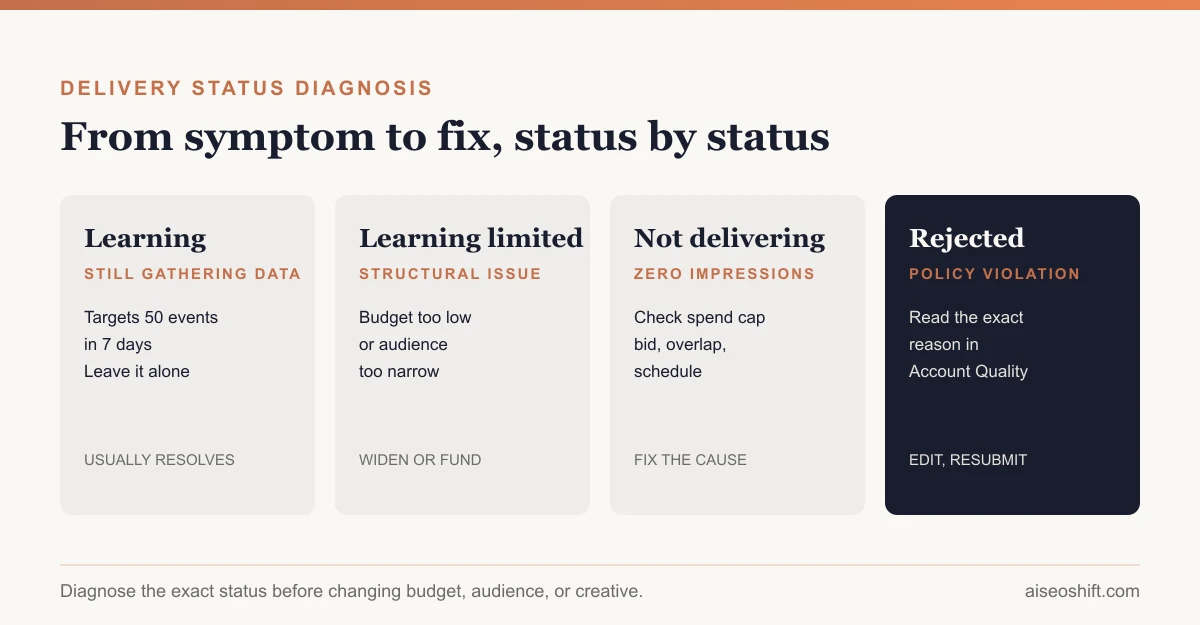
Open Ads Manager, add the “Delivery” column if it’s not already showing, and look at the exact wording next to each ad set. Here’s what each one means.
| Status | What it means | What to do |
|---|---|---|
| Active | Delivering normally | Nothing. Monitor performance, don’t touch the ad set |
| Learning | Still gathering data toward ~50 optimization events in 7 days | Leave it alone. Avoid edits that restart learning |
| Learning limited | Current setup is unlikely to ever reach 50 events in 7 days | Expand audience, raise budget, or optimize for a higher-funnel event |
| Not delivering | Active but getting zero impressions | Check budget, bid cap, audience overlap, and account spending limit |
| In review | Meta is checking the ad against policy | Wait up to 24 hours; don’t edit, it restarts the review clock |
| Rejected | Violates an ad policy | Open Account Quality for the specific reason, fix that element, resubmit |
| Scheduled | Approved, waiting for its start date | Confirm the date and time zone are what you intended |
| Ads off / Ad set off | Manually paused, rule-paused, or past its end date | Reactivate if that wasn’t intentional |
Meta’s own help documentation frames “Not delivering” as a catch-all: the ad is active but something, budget, targeting, or competition, is stopping it from winning impressions. That’s the status you’ll spend the most time diagnosing, because it covers the widest range of causes.
Why “Learning limited” shows up
Learning limited is Meta’s way of saying “the math doesn’t work at your current settings.” It’s a diagnosis, not a waiting room.
The usual culprits, in order of how often they show up:
- Budget-to-conversion mismatch. A $30 daily budget optimizing for a $40 purchase that converts at 1% needs a lot more traffic than that budget buys. If your math only produces 1 or 2 conversions a day, you’ll never hit 50 in a week.
- Audience too narrow. Stacking three or four interest filters, or targeting a single city, can shrink the pool below what the budget needs to spend efficiently.
- Optimizing for a rare event. If “Purchase” only fires 5 times a week, switch the ad set to optimize for Add to Cart or Initiate Checkout instead, which fire far more often, then move back to Purchase once the ad set has real volume.
- Fragmented ad sets. Five $20 ad sets each chasing the same audience split the signal five ways. One $100 ad set concentrates it.
The fix in every case is structural: consolidate budget into fewer ad sets, widen the audience, or optimize for an event that happens often enough to hit the threshold. None of that fix shows up by waiting longer at the same settings.
Why “Not delivering” shows up
This status means the ad is active and approved, but it’s losing every auction or can’t spend. Work through these in order:
- Check the account spending limit. Go to Billing & Payment Settings. If the account hit its spending cap, every campaign stalls at once, and that’s the tell: if more than one unrelated ad set stopped on the same day, it’s an account-level issue, not a creative or targeting one.
- Check for audience overlap. Run Meta’s Audience Overlap tool across your active ad sets. When two ad sets target the same people, Meta tends to let one win and starves the other, which shows up as “Not delivering” on the loser.
- Raise the bid or switch to Lowest Cost. A manual bid cap set below the going rate for your audience will lose auctions silently. Lowest Cost (Meta’s default automatic bidding) removes that ceiling.
- Widen the audience. The same narrow-targeting problem that causes Learning limited also causes Not delivering, just at a more extreme end.
- Check the schedule and time zone. A dayparting rule or an end date set in the wrong time zone can look identical to a delivery bug.
Policy rejections and how to read them
A rejected ad never delivers until it’s fixed and reapproved. The rejection notice in Account Quality names the specific policy, so start there instead of guessing.
The most common trip-wires:
| Trigger | Example | Fix |
|---|---|---|
| Personal attributes | ”Are you struggling with debt?” | Describe the situation, not the person: “Struggling to keep up with bills?” |
| Before/after imagery | Weight-loss or skin transformation photos | Use testimonials or product shots instead |
| Unsubstantiated claims | ”Cures anxiety” | Use language the product can actually support |
| Landing page mismatch | Ad promises 50% off, page shows full price | Match the offer exactly, every time |
| Prohibited content | Supplements, crypto, or financial claims without required disclosures | Check Meta’s policy pages for the specific category before running the ad |
If the policy cited genuinely doesn’t apply, request a manual review through Account Quality rather than resubmitting the same creative. Resubmitting unchanged creative after an automated rejection usually gets the same automated result.
A faster way to check creative, not just delivery
Delivery problems and creative problems often look the same from the outside: fewer impressions, climbing CPMs, a stalled ad set. Before you blame the algorithm, rule out the creative itself. Our guide to ad creative testing walks through isolating one variable at a time, and creative fatigue covers the specific signals that tell you an ad has simply worn out its audience rather than hit a delivery wall.
If the issue traces back to the ad copy getting flagged repeatedly, how to write ad copy that converts has the specific language patterns that tend to clear review the first time.
Account and tracking issues worth ruling out
Two problems outside Ads Manager itself can look exactly like a delivery issue:
- Broken event tracking. If your pixel or Conversions API stopped firing, Meta’s optimization can’t see the signal it needs, which looks identical to Learning limited from the outside. Our Meta Conversions API guide covers the setup most stores get wrong.
- A page or domain change. If the linked Page was unpublished, or the destination URL now redirects somewhere unapproved, the ad can get flagged without a clear rejection notice.
Compare your setup against Google Ads vs. Facebook Ads if you’re running both and only one platform is stalling. Divergent delivery between platforms running the same offer and budget is a strong signal the issue is platform-specific, not product-market fit.
Account and payment issues that stop every campaign at once
Some delivery problems have nothing to do with the ad itself. These show up across every active campaign on the account at the same time, which is the tell that separates them from a creative or targeting issue:
- Declined payment method. Meta retries a failed charge a few times, then pauses delivery account-wide until the payment method is updated in Billing & Payment Settings.
- Account spending limit. This is a cap you or a teammate set, deliberately or by accident, and it behaves like a hard stop: every campaign under it halts the moment it’s reached, with no warning banner on the individual ad sets themselves.
- Ad account restricted or disabled. Usually triggered by a cluster of policy violations across multiple ads, not just one. Check Account Quality for the specific reason; appealing without addressing the underlying pattern of violations rarely works.
- Identity or business verification pending. Newer or recently-edited accounts sometimes need Meta Business verification before certain ad categories (housing, employment, credit, political) are allowed to deliver at all.
The fastest way to tell an account-level issue from an ad-level one: open two unrelated campaigns targeting different audiences. If both stalled on the same day, it’s the account, not the audience or the creative.
A 10-minute diagnostic checklist
Run through this in order before changing anything in the ad set itself:
- Check Billing & Payment Settings for a declined card or a hit spending cap.
- Check Account Quality for any pending or active restrictions.
- Open the specific ad set and read the exact delivery status word for word, not just “it’s not working.”
- If the status is Learning or Learning limited, check whether the weekly conversion volume realistically clears 50 events. If it doesn’t, that’s the fix, not more patience.
- If the status is Not delivering, check the bid strategy and run the Audience Overlap tool against your other active ad sets.
- If the status is Rejected, open the specific policy cited before touching the creative.
Most delivery problems resolve from this list alone, without needing to pause the campaign, rebuild it, or talk yourself into blaming the algorithm.
The bottom line
Every delivery status in Ads Manager is Meta telling you exactly what’s wrong, not a black box. Learning limited means your budget, audience, or optimization event doesn’t produce enough data, structurally. Not delivering means you’re losing auctions or hit a spending cap. Rejected means a specific policy was triggered, and Account Quality names it.
Read the status before you touch the ad set. The fix is almost always structural, and the fastest path to delivery is matching the fix to the status instead of changing everything at once.
Related guides
- 10 Facebook Ads Strategies That Work After Meta’s Latest Updates (October 2026)
- Best Meta Ads Courses in 2026 to Learn Facebook and Instagram Ads for Your Brand
- Best Tools to Monitor Competitor Facebook and TikTok Ads in 2026 (Free and Paid)
- What Is Meta Andromeda? Why Creative Is the New Targeting in 2026