Playbooks
Meta Conversions API: What It Is and How to Set It Up
The pixel alone was never going to survive ad blockers, Safari's cookie limits, and iOS privacy prompts. The Conversions API is Meta's answer, and it's less work to set up than most agencies make it sound.

Meta Conversions API, usually shortened to CAPI, is a way to send website or app events to Meta directly from your server instead of relying only on a browser pixel. It exists because pixel-only tracking has been losing visibility for years: ad blockers strip pixel scripts, Safari’s Intelligent Tracking Prevention limits third-party cookies, and iOS App Tracking Transparency prompts cut mobile app signal. A server call doesn’t ask the customer’s browser to cooperate. It just happens.
If your Meta ad account’s reported conversions look lower than what your store’s order data shows, pixel signal loss is the most common reason, and CAPI is the standard fix.
Key takeaways
- CAPI sends conversion events server-side, so they don’t depend on a browser running JavaScript or allowing third-party trackers.
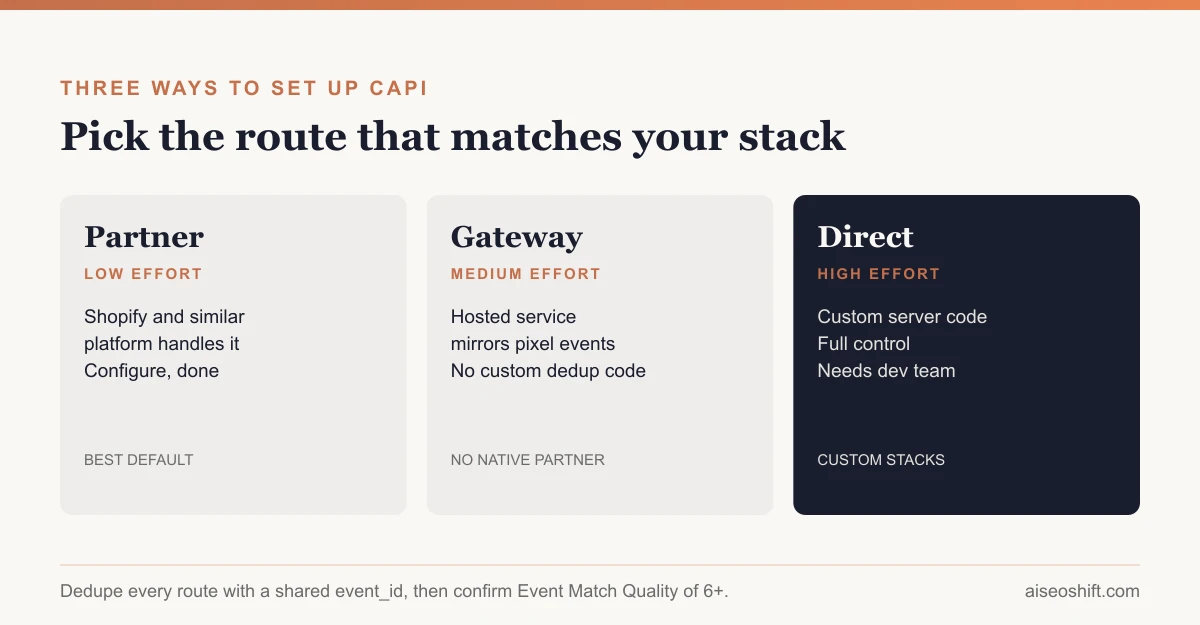
- Meta documents three setup routes: partner integrations (Shopify and similar platforms), the hosted Conversions API Gateway, or a direct manual server integration.
- Deduplicate pixel and server events with a shared
event_idand matchingevent_name; Meta reconciles them within a 48-hour window.- Event Match Quality (EMQ) measures how well your server events match to real Meta profiles. Meta’s own documentation recommends a score of 6+ out of 10.
- Test every setup in Events Manager before trusting the data; a broken CAPI integration can silently send malformed or duplicate events for weeks.
Why pixel-only tracking stopped being enough
The Meta Pixel is a piece of JavaScript that fires in the customer’s browser when something happens: a page loads, a product gets added to cart, an order completes. It has always depended on three things going right: the script loading, the browser allowing it to run, and cookies persisting long enough to connect that event back to an ad click.
All three got harder over the past several years. Ad blockers and browser extensions block pixel scripts outright. Safari’s ITP shortens how long tracking cookies survive. iOS prompts let users decline app tracking outright, and plenty do. None of that is a bug Meta can patch. It’s the direction browsers and operating systems are moving, and it isn’t reversing.
Meta’s own developer documentation frames Conversions API as a server-side complement built specifically to recover that lost visibility, connecting “marketing data…from an advertiser’s server, website platform, mobile app, or CRM to Meta systems,” rather than relying solely on what the browser reports.
The three setup routes
Meta’s documentation is explicit that there isn’t one way to implement CAPI. The right one depends on your platform and your appetite for custom code.
1. Partner integrations
If you run an ecommerce platform with a native Meta integration, usually Shopify, this is the fastest route. The platform’s own app handles sending server events to Meta, matching pixel and server data, and keeping up with Meta’s API version changes. You configure it inside your store admin and inside Meta’s Events Manager setup flow; there’s no code to write or host.
This is the right default for most small and mid-size stores. It’s the lowest-maintenance option because someone else owns keeping the integration current.
2. Conversions API Gateway
For stores or sites without a native partner integration, Meta offers Conversions API Gateway: a hosted service you deploy (commonly on AWS) that sits between your existing pixel setup and Meta. It monitors pixel events firing in the browser and automatically sends a matching server-side copy, handling deduplication without you manually wiring event_id matching yourself.
Gateway is the middle option: more setup than a partner integration, far less custom code than building a direct server integration from scratch. It suits a custom-built site or a platform without a native CAPI partner app.
3. Direct server implementation
The most flexible and most work: you send events yourself via a POST request to Meta’s /events endpoint, built around your own pixel ID and access token. Meta’s documentation describes this as the primary focus of its developer docs, aimed at teams with backend engineering resources who want full control over which events fire, what customer data accompanies them, and how deduplication is wired into existing checkout or CRM code.
Choose this route if you have custom checkout logic, a non-standard ecommerce stack, or need to send events from sources a partner integration or Gateway doesn’t cover, like offline conversions from a CRM.
| Route | Setup effort | Who it suits | Maintenance owner |
|---|---|---|---|
| Partner integration (e.g. Shopify) | Low | Standard ecommerce platforms | Platform/partner |
| Conversions API Gateway | Medium | Custom sites without a partner app | You (hosted service) |
| Direct server implementation | High | Custom backends, non-standard events | Your dev team |
Deduplication: why event_id matters
Running the pixel and CAPI together means the same real-world action, a purchase, can get reported twice: once from the browser, once from your server. Meta’s documentation on this is specific about how it prevents double-counting.
Both the browser pixel call and the server-side CAPI call need to carry the same identifier. On the browser side, that means passing an eventID as the fourth argument to the pixel’s track call:
fbq('track', 'Purchase', {value: 65, currency: 'USD'}, {eventID: 'order-10482'});On the server side, the matching CAPI event carries the same value as its event_id field, alongside a matching event_name (“Purchase” on both sides). Meta’s documentation states plainly: “We determine if events are identical based on their ID and name,” and that matching only applies “if they are received within 48 hours of when we receive the first event with a given event_id.” When both match, Meta counts the action once and keeps whichever event arrived first.
Skip this step and you’ll see inflated conversion counts in Events Manager, which throws off cost-per-result numbers you might be using to judge campaign performance. If your reported ROAS suddenly looks better right after turning on CAPI with no other change, double-counted events are the first thing to check, before you start asking what counts as a good ROAS for the campaign.
Event Match Quality: the number that tells you if it’s working
Turning on CAPI doesn’t automatically mean Meta can use the data well. Event Match Quality (EMQ) measures how reliably the customer information in your server events, hashed email, phone number, name, location, matches back to an actual Facebook or Instagram profile. Meta’s Dataset Quality API documentation puts the practical target at an EMQ score of 6 or higher out of 10.
Two parameters move that score the most: hashed email and hashed phone number. If your server events are only sending an IP address and user agent, with no customer-provided identifiers, EMQ will sit low no matter how reliably the events fire. Sending email and phone consistently, hashed per Meta’s required format, is the single most effective change most setups can make after the basic integration is live.
Check EMQ inside Events Manager under the Diagnostics tab for each event (Purchase, Lead, AddToCart). A low score on one specific event, while others score fine, usually points to a gap in what data that particular event’s code sends, not a platform-wide problem.
What customer data to actually send
A server event without customer data is barely better than nothing for matching purposes. Meta’s parameters for CAPI events fall into two groups: event data (what happened: Purchase, value, currency, timestamp) and customer information (who it happened to: email, phone, name, external ID, client IP, user agent, and the _fbc/_fbp cookies if the browser still sets them).
The customer information fields must be hashed with SHA-256 before they’re sent, lowercase and trimmed of whitespace first. Sending an unhashed email will fail validation outright, not just hurt match quality. A practical minimum for a Purchase event:
| Field | Required? | Matching weight |
|---|---|---|
| Hashed email | Strongly recommended | High |
| Hashed phone | Strongly recommended | High |
| Client IP address | Recommended | Medium |
| Client user agent | Recommended | Medium |
_fbc / _fbp cookies | Recommended if available | High |
| External ID (your internal customer ID) | Recommended | Medium |
| Name, city, state, zip | Optional | Low-medium |
Send everything you legitimately have for that customer at the moment of the event, not just the minimum. There’s no penalty for sending more matching fields, only upside.
Testing before you trust it
Never assume a CAPI integration works just because it deployed without errors. Events Manager includes a Test Events tool: open it, generate an action on your live site or app (add to cart, start a purchase), and watch for the event to appear in the test stream within a few seconds, tagged as coming from either “Browser” or “Server.” You want to see both show up for the same action, with matching event names, confirming both legs are firing.
Common failure patterns worth checking for in testing:
- Server events firing with no customer parameters at all (email, phone, external ID all blank), which tanks EMQ immediately.
- Pixel and server events firing with different
event_idvalues for the same action, which defeats deduplication entirely. - Events firing from a staging or test environment that accidentally share the same Pixel ID as production, polluting your real dataset.
Catch these in the test stream before they run for weeks. A silently broken CAPI integration doesn’t throw an error. It just quietly reports bad data that someone eventually has to untangle in a reporting review.
Re-test after any platform update, theme change, or checkout redesign. A checkout rebuild that changes the order confirmation page structure is a common, boring way for a Purchase event to stop firing entirely, and nobody notices until someone asks why conversions dropped off a cliff with no change in traffic.
The bottom line
CAPI isn’t optional anymore for anyone serious about Meta ad measurement; it’s the standard answer to signal loss that browser-only pixel tracking can’t solve on its own. Pick the setup route that matches your stack: a partner integration if your platform has one, Gateway if it doesn’t, direct implementation if you need full control. Then verify with event_id deduplication and an EMQ check in Events Manager before you trust a single number it reports.
CAPI’s value depends entirely on the quality of what the browser pixel side is already sending, so it’s worth auditing your base pixel setup alongside any broader Facebook ad strategy changes you’re already making. And once both are solid, that’s the foundation retargeting and lookalike audiences depend on for email marketing built for a small catalog, since stale or duplicated conversion data quietly degrades every audience built from it.
Related guides
- What Is Meta Andromeda? Why Creative Is the New Targeting in 2026
- Best Meta Ads Courses in 2026 to Learn Facebook and Instagram Ads for Your Brand
- Meta Pixel Setup: A Step-by-Step Install and Test Guide
- Best Tools to Monitor Competitor Facebook and TikTok Ads in 2026 (Free and Paid)