Playbooks
YouTube Shorts Ads: Campaign Types, Specs and Setup for 2026
There's no 'YouTube Shorts ads' campaign to create. There are four existing campaign types that can serve on Shorts, and they behave differently once they get there.

YouTube Shorts ads aren’t a separate campaign type you create in Google Ads. They’re a placement that Demand Gen, Video view, Video reach, YouTube reservation, and Performance Max campaigns can all serve on, depending on which one you pick and how you set it up, according to Google’s own help documentation on campaign types that support Shorts ads. If you’ve been searching for a “Shorts campaign” button, stop. The decision you’re actually making is which existing objective to run, and how much control you want over where it shows up.
Key takeaways
- Shorts ads run through five existing campaign types: Demand Gen, Video view, Video reach, YouTube reservation, and Performance Max. There’s no Shorts-only campaign.
- Demand Gen is the closest thing to a Shorts-native option for most advertisers, built around short, vertical, visual content across YouTube, Discover and Gmail.
- Performance Max also serves on Shorts, but blends it with every other Google surface and gives you far less placement-level reporting or control.
- Creative should default to vertical 9:16, full-screen, with the hook landing in the first one to two seconds, since a swipe-away is one thumb-flick.
- Only Demand Gen and Video campaigns let you filter reporting down to the Shorts placement specifically; Performance Max reports a blended number.
Which campaign types actually serve on Shorts
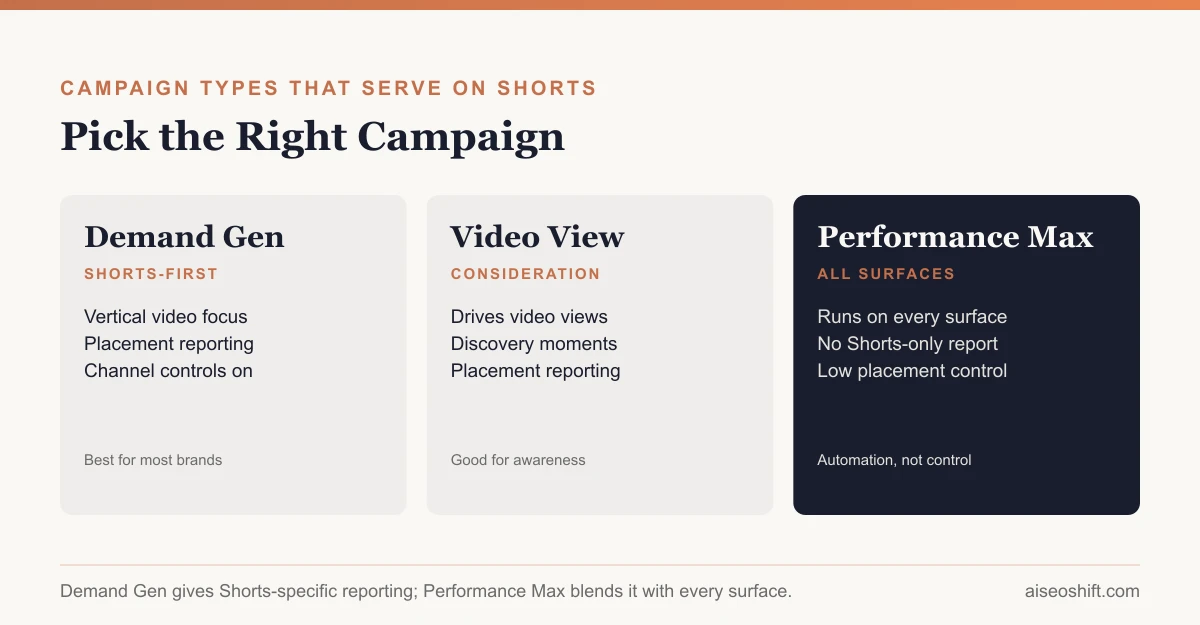
Google’s help center lists exactly which campaign types are eligible for the Shorts placement and what each one is built for:
- Demand Gen. Built to “capture engagement and action across YouTube, including Shorts, Discover, Gmail, and Google video partners,” per Google Ads Help. Google cites more than 50 billion global daily views on Shorts alone as the scale behind this placement. It’s the default pick when the goal is clicks, sign-ups, app installs or sales driven by short, scrollable creative.
- Video view campaigns. Optimized to drive views and influence consideration during discovery, useful when the metric that matters is attention, not a direct click.
- Video reach campaigns (“Efficient reach” goal). Built to maximize reach at low cost per impression, the right pick for straight awareness budgets rather than response.
- YouTube reservation campaigns. Reserved placements through YouTube Select Shorts, bought by contacting a Google Ads representative rather than self-serve. This is the premium, guaranteed-placement path, not a default.
- Performance Max. Runs across every eligible Google surface at once, including Shorts, Search, Display, Shopping, Gmail and Discover, from one campaign with one set of assets.
- App campaigns. App install and app re-engagement campaigns can also place on Shorts when the objective is driving or recovering app usage.
Reporting on Shorts specifically, with placement-level control, is available in Demand Gen, Video view, Video reach, and YouTube reservation campaigns. Performance Max does not break this out the same way, since it’s designed to let Google’s automation move budget across surfaces without the advertiser managing each one.
Demand Gen vs. Performance Max for Shorts
Both can show up on Shorts. They’re not interchangeable choices.
| Demand Gen | Performance Max | |
|---|---|---|
| Surfaces | YouTube (incl. Shorts), Discover, Gmail, Google video partners | All eligible Google surfaces: Search, Display, Shopping, YouTube, Gmail, Discover, Maps |
| Built for | Visual, short-form storytelling to drive engagement and conversions | Automated bidding and placement across every channel from one campaign |
| Placement control | Channel controls let you include/exclude Shorts, in-feed, and other surfaces | Minimal; the system decides where your budget goes |
| Shorts-specific reporting | Yes, breaks out by placement | No, reports a blended cross-channel number |
| Best for | Advertisers who want to run and measure a Shorts-first creative strategy deliberately | Advertisers who want Google’s automation to find conversions anywhere, without managing channel mix |
If you want to know whether your vertical video creative is working on Shorts specifically, run Demand Gen. If you want Google’s bidding system to find conversions wherever they’re cheapest and you don’t care which surface gets the credit, Performance Max will include Shorts automatically as one option among many, without telling you how much of the result came from that surface.
Creative specs and format
Shorts is a full-screen, vertical, sound-on environment, and the ad format needs to match the feed it’s dropped into or it reads as an obvious interruption.
- Aspect ratio. Vertical 9:16 as the primary asset. Google’s asset guidance for video and Demand Gen campaigns recommends supplying vertical and square assets so the same asset group can serve across Shorts-style vertical feeds without cropping or letterboxing.
- Length. Shorter performs better on a swipeable feed; treat 15 to 30 seconds as the practical range for direct-response creative, with the core message landing in the first one to two seconds before a viewer’s thumb moves.
- Sound-on by default. Unlike traditional video ad placements historically, vertical feed environments assume sound on. Design the hook to work with audio, and caption it so it still lands muted.
- Native feel. Polished TV-style spots tend to underperform UGC-style, handheld, native-feeling video on Shorts, the same pattern seen across TikTok and Reels. If your creative library is thin on this format, our guide to AI video ad generators covers tools built specifically for fast vertical-video production.
A worked example
Say you sell a $60 pair of running shoes and you’ve been running one 30-second horizontal brand video as a Demand Gen asset. It’s getting impressions on Shorts but a low click-through rate, because it was shot for a living-room TV, not a vertical phone feed. You reshoot three variants: a 20-second vertical cut that opens on the shoe mid-stride with text overlay in the first second, a 15-second UGC-style unboxing filmed on a phone, and a 25-second side-by-side comparing cushioning to a competitor. You enable Demand Gen’s Shorts placement reporting and find the UGC cut drives double the click-through rate of the original horizontal spot on that specific surface, while the comparison cut does better on in-feed. That’s a hypothetical, not a real result, but it’s the kind of split you can only see once you stop treating “YouTube” as one undifferentiated placement.
Targeting, budget and bidding for Shorts
Demand Gen and Video campaigns use Google’s standard automated bidding strategies rather than a Shorts-specific bid type. In practice, that means you’re choosing an objective, maximize conversions, maximize clicks, or target CPA/ROAS once you have conversion history, and letting Google’s system decide how much of your budget lands on Shorts versus the other enabled surfaces within that campaign.
A few practical points that apply specifically once Shorts is one of your enabled placements:
- Don’t set a Shorts-only budget cap inside a multi-surface campaign. You can exclude Shorts entirely through channel controls, but you can’t ring-fence a specific dollar amount for it inside Demand Gen; the system allocates spend across whichever surfaces you’ve left enabled based on where it predicts results.
- Audience signals, not hard targeting. Demand Gen leans on audience signals (your own customer lists, similar segments, interest and in-market categories) as a starting point for its AI rather than a hard filter, which is the same directional shift advertisers have seen on Meta as automation took over more of the delivery decision.
- Give it a learning period before judging cost. A new Demand Gen campaign, or a newly enabled Shorts placement inside one, typically needs a week or more of live delivery before cost per result settles, since the automated bidding system is still calibrating against your actual conversion data.
- Frequency caps matter more on Shorts than in-feed. Because Shorts is an endless scroll, the same user can see an ad repeatedly in a single sitting. If you notice rising frequency with flat conversions, that’s often the clearer signal to refresh creative than a dip in click-through rate alone.
Common mistakes that waste Shorts budget
- Reusing a horizontal TV cut as-is. It gets letterboxed or cropped awkwardly, and the mismatch with the native vertical feed around it reads as an ad before the message even lands.
- Burying the hook. If the first one to two seconds don’t say who this is for or what’s being offered, most viewers have already swiped past before your message starts.
- Running one asset group for months. Vertical feed audiences churn through creative fast. The same fatigue that shows up in paid social generally applies to Shorts, often faster, given how quickly a single user can cycle through impressions in one scrolling session. A practical habit for feed-style video is to line up the next creative variant before performance visibly drops, not after.
- Judging Shorts by Performance Max’s blended report. If PMax is your only active campaign touching Shorts, you have no way to isolate whether the surface itself is working. That’s the core argument for running Demand Gen deliberately, at least for one placement-reporting test, before deciding how much budget Shorts deserves.
Measurement
Pull placement-level reports inside Demand Gen or Video campaigns to see Shorts performance in isolation rather than blended into a total YouTube number. From there:
- Compare cost per result on Shorts against your other enabled placements (in-feed, Home, watch next) before assuming the surface itself is the problem versus the creative running on it.
- If conversions look thin relative to impressions, that’s often a signal the creative wasn’t built for a swipe environment, not that Shorts traffic is low-intent.
- Treat early read with caution. Short-form vertical creative tends to need a real sample of impressions before cost-per-result stabilizes, since the format rewards or punishes a hook within the first second, and that’s a binary outcome across thousands of views, not a gradual signal.
- If you’re running Shorts alongside other short-form paid social, our TikTok Spark Ads guide covers the closest cross-platform equivalent, and incrementality testing covers how to check whether any of this short-form spend is driving results you wouldn’t have gotten anyway.
The bottom line
YouTube Shorts ads are a placement, not a product. The real decision is Demand Gen for deliberate, measurable, Shorts-first creative with placement controls, or Performance Max if you want Google’s automation to include Shorts as one surface among many without managing it directly. Either way, the creative has to be built vertical, fast and sound-on from the start. A horizontal TV spot dropped into a Shorts feed will underperform regardless of which campaign type delivers it.
Related guides
- Google Ads Quality Score: What It Is and How to Improve It
- Google Demand Gen Campaigns: What They Are and How to Set One Up
- Facebook Ads Not Delivering? Here’s What’s Actually Wrong
- Best Meta Ads Courses in 2026 to Learn Facebook and Instagram Ads for Your Brand