Playbooks
Google Demand Gen Campaigns: What They Are and How to Set One Up
Demand Gen is where Google put the creative-led, visual-platform budget that used to live in Discovery campaigns. Here's how it actually works and when it earns a slot in your plan.


Google Demand Gen campaigns run video and image ads across YouTube (including Shorts), Discover, Gmail, and the Google Display Network from one campaign, using Google’s AI to match your creative to audiences likely to engage. Demand Gen replaced Discovery campaigns, with the migration starting in October 2023 and finishing by March 2024, and it has kept absorbing adjacent campaign types since then: Video Action campaigns moved over in 2025, and standalone Display campaigns start folding in from June 2026.
Key takeaways
- Demand Gen runs across five surfaces: YouTube in-feed and Shorts, Discover, Gmail, and the Display Network.
- It replaced Discovery campaigns on a forced timeline that completed in March 2024, carrying over campaign history and Smart Bidding data.
- You get real audience controls, including lookalike and custom segments, something Performance Max doesn’t expose.
- Google recommends Maximize Conversions until a campaign has 50+ conversions, then a move to Target CPA or Target ROAS.
- Pick Demand Gen over Performance Max when creative testing and audience precision matter more than chasing every last conversion across Search and Shopping too.
What a Demand Gen campaign actually is
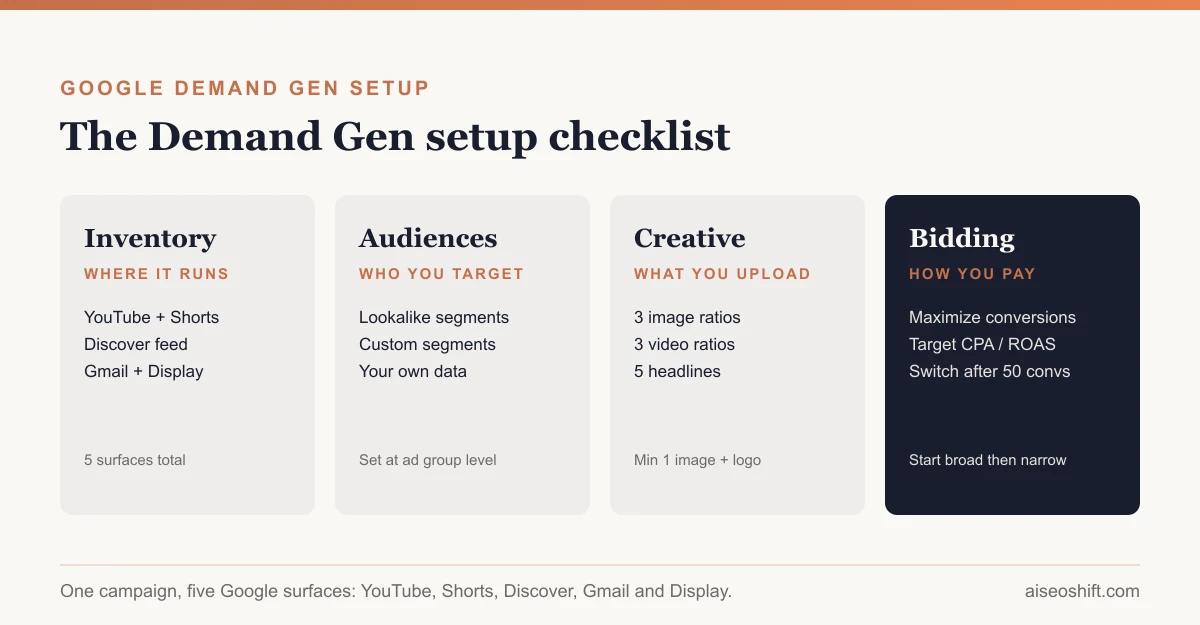
Demand Gen sits in the “visual, scroll-based” part of Google’s ad stack. Instead of bidding for a search query, you’re buying attention inside a feed people are already scrolling: YouTube’s in-feed and Shorts placements, the Discover feed on Android, Gmail’s promotions tab, and Display Network inventory. Google’s own description is that Demand Gen campaigns “capture engagement and action” across those surfaces by pairing your image and video assets with its targeting and bidding systems (Google Ads Help: About Demand Gen campaigns).
It took over from Discovery campaigns, which only ran on Discover and Gmail. The replacement wasn’t a rebrand you opted into. Google began the migration in October 2023 and had upgraded every remaining Discovery campaign to Demand Gen by March 2024, carrying over campaign IDs, historical performance data, budgets, bid strategies, and existing image assets, with Smart Bidding’s learning left intact rather than reset (OpenMoves: Google’s Newest Campaign Type).
The expansion didn’t stop there. Video Action campaigns were folded into Demand Gen in 2025, and Google is now moving standalone Display campaigns in too: eligible advertisers can voluntarily migrate starting June 2026, with new campaigns eventually only creatable inside Demand Gen and remaining Display campaigns auto-migrated after that (Google Ads Help: About Demand Gen campaigns). If you’ve been running Display separately, plan for that to change.
Where Demand Gen ads run
One campaign serves across:
- YouTube in-feed, the Home feed, Watch Next, and YouTube search
- YouTube Shorts
- Discover, Google’s personalized content feed
- Gmail, in the Promotions and Social tabs
- Google Display Network and Google video partners
That’s a wider net than Discovery ever had, and it’s the reason Demand Gen asks for both image and video assets rather than letting you run an image-only campaign and call it done. A format that only works in one of these feeds (a square product shot, say) will get far less reach than a set that also covers vertical video for Shorts.
Setting up a Demand Gen campaign
The sequence is close to any other Google Ads campaign, with two extra decisions: inventory and audience structure.
- Pick the goal. Sales, leads, website traffic, or no specific goal if you’re running pure awareness.
- Choose Demand Gen as the campaign type, then set budget and dates.
- Pick bidding (covered below). You can’t set manual CPC here; everything runs through automated bidding.
- Set languages and locations at the campaign level.
- Build ad groups around a single audience and message each. Google’s own guidance is to separate distinct audiences into their own ad groups rather than stacking several into one, and to set location, language, and demographic nuance at the ad group level for more tailored messaging (Google Ads Help: Demand Gen audiences overview).
- Add your audience signals: first-party data, Google audiences, custom segments, lookalikes, or a mix.
- Upload creative across the required and optional image and video ratios (see the specs table below).
- Write headlines, descriptions, and a business name, following the character limits.
- Review placements, choosing which surfaces (YouTube, Discover, Gmail, Display) the ad group can serve on if you want to restrict reach.
- Launch, then leave it alone for at least a week before judging performance. Feed-based delivery needs time to find its footing, the same way Meta’s Andromeda update changed how creative and targeting interact.
Audiences: who actually sees the ad
Demand Gen gives you more targeting control than most Google AI-driven campaign types, split into a few categories you can combine at the ad group level:
- Your own data. Customer Match lists, people who visited your site or app, and YouTube channel viewers or subscribers.
- Google audiences. In-market segments (people showing recent purchase intent), affinity segments (longer-running interests and habits), life events, and detailed demographics.
- Custom segments. Built from the keywords, URLs, and apps your ideal customer would search for or use, rather than a Google-defined category.
- Lookalike segments. Built from a seed list you provide, such as a Customer Match list or your site visitors. Google finds people who resemble that seed list and lets you choose how far the match stretches, from a tighter, more similar audience to a broader one that trades precision for reach (Google Ads Help: Demand Gen audiences overview).
A seed list under about 100 people won’t give Google enough signal to build a useful lookalike. If your Customer Match list is thin, grow it with engaged-visitor or YouTube-viewer audiences before leaning on lookalikes.
Creative specs
Demand Gen pools several asset ratios into one campaign and automatically assembles whichever combination fits the surface it’s serving on. Here’s what’s required and what’s optional, straight from Google’s spec page:
| Asset type | Ratio | Recommended size | Minimum size | Quantity | Required |
|---|---|---|---|---|---|
| Image, horizontal | 1.91:1 | 1200 x 628 px | 600 x 314 px | 1-20 (3 recommended) | Yes |
| Image, square | 1:1 | 1200 x 1200 px | 300 x 300 px | 1-20 (3 recommended) | Yes |
| Logo | 1:1 | 1200 x 1200 px | 144 x 144 px | 1-5 (1 recommended) | Yes |
| Image, vertical | 4:5 | 960 x 1200 px | 480 x 600 px | 1-20 (3 recommended) | Optional |
| Video, horizontal | 16:9 | 10-60 sec | 5 sec | up to 3 | Optional |
| Video, vertical | 9:16 or 4:5 | 10-60 sec | 5 sec | up to 3 | Optional |
| Video, square | 1:1 | 10-60 sec | 5 sec | up to 3 | Optional |
Source: Google Ads Help: Demand Gen campaigns specs and format requirements
Text limits: headlines max 40 characters (Google recommends 5, with at least one under 30), descriptions max 90 characters (3 recommended), business name max 25 characters, and the final URL can run up to 2,048 characters (Google Ads Help: Demand Gen campaigns specs and format requirements).
Video is technically optional, but skipping it cuts you out of YouTube in-stream and Shorts, which is most of the inventory Demand Gen exists to reach. If your ad creative testing process already produces short vertical cuts for TikTok or Reels, reformat the winners for Demand Gen rather than treating it as a separate shoot.
Bidding options
Demand Gen runs entirely on automated bidding; there’s no manual CPC. The supported strategies are Maximize Clicks, Maximize Conversions, Target CPA, Maximize Conversion Value, Target ROAS, and Target CPC (ppc.land: Understanding Demand Gen in Google Ads).
For a new campaign, Google’s guidance is specific: start with Maximize Conversions if you’re new to Demand Gen or don’t have a firm cost target, and wait until the campaign has at least 50 conversions before switching to Target CPA or Target ROAS, so the algorithm has a real data set to work from (Google Ads Help: Demand Gen FAQ).
If you do switch to Target ROAS, pull your actual ROAS from the previous 30 days and set the target roughly 20% below that figure to start, then nudge it up or down by about 10% as performance stabilizes rather than making a big jump on day one (Google Ads Help: Demand Gen FAQ). That’s close to the same discipline worth applying any time you’re asking a bid strategy to hit a target ROAS it hasn’t earned yet.
Maximize Clicks works for pure awareness and consideration goals, where a conversion target doesn’t make sense yet; Google sets your max CPC bids automatically under that strategy.
Demand Gen vs. Performance Max
These two get confused constantly because they’re both heavily automated and both from Google. The difference is scope and control.
| Demand Gen | Performance Max | |
|---|---|---|
| Surfaces | YouTube, Shorts, Discover, Gmail, Display | Search, Shopping, Display, YouTube, Discover, Gmail, Maps |
| Creative control | You choose which assets run and can test specific concepts | Google assembles ads from your asset groups with less visibility into which combo runs where |
| Audience control | Lookalike, custom, and first-party audiences you define | Audience signals are a hint to the algorithm, not a hard target |
| Placement visibility | You can see and restrict surfaces | Largely a black box; limited placement-level reporting |
| Best fit | Brand and product awareness, creative testing, mid-funnel nurture | Full-funnel conversion goals where Search and Shopping inventory matters |
Google’s own Demand Gen documentation doesn’t position it as a Performance Max competitor; it’s framed as the campaign type for advertisers who want creative testing, audience targeting, and placement control on visual surfaces rather than broad, cross-channel conversion optimization (Google Ads Help: About Demand Gen campaigns). If your goal is “get more purchases, use whatever channel mix gets there,” Performance Max is built for that question. If your goal is “test this specific set of video concepts against this specific audience on YouTube and Discover,” that’s Demand Gen’s job, and it’s the only one of the two that will tell you which creative and audience combination is actually working, the same granularity you’d want before declaring creative fatigue on a concept.
A workable split for a brand running both: use Performance Max for the bottom-funnel conversion push, and run Demand Gen for the awareness and consideration work that feeds it new audiences to retarget later. They’re not mutually exclusive budgets.
A Demand Gen launch checklist
Run through this before you hit publish:
- Campaign goal matches what you’re actually optimizing for (awareness vs. conversions)
- At least one seed list over 100 people ready for lookalike targeting, if using one
- Required image ratios (1.91:1, 1:1, logo) uploaded at recommended size, not just minimum
- At least one video asset per aspect ratio you want eligible for YouTube and Shorts placement
- 5 headlines, at least one under 30 characters
- 3 descriptions written, not duplicated from Search ads
- Audiences split into separate ad groups by type, not combined
- Bidding set to Maximize Conversions for a new campaign, or tCPA/tROAS only if you already have 50+ conversions of history
- A plan to leave the campaign untouched for at least 7 days before judging it
The bottom line
Demand Gen is Google’s answer to “we need a creative-led, visual-feed campaign type that isn’t Search and isn’t the Performance Max black box.” It covers more inventory than Discovery ever did, gives you real audience levers including lookalikes and custom segments, and runs on the same automated bidding logic as the rest of modern Google Ads. Use it when the creative and the audience targeting are the actual lever you’re pulling, not when you just want a conversion number to go up by whatever means Google decides. For that second job, Google’s Performance Max documentation and the Search/Shopping side of the account are still where the real volume comes from.
If you’re coming to this from a Meta-first background, it’s worth comparing the two ecosystems directly before you split budget: see how Google Ads stacks up against Facebook Ads for the channels that matter to your funnel, and check what Google announced for AI-driven search ads at Marketing Live 2026 if you haven’t already.
Related guides
- Performance Max Campaigns: What They Are and When to Use Them
- Google Ads Quality Score: What It Is and How to Improve It
- YouTube Shorts Ads: Campaign Types, Specs and Setup for 2026
- Best Tools to Monitor Competitor Facebook and TikTok Ads in 2026 (Free and Paid)
References
- Google Ads Help: About Demand Gen campaigns
- Google Ads Help: Demand Gen campaigns specs and format requirements
- Google Ads Help: Demand Gen audiences overview
- Google Ads Help: Demand Gen Frequently Asked Questions
- OpenMoves: Google’s Newest Campaign Type: Demand Gen Replaces Discovery Campaigns
- ppc.land: Understanding Demand Gen in Google Ads