Playbooks
Performance Max Campaigns: What They Are and When to Use Them
Performance Max hands most of the targeting and placement decisions to Google's automation. That is either the best thing that happened to your account or the reason it stopped making sense, depending on how you set it up.


Performance Max is a Google Ads campaign type that runs across every Google ad surface, Search, Display, YouTube, Discover, Gmail and Maps, from one campaign instead of several. You feed it assets, a conversion goal and a budget, and Google’s automation decides which combination of those assets to show, to whom, and on which channel.
Key takeaways
- Performance Max accesses all Google Ads inventory from a single campaign, built around asset groups and automated placement.
- Asset groups are themed sets of creative tied to a product line, audience or offer; weak or generic assets are the most common reason a campaign underperforms.
- Audience signals help the system learn faster at the start but do not restrict who the ads ultimately reach.
- Retail advertisers should connect a Merchant Center product feed; it is what lets the campaign show actual products instead of generic ads.
- Use channel-level reporting, placement reports and brand exclusions to keep visibility and some control without losing the automation benefit.
What Performance Max actually does
Google’s own description of the campaign type: it “allows you to access all Google Ads inventory from a single campaign.” That single sentence explains both what makes it attractive and what makes it harder to control than older campaign types. Where a Search campaign only ever shows up in search results, and a Display campaign only ever shows on the Display Network, a Performance Max campaign can serve across all of those surfaces at once, with Google deciding the mix based on where it predicts your goal is most likely to be met.
Asset groups
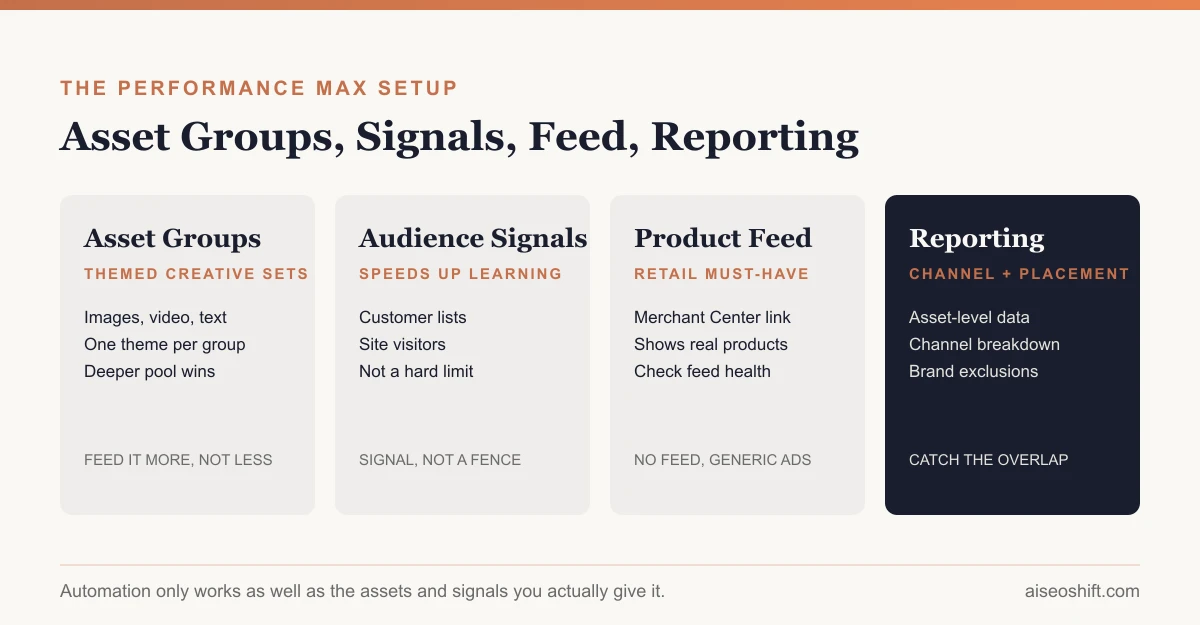
An asset group is “a collection of creative assets, like images, text, logos, and videos, centered on a specific theme or target audience.” You build one or more asset groups per campaign, each one themed around a product line, audience segment or offer, and Google’s system combines the assets within a group into ads automatically, matching the format to whatever channel it is serving on.
This means your job shifts from writing one ad to supplying a pool of material the system can recombine. A thin asset group, one image, one headline, one short description, gives the automation almost nothing to work with. A full one, several images and videos, multiple headlines and descriptions written for different angles, gives it room to find combinations that actually perform.
Audience signals
Audience signals are where you tell the campaign who you think should see it first: customer lists, website visitors, interests, demographics. Google frames this as a way to “accelerate campaign learning using high-intent audiences,” which is the key distinction to hold onto: a signal speeds up how fast the system learns who converts, it does not lock the campaign into only reaching that group. Performance Max can and will serve outside your signal once it has enough data to find better matches elsewhere.
When to use it instead of Search or Demand Gen
| Campaign type | Best for | Tradeoff |
|---|---|---|
| Search | Keyword-level control, protecting brand terms, high-intent queries | Limited to search results, no cross-channel reach |
| Performance Max | Broad conversion goals, full-inventory reach, retail with a product feed | Less placement-level control, relies on asset quality |
| Demand Gen | Visual, feed-style discovery across YouTube, Discover and Gmail | Not built around direct-response search intent the way Search is |
Performance Max tends to work best layered on top of an already-working Search campaign, not as a replacement for it. Running Search for high-intent, keyword-specific traffic and Performance Max for everything else, additional reach, retail feed-driven product ads, YouTube and Display placements the account was not covering before, is a more common and more defensible structure than replacing Search entirely with one Performance Max campaign and hoping branded traffic still gets captured.
For a sense of how this fits against a platform you are not using at all yet, our Google Ads vs Facebook Ads comparison covers where each platform’s strengths sit relative to the other, and our guide to Google Demand Gen campaigns is the right read if you are deciding between that format and Performance Max for a visual, discovery-style goal rather than a direct conversion one.
Retail feeds and reporting controls
For ecommerce accounts, Performance Max connects to a Google Merchant Center product feed, which is what lets the campaign surface specific products with their own images, prices and availability rather than generic text and display ads. This is the setup most retail advertisers should be running; a Performance Max campaign without a connected feed is leaving the most relevant inventory type unused.
On visibility, the campaign type gives you more than it used to. Current reporting includes asset-level and asset-group-level performance, channel performance metrics so you can see how spend and conversions split across Search, Display, YouTube and the rest, and placement reports. For control, you can add brand exclusions, use negative keywords where the account type allows it, add search themes to guide the kind of queries the campaign should chase, and set final URL expansion and text customization settings. None of that gives you placement-by-placement control the way a dedicated Display or Search campaign does, but it is enough to catch the obvious problems, an asset group getting all its spend from one weak channel, or brand terms showing up where they should not.
A setup checklist
| Step | What to do |
|---|---|
| Conversion goal | Set a specific, measurable goal before building assets, not after |
| Asset groups | Build at least one per distinct product line, audience or offer; do not combine unrelated products into one group |
| Asset depth | Multiple images, headlines and descriptions per group, written for different angles, not minor rewrites of the same line |
| Audience signals | Add first-party customer lists and site visitor segments to speed up learning |
| Product feed | Connect Merchant Center for any retail account; verify feed health before launch |
| Brand protection | Add brand exclusions if you are running a separate branded Search campaign and do not want Performance Max competing with it |
| Reporting cadence | Check channel-level and asset-level reports weekly for the first month, since this is when the learning phase settles |
| Negative keywords/search themes | Add where supported, to steer intent away from obviously irrelevant queries |
Common mistakes
The pattern that shows up most in underperforming accounts: feeding the campaign the bare minimum, one asset per slot, and expecting the automation to make up the difference. It cannot. The system recombines what you give it; it does not invent creative you never supplied.
The second common mistake is launching Performance Max without brand exclusions while running a separate branded Search campaign, which lets the two compete against each other for the same branded traffic and muddies which campaign is actually driving results.
The third is judging the campaign too early. Performance Max campaigns go through a learning phase while the system gathers conversion data across all the channels it is testing; pulling the budget or rewriting asset groups in the first one to two weeks resets that learning and makes the campaign look worse than it would if left alone slightly longer.
The fourth is treating Performance Max spend as its own silo when you decide where next month’s budget goes. Because it blends Search, Display and YouTube performance into one set of numbers, it needs to be judged against your overall MER and against the marginal return on other channels, the same way described in our guide to marketing budget allocation, rather than compared on raw ROAS against a channel that is not blending multiple surfaces together. Our full-funnel performance marketing system guide covers how to build that blended view so a strong-looking Performance Max number does not just mean it took credit for conversions another channel actually drove.
The bottom line
Performance Max trades placement-level control for reach and automation. That trade works well when you feed it a genuinely deep set of assets, connect a product feed if you sell physical goods, and keep enough reporting visibility to catch the obvious failure modes, thin assets, brand-term overlap, judging it before the learning phase settles. It works badly when it is treated as a way to stop thinking about creative and targeting altogether.
Related guides
- TikTok GMV Max Explained: What It Is and Who Needs It
- Google Ads Quality Score: What It Is and How to Improve It
- YouTube Shorts Ads: Campaign Types, Specs and Setup for 2026
- What Is Meta Andromeda? Why Creative Is the New Targeting in 2026