Playbooks
Google Ads Quality Score: What It Is and How to Improve It
Quality Score is not what most PPC advice treats it as. Google says it plainly: it's a diagnostic number, not an auction input. Here's what actually moves your costs.

Google Ads Quality Score is a 1-to-10 diagnostic rating, built from three components: expected clickthrough rate, ad relevance, and landing page experience. Google’s own documentation is explicit that Quality Score itself “is not an input in the ad auction.” It’s a readout telling you how your ads compare to competitors, not the number the auction actually runs on.
That distinction matters more than most PPC advice treats it. The real-time quality signals that set your actual cost-per-click and Ad Rank are calculated separately, during the live auction. Quality Score is Google showing you a snapshot of the same underlying factors so you have something to diagnose against.
Key takeaways
- Quality Score is a 1-10 diagnostic tool built from three components, each rated below average, average, or above average versus other advertisers over the trailing 90 days.
- Google states directly that Quality Score “is not an input in the ad auction.” It’s reporting, not the live calculation.
- Ad Rank, the real mechanism behind auction eligibility and your actual CPC, is built from your bid, ad and landing page quality, Ad Rank thresholds, search context, and the expected impact of your assets.
- You can win a better position at a lower price than a higher bidder, if your quality signals are strong enough; Google states this plainly.
- Fixing what Quality Score flags, weak expected CTR, poor ad relevance, thin landing pages, still lowers your real costs in practice, because the same underlying quality factors feed both numbers.
Where to actually find it
Quality Score isn’t shown by default. In Google Ads, open the Keywords view for a search campaign, then add the Quality Score, Expected CTR, Ad Relevance, and Landing Page Experience columns through the column customization menu. The overall 1-10 score sits alongside the three component ratings per keyword, which is the breakdown that actually tells you what to fix, not just that something needs fixing.
The three components, and what moves each one
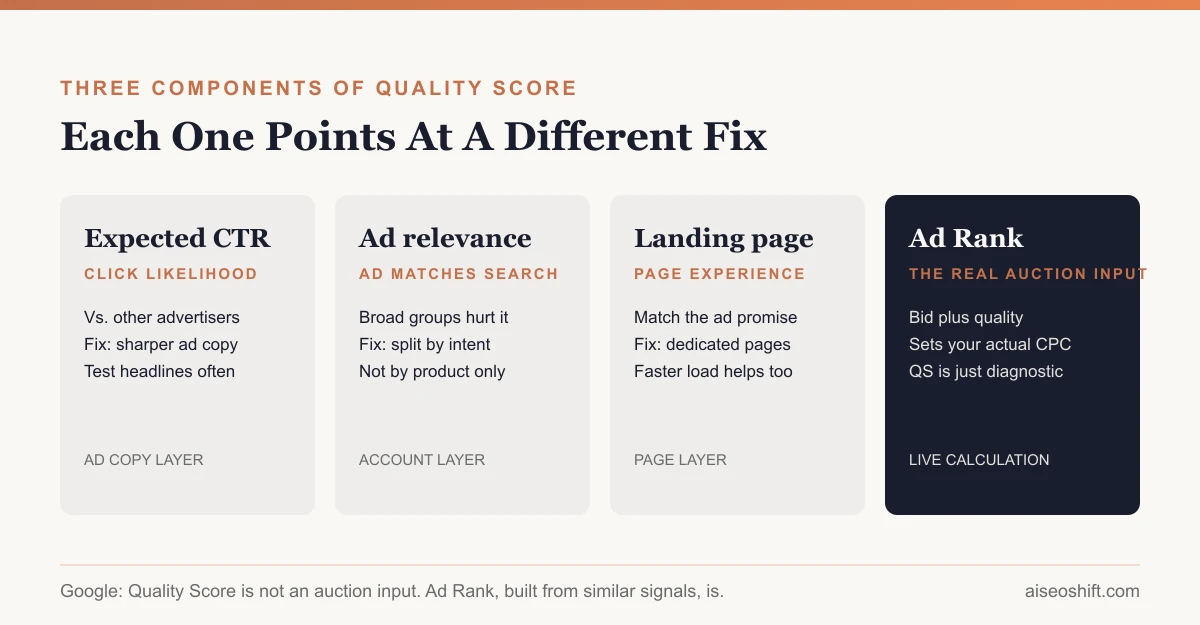
Google calculates each component by comparing your ads to other advertisers who’ve shown ads for the same keyword, rated as below average, average, or above average, based on the last 90 days of data.
Expected clickthrough rate (CTR)
This measures how likely your ad is to get clicked when it’s shown for a given keyword, regardless of position or ad extensions, as Google’s documentation frames it: how your keyword’s ad has historically performed relative to competitors.
What tanks it: vague ad copy, headlines that don’t mention what was searched, ads that haven’t been touched in months while the competitive set around them improved.
What fixes it: writing ad copy that speaks directly to the search term, testing multiple headline variations per ad group, and keeping ad groups tightly themed so one ad can genuinely match the intent behind every keyword in it, rather than one generic ad stretched across a broad group.
Ad relevance
This measures how closely your ad’s message matches what someone actually searched. A mismatch here usually means your account structure is too loose: one ad group holding keywords that should really be three.
What tanks it: broad ad groups mixing distinct search intents under one ad. Someone searching “running shoes for shin splints” and someone searching “running shoes clearance” are different people with different intent, served the same generic ad.
What fixes it: splitting ad groups by intent, not just by product line, so each ad group’s keywords share an actual reason someone is searching them, and the ad text can speak to that reason directly.
Landing page experience
This measures how relevant and useful the page someone lands on actually is, not just how fast it loads, though speed is part of a good experience.
What tanks it: sending every click to the homepage regardless of what was searched, slow load times, intrusive pop-ups, or a page whose content doesn’t match the ad’s promise.
What fixes it: a dedicated landing page per ad group theme that matches the ad’s specific promise, fast load times, and content that actually answers what the searcher was looking for instead of just existing as a funnel step. Our landing page best practices guide covers the structural side of this in more depth.
| Component | What it measures | Common failure | Fastest fix |
|---|---|---|---|
| Expected CTR | Likelihood of a click vs. competitors | Generic, untested ad copy | Write to the specific keyword intent, test variations |
| Ad relevance | Match between ad and search term | Broad ad groups mixing intents | Split ad groups by intent, not just product |
| Landing page experience | Usefulness and relevance of destination page | Generic homepage, slow load, mismatched content | Dedicated landing page per ad group theme |
How Quality Score relates to Ad Rank and CPC
This is where most PPC explainers get sloppy, so it’s worth quoting Google directly. Google’s Quality Score documentation states plainly: “Quality Score is not an input in the ad auction. It’s a diagnostic tool to identify how ads that show for certain keywords affect the user experience.”
The number that actually runs the auction is Ad Rank. Google’s Ad Rank documentation describes it as calculated from “your bid amount, the quality of your ads and landing page, the Ad Rank thresholds, the competitiveness of an auction,” along with context like the searcher’s location, device, and the specific terms of their search, plus the expected impact of your ad formats and assets.
The practical point Google makes about this: “even if your competition has higher bids than yours, you can still win a higher position at a lower price” by having stronger relevance and quality signals. Your actual cost-per-click is determined relative to the Ad Rank of the ad below you in the auction, not your own bid directly, so improving quality can lower your CPC even while your bid stays flat.
So the honest relationship is this: Quality Score and Ad Rank are built from overlapping inputs, expected CTR, ad relevance, and landing page quality show up conceptually in both, but Google explicitly keeps Quality Score itself out of the live calculation. Treat Quality Score as the dashboard light telling you something is wrong with one of the ingredients. Ad Rank is the engine actually running on those ingredients in real time.
Diagnosing a Quality Score problem
Work through this in order. Each component tends to point at a different layer of the account.
- Check which of the three components is flagged below average, inside the Status column for each keyword in Google Ads. Don’t guess; the breakdown tells you exactly which lever to pull.
- If expected CTR is the problem, look at your ad copy and testing cadence before touching bids. A keyword with weak expected CTR usually has stale or generic ad copy sitting untested for months.
- If ad relevance is the problem, check your ad group structure. This is almost always a segmentation issue: one ad group covering search intents that should be split into two or three.
- If landing page experience is the problem, check where the ad actually sends traffic. Homepage-only destinations are the most common cause, followed by slow load times and content that doesn’t match the ad’s specific promise.
- Re-check after changes settle. Quality Score components reflect a trailing 90-day window, so a fix doesn’t show up as an improved rating overnight. Judge the fix by whether CPC and position actually move, not by watching the Quality Score number day to day, and track that movement against your other marketing KPIs rather than in isolation.
A worked hypothetical: one fix, traced through
Say you manage a small outdoor gear store running search ads for “waterproof hiking boots.” The keyword shows Quality Score 4/10, with expected CTR and ad relevance both rated average, but landing page experience rated below average, because every click from that keyword lands on the store’s general footwear category page instead of anything about hiking boots specifically, let alone waterproofing.
You build a dedicated page: hiking boots only, a waterproofing callout above the fold, and load time trimmed by compressing the hero image. Nothing else about the account changes, same bids, same ad copy, same keyword list.
What should move, and on what timeline: landing page experience is rated against a trailing 90-day window, so the rating itself won’t flip overnight. What can move faster is the real-time signal feeding Ad Rank for that keyword, since Google’s auction calculation reads the live page, not just the lagging diagnostic score. In practice that means CPC and position on that keyword can start shifting within days of the page going live, while the Quality Score column itself catches up over the following weeks as enough fresh data accumulates. Don’t panic if the visible score lags behind what you’re already seeing in cost and position, that gap is expected, not a sign the fix didn’t work.
Myths worth retiring
“Raising my bid fixes a low Quality Score.” It doesn’t touch any of the three components. It can buy a worse position back temporarily, at a higher cost, while the underlying problem stays exactly where it was.
“Quality Score is the same across every keyword in an ad group.” It’s calculated per keyword, not per ad group or account. Two keywords in the same ad group, served by the same ad, can carry different scores if their individual click history and relevance differ.
“A 10/10 Quality Score guarantees the top position.” It doesn’t. Ad Rank also depends on your bid and your competitors’ Ad Rank in that specific auction. A perfect quality score with a low bid can still lose to a strong bid with solid, not perfect, quality.
“Quality Score changes affect every auction instantly.” The visible number reflects a trailing 90-day comparison. The underlying real-time signals feeding live Ad Rank calculations move faster than the dashboard number does.
The bottom line
Quality Score tells you where your ads are weak relative to competitors. It doesn’t run the auction, Google says so directly, but the same quality signals it’s built from do feed Ad Rank, which determines whether your ad shows and what you actually pay. Fix expected CTR with sharper, tested ad copy. Fix ad relevance by splitting ad groups around real search intent instead of product categories. Fix landing page experience by sending clicks somewhere that actually matches what they searched for.
None of this works in isolation from the rest of the account. A Google Ads vs. Facebook Ads budget split should account for where your landing pages and creative are strongest, and once your ad relevance is solid, the same tightly segmented structure tends to make checkout optimization fixes land harder too, since you’re sending qualified traffic to a page that was already built to match their intent.
Related guides
- Google Demand Gen Campaigns: What They Are and How to Set One Up
- Facebook Ads Not Delivering? Here’s What’s Actually Wrong
- Best Meta Ads Courses in 2026 to Learn Facebook and Instagram Ads for Your Brand
- YouTube Shorts Ads: Campaign Types, Specs and Setup for 2026