Playbooks
TikTok Ad Library: How to Use It for Creative Research
People say 'TikTok Ad Library' and mean two different tools. One is a DSA transparency repository, the other a creative inspiration feed. Knowing which one answers your question saves an afternoon.

“TikTok Ad Library” gets used to describe two different things, and that’s the first thing to untangle before you go looking for competitor ads. One is TikTok’s Commercial Content Library, a public transparency tool built to satisfy EU ad-disclosure law. The other is Creative Center’s Top Ads, a creative research feed showing which ads are performing well right now. They answer different questions, and neither one shows you a competitor’s ad spend.
Key takeaways
- “TikTok Ad Library” most often refers to the Commercial Content Library, TikTok’s ad transparency repository built for EU Digital Services Act compliance, with similar coverage extended to the UK and Switzerland.
- Creative Center’s Top Ads is a separate, older tool for creative inspiration: it ranks currently strong ads by region, industry and format, not by compliance disclosure.
- Neither tool publishes exact ad spend. The Commercial Content Library discloses the payer and targeting criteria; Creative Center shows relative performance, not budget.
- Use the Commercial Content Library when you need to know who is running an ad and where. Use Creative Center’s Top Ads when you need working creative ideas for your own account.
- Both are free. Pair them with a dedicated ad-spy tool if you need ads outside the “top performing” leaderboard.
Two tools, two different jobs
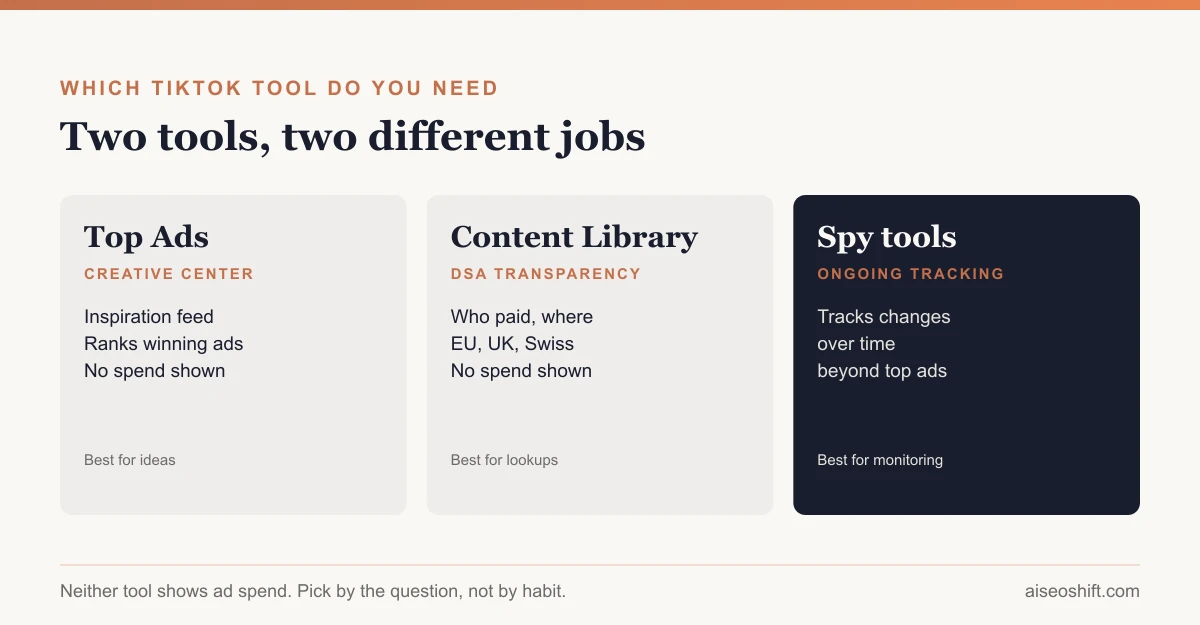
Think of it as the difference between a leaderboard and a public record. Creative Center’s Top Ads is a leaderboard: it shows you ads that are already winning, so you can borrow structure, hooks and pacing. The Commercial Content Library is a public record: it exists so anyone, researcher, journalist or competitor, can look up who is advertising on TikTok, roughly where, and on what topic, regardless of whether that ad is doing well.
That distinction matters for what you can and can’t get out of either one. You won’t find a small, low-performing test ad in Top Ads, because it only surfaces ads that are already succeeding. You won’t find a competitor’s ad spend in the Commercial Content Library, because disclosure law requires transparency about who’s advertising, not a leak of a competitor’s media budget.
TikTok Creative Center’s Top Ads
Creative Center is TikTok’s free tool for advertisers and creative teams, and Top Ads is its flagship feature for competitive and trend research. It works as a filterable, browsable feed of currently strong-performing ads, built around a few core filters: region, industry category, campaign objective (think awareness, consideration, conversion-style groupings), ad format, and a time window such as the last week, month, or several months.
What you can actually do with it:
- Watch the full creative, not a thumbnail or a description. This is the main draw: you see the actual video, hook, pacing and call to action.
- Filter to your own industry and region to see what’s working for businesses in a similar position, rather than scrolling a generic global feed.
- Sort by relative performance signals TikTok surfaces for each ad, which are useful for spotting which concepts are resonating, even though they are not raw impression or spend numbers.
- Use it as a swipe file, saving ad structures and hooks to adapt for your own brand, not to copy outright.
What it won’t give you:
- Exact spend. Nothing in Creative Center discloses budget.
- A full history of a specific advertiser’s ads. It’s organized around what’s performing well in a category right now, not around a searchable advertiser profile.
- Underperforming or newly launched test ads. If an ad hasn’t gained traction, it generally won’t surface in a “top ads” ranking by definition.
The Commercial Content Library (TikTok’s DSA ad repository)
This is the tool people usually mean when they say “TikTok Ad Library,” and it exists for a different reason than Creative Center. Under the EU’s Digital Services Act, very large online platforms are required to keep a public repository of the ads they run, disclosing enough detail that outside researchers can see who is paying for what. Wikipedia’s summary of DSA enforcement actions describes the baseline requirement as disclosing an ad’s “contents, topics and payers,” accessible without excessive delay; the European Commission fined X (formerly Twitter) €120 million in December 2025 for failing to meet that standard, which is a useful indicator of how seriously regulators are enforcing this.
TikTok built its Commercial Content Library to meet that obligation for ads served to users in the EU, and has extended comparable ad-transparency coverage to the UK and Switzerland. The library is searchable, generally by keyword in the ad’s content, by the advertiser or page that paid for it, and by the country or region the ad ran in, with a date range. For each result, you’d expect to see the actual ad creative, who paid for it, and the general targeting parameters used, such as broad age range, gender, or region, rather than a precise rule-targeting breakdown.
Because this tool exists for legal transparency rather than marketing research, it behaves less like a polished product and more like a compliance archive: built for completeness and auditability, not for a slick browsing experience. Treat it as the place to confirm who is actually running an ad and roughly where, not as a creative inspiration feed.
A note on Spark Ads in the feed
A lot of what shows up in Top Ads is boosted organic content rather than studio-produced ads, because TikTok’s Spark Ads format lets brands pay to amplify an existing organic post, including ones made by creators. If a top-performing ad in your feed looks like a normal TikTok video with none of the usual ad polish, that’s probably why. It’s a useful reminder that the bar for “top ad” on this platform is native-feeling content, not production value.
Creative Center Top Ads vs. the Commercial Content Library
| Creative Center Top Ads | Commercial Content Library | |
|---|---|---|
| Purpose | Creative inspiration and trend research | Legal ad transparency (EU DSA, extended to UK/Switzerland) |
| Who it’s for | Marketers, creative teams, agencies | Researchers, journalists, regulators, competitors, anyone |
| What you see | Full ad creative, relative performance signals | Full ad creative, who paid, approximate targeting, country |
| What you don’t see | Exact spend, advertiser-level history | Exact spend |
| Coverage | Only ads performing well enough to rank | All disclosure-eligible ads served in covered regions |
| Access | No active ad account required for core browsing | Public, no login required |
| Best for | ”What creative should I make next" | "Who is running this ad, and where” |
How to search each one
In Creative Center: pick your region and industry first, since the default feed is broad and not useful on its own. Narrow by objective and ad format next. Sort by the performance signal and scan the top results for a pattern, like a recurring hook style or pacing, rather than fixating on one single ad. Save the three or four that best match the structure you want to test, not the ones that simply look the most polished.
In the Commercial Content Library: start from what you actually know, a brand name, a keyword from an ad you saw, or a country. Set the date range to match when you believe the ad ran, since these libraries typically only retain ads for a defined retention window after they stop running rather than indefinitely. If a search comes back empty, widen the date range or region before assuming the advertiser isn’t running anything, since coverage is specific to the jurisdictions the disclosure law applies to.
Using both together: a worked research pass
Say you sell a $35 skincare serum and want to see how competitors are advertising on TikTok before building your own campaign. A reasonable sequence: open Creative Center, filter to beauty/personal care and your target region, and pull the five top-performing ad concepts for inspiration on hooks and format. Then switch to the Commercial Content Library and search your two or three named competitors directly, to confirm whether they’re currently running EU/UK ads at all and get a sense of how many distinct creatives they have live. The first pass gives you creative direction. The second gives you a reality check on whether a competitor is actually active in the regions you’re planning to enter.
Neither tool replaces a dedicated monitoring workflow if you need ongoing competitor tracking rather than a one-time look. For that, pairing these with a competitor ad-spy tool for Facebook and TikTok fills the gap, since those tools track changes over time instead of giving you a single snapshot.
A B2B example looks different, because B2B advertisers show up far less often in Top Ads. Say you sell project management software to construction firms. Filtering Creative Center to “software” or a nearby category will mostly surface consumer-app ads, since B2B spend on TikTok is still thin compared to ecommerce. In that case the Commercial Content Library is the more useful tool of the two: search for the two or three competitors you know by name to see whether they’re running EU/UK ads at all, rather than expecting a rich inspiration feed. For a B2B brand, the honest finding is often “our category barely advertises here yet,” which is itself useful input before committing budget.
What not to do with either tool
Treat both as research, not a template to trace. Lifting a competitor’s exact script, visuals or on-screen text crosses from inspiration into copying, and can create real trademark or copyright exposure if the original creative included licensed music, a creator’s likeness, or distinctive branding. Pull the structure, the pacing, the type of hook, not the specific words and shots. And don’t mistake a high rank in Top Ads for proof a format will work for you. It means the format worked for that advertiser, in that category, in that window. Test it on a small budget before assuming it transfers.
The bottom line
If someone asks for “the TikTok Ad Library,” find out which tool they actually mean before you go looking. Need to know who’s running an ad and roughly where: that’s the Commercial Content Library, built for DSA transparency and extended to the UK and Switzerland. Need ideas for your next ad: that’s Creative Center’s Top Ads, filtered to your category. Both are free, neither shows spend, and using the wrong one for the question wastes the research session.
Once you’ve pulled creative ideas, the harder part is making sure your own ads don’t go stale. Our guides to TikTok Spark Ads, TikTok ads best practices, ad creative testing and spotting creative fatigue cover what to do with the ideas once you’ve found them.
Related guides
- How Much Do TikTok Ads Cost in 2026? Budgets by Format
- TikTok GMV Max Explained: What It Is and Who Needs It
- What Is Meta Andromeda? Why Creative Is the New Targeting in 2026
- Google Ads Quality Score: What It Is and How to Improve It