Playbooks
TikTok Ads Best Practices That Actually Move Spend
TikTok ads reward native video, a fast hook, and a handful of creative variations. Here is the version of best practices that holds up past the first week.

TikTok ads work best when the creative looks native to the feed, the hook lands in the first 3 seconds, and the account runs enough creative variations for the algorithm to find a winner. Add Smart+ automation on top of that foundation, track with both the Pixel and the Events API, and most of what’s left is budget discipline and watching for creative fatigue.
The platform punishes anything that looks like a traditional ad. That’s the one rule everything else here supports.
Key takeaways
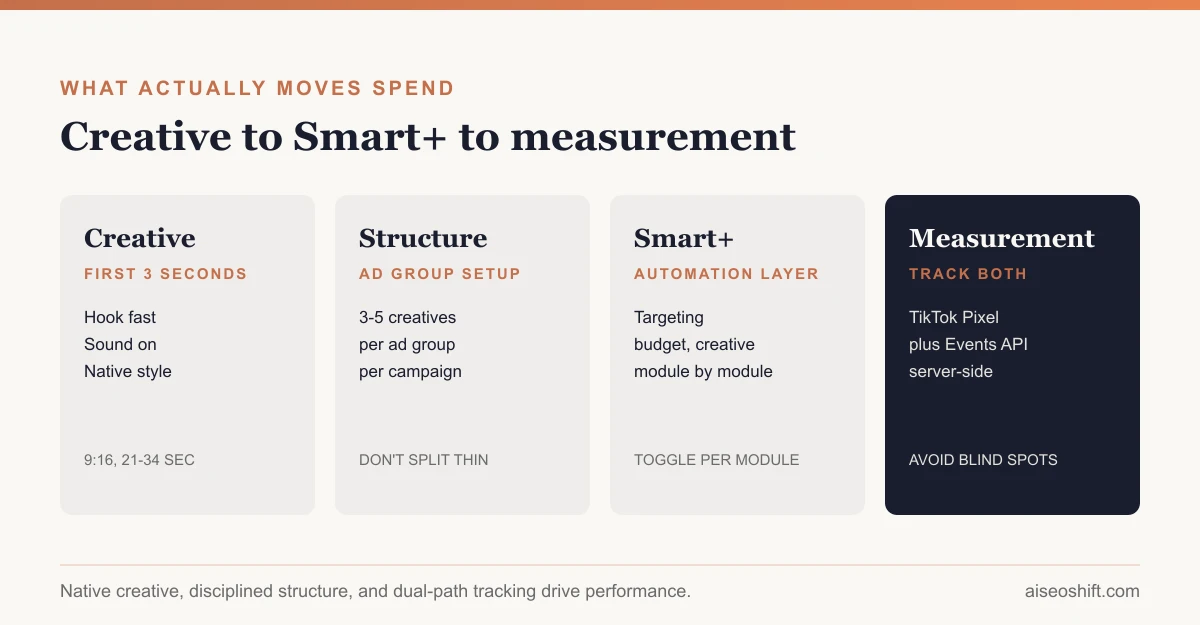
- Put your content proposition in the first 3 seconds and your hook within 6 seconds. TikTok’s own creative guidance is specific about this window.
- Run 3 to 5 creatives per ad group and 3 to 5 ad groups per campaign, per TikTok’s recommendation, not a dozen thin variants.
- Native, slightly rough creative consistently beats polished studio production on this platform.
- Smart+ automates targeting, budget, and creative within one campaign, module by module, so you can automate only the parts you want.
- Pair the TikTok Pixel with server-side Events API tracking. Browser-only tracking undercounts conversions after signal loss from iOS privacy changes.
Creative: build for the feed, not for a TV spot
TikTok’s own creative best practices guidance is specific: introduce the content proposition in the first 3 seconds, and get the hook working within the first 6. That’s the window before a thumb decides to keep scrolling.
A few specifics that hold across most verticals:
- Vertical, 9:16, minimum 720p. Letterboxed horizontal video reads as an ad immediately.
- Sound on. TikTok is built around audio-first discovery. Silent creative with text cards looks like a slideshow, not a video.
- Captions anyway. Add them for accessibility and for the portion of viewers scrolling with sound off, but don’t design the hook assuming they’ll be read instead of heard.
- Stay inside the safe zone. Keep text, logos, and CTAs out of roughly the top 10% and bottom 20% of the frame, since the profile icon, caption line, and engagement buttons occupy that space.
- 21 to 34 seconds for In-Feed ads. That’s the length TikTok’s guidance points to for completion rate, inside a broader 5 to 60 second allowed range.
- Native over polished. Creator-style handheld footage in an ordinary setting tends to outperform a studio shoot, because it doesn’t trigger the “this is an ad” scroll-past reflex.
Campaign structure that doesn’t starve its own creative
Run 3 to 5 different creatives inside each ad group, and keep 3 to 5 ad groups per campaign. That’s TikTok’s own recommendation, and it exists for a reason: enough variation for the algorithm to separate winners from losers, without splitting a limited budget across so many assets that none of them gathers enough data.
Test different angles in parallel rather than one at a time: a problem-led hook, a proof-led hook, a lifestyle hook, running simultaneously in the same ad group, rather than testing them sequentially over separate weeks. Sequential testing burns calendar time that parallel testing doesn’t need.
Leave a new ad group alone for its first week. Volatility in delivery and cost typically settles down after roughly 25 results or 7 days, similar in spirit to Meta’s learning phase. Editing mid-flight restarts that clock. If you’re also running Meta, the parallel is worth knowing: see why Facebook ads stop delivering for how a near-identical mechanism plays out on that platform.
Smart+: what it automates, and what it doesn’t
Smart+ is TikTok’s automation layer. It runs targeting, budget allocation, placement, and creative optimization inside one AI-driven campaign flow, and crucially, you can switch automation on or off at the module level. That means you can let Smart+ handle budget pacing while keeping manual control over creative, or the reverse.
This matters for how you plan a test: Smart+ isn’t a separate campaign type you either fully adopt or ignore. It’s a set of toggles layered onto the same campaign structure above. Start with one module automated, usually targeting, and compare it against your manually-targeted control before handing over more.
| Module | What Smart+ does | Keep manual when |
|---|---|---|
| Targeting | Expands and adjusts audience automatically | You have a proven niche audience that converts well |
| Budget | Shifts spend toward better-performing ad groups | You need predictable spend caps per campaign |
| Placements | Selects where ads run across TikTok’s surfaces | A specific placement (e.g. TopView) is part of the buy |
| Creative | Tests and refreshes creative variants automatically | You’re mid-way through a structured creative test |
A note on bid strategy and account structure
Most accounts do better running fewer, better-funded campaigns than many thin ones. If three separate campaigns are each testing a similar audience with a similar offer, they end up competing against each other in the same auction, which is the TikTok equivalent of the audience-overlap problem that causes “Not delivering” on Meta. Consolidate overlapping campaigns before adding new ones, the same way you would on Meta, when ads stop delivering over an audience-overlap issue.
Cost caps and bid caps work the same way they do on most auction-based platforms: set a cap too low relative to the competition for that placement and audience, and the system simply won’t spend the budget, since it won’t buy an impression above the cap. If an ad group is pacing well under budget with no delivery issues flagged, a bid cap set too conservatively is usually why.
Targeting and bidding
Structure targeting around purchase intent rather than demographics alone: cold audiences get education-led creative, warm audiences get differentiation, hot audiences (site visitors, cart abandoners) get urgency and retargeting. That structure works whether you’re running Smart+ or manual targeting underneath it.
On bidding, set your CPA or ROAS threshold against actual margin and repeat-purchase rate before launch, not against engagement metrics like watch time. Vanity metrics on TikTok are easy to win and don’t always correlate with the number that pays your bills.
Budgets and when to refresh creative
Don’t refresh creative on a calendar schedule. Refresh when delivery shows a consistent decline or when the daily volume of new users seeing the ad drops, since that’s the actual signal that an audience has exhausted a creative, not an arbitrary two-week mark. For the specific metrics that flag this before it tanks your CPA, see creative fatigue and ad creative testing for how to structure the test that replaces a tired creative with a better one, not just a different one.
If you’re deciding how to split budget between TikTok and other paid social, Google Ads vs. Facebook Ads covers the comparable tradeoff on the search-versus-social side, and TikTok Spark Ads is worth reading before you commit new-creative budget, since boosting an organic post that’s already proven itself often outperforms a cold-launched ad.
Reading performance without over-indexing on vanity metrics
Watch rate and engagement rate are easy numbers to feel good about and easy to mistake for proof something’s working. A video with a 60% watch-through rate and a terrible CPA is still a losing ad. Check watch-through and engagement as diagnostic signals, useful for understanding why a creative is or isn’t converting, but judge the campaign on CPA or ROAS against your actual margin, every time.
Measurement: Pixel plus Events API, not either/or
The TikTok Pixel is a browser-side snippet that reports standard events, page views, add-to-cart, purchases, back to Ads Manager. The Events API does the same job server-to-server, which matters because browser-only tracking has gotten less reliable since iOS privacy changes started blocking a meaningful share of client-side signals. Running both gives TikTok’s optimization two independent paths to see the same conversion, which tends to produce more stable attribution than either alone.
If you haven’t set up server-side tracking on another platform yet, the mechanics are similar to Meta’s Conversions API: a server-to-server connection that doesn’t depend on the user’s browser cooperating.
A worked budget example
Say you’re launching a new campaign with a $150 daily budget and 4 creatives in a single ad group. Rather than splitting that evenly ($37.50 per creative, too thin for any of them to gather a real signal), let the ad group spend concentrate naturally: Smart+ budget automation or standard delivery will shift spend toward whichever creative is winning early, usually within the first 2 to 3 days.
By day 4 or 5, you should see a clear spend split, something like one creative pulling 50% of spend and the rest splitting what’s left. That’s the system working correctly. Forcing an even split across all 4 creatives for the full campaign life defeats the purpose of running multiple creatives in the first place.
| Day | What to expect | What not to do |
|---|---|---|
| 1-2 | Volatile CPA, uneven delivery across creatives | Don’t judge winners yet, don’t pause anything |
| 3-5 | Spend starts concentrating on 1-2 top creatives | Don’t manually force budget splits |
| 6-7 | CPA should start stabilizing if the ad group has volume | Decide whether to add new creative variants now |
| 7+ | Clear winner(s) emerge; losers can be paused | Refresh only when delivery or new-user volume actually drops |
Checklist before you launch
- Hook lands in the first 3 seconds, full content proposition by second 6
- Sound on, captions added as backup, nothing relies on silent viewing
- Vertical 9:16, minimum 720p, 21-34 seconds for the primary cut
- Text, logos, and CTA stay out of the top ~10% and bottom ~20% of frame
- 3-5 creatives loaded into the ad group, not 1 and not 15
- CPA/ROAS threshold set against margin before launch, not adjusted after seeing early vanity metrics
- Both the Pixel and Events API firing and verified in Events Manager before spending real budget
- A plan for when to refresh creative that’s tied to a delivery signal, not a date on the calendar
The bottom line
TikTok ads reward creative that doesn’t look like an ad: native footage, sound on, the proposition landing in the first 3 seconds. Structure campaigns with enough creative variety to let the algorithm find a winner, 3 to 5 creatives per ad group, 3 to 5 ad groups per campaign, and give new ad groups a week before judging them.
Smart+ automates the mechanical parts, targeting, budget, placement, module by module, so turn it on where you don’t have a strong manual edge and keep control where you do. Track with both the Pixel and the Events API so one blind spot doesn’t cost you the data the algorithm needs to optimize.
Related guides
- How Much Do TikTok Ads Cost in 2026? Budgets by Format
- Best Meta Ads Courses in 2026 to Learn Facebook and Instagram Ads for Your Brand
- Best Tools to Monitor Competitor Facebook and TikTok Ads in 2026 (Free and Paid)
- TikTok GMV Max Explained: What It Is and Who Needs It