Playbooks
Server-Side Tracking Explained: Setup, Cost and When You Need It
Your pixel is losing data every day, quietly. Server-side tracking is the fix most platforms now point to, and it is less exotic than it sounds.

Server-side tracking means sending conversion and event data to ad platforms from a server you control, rather than relying only on JavaScript firing in the customer’s browser. It exists because browser-based tracking has been quietly losing data for years, and every major ad platform, Google, Meta and TikTok, now documents a server-side path as the fix.
Key takeaways
- Client-side tracking depends on a script loading and running in the browser. Server-side tracking sends the same event from your infrastructure, so it survives ad blockers and browser privacy limits.
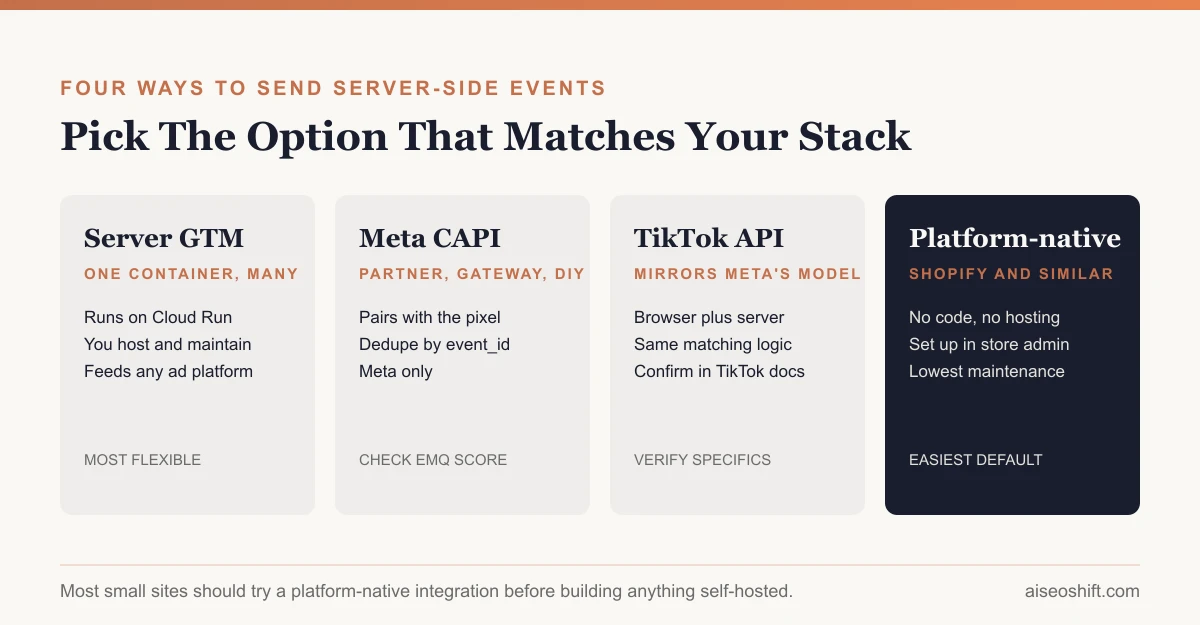
- The main options are server-side Google Tag Manager (self-hosted), Meta Conversions API, and platform-native integrations like Shopify’s built-in connections, which need no separate hosting.
- Server-side tracking replaces nothing on its own. Meta’s documentation explicitly recommends running CAPI alongside the pixel, deduplicated with a shared event ID.
- Consent mode is a separate layer: it governs what your tags do when a visitor hasn’t consented, regardless of where the tag runs.
- Hosting your own server container costs real money, but for most small sites it’s closer to a cheap SaaS subscription than an engineering budget line.
Client-side vs. server-side tracking
Client-side tracking is what most sites still run by default. A pixel or tag, Meta’s, Google’s, TikTok’s, sits as JavaScript in the page. When a visitor loads a page or completes a purchase, that script fires and sends the event straight from their browser to the ad platform.
That path depends on three things going right: the script has to load, the browser has to allow it to run, and any cookies involved have to survive long enough to connect the event back to an ad click. Server-side tracking removes the browser from that chain. Your own server, or a container you manage, sends the event instead. The visitor’s browser never has to cooperate, because it isn’t the one doing the reporting.
Google’s own documentation for server-side Google Tag Manager frames the value in three parts: better page performance (fewer scripts loading client-side), more control over what data leaves your site and in what form, and better data quality because the browser’s unreliability stops being the bottleneck.
Why signal loss happens
None of the forces causing signal loss are new, and none are reversing:
- Ad blockers and privacy extensions block known tracking scripts outright, which is most pixels by name.
- Browser cookie limits, like Safari’s Intelligent Tracking Prevention, shorten how long a tracking cookie survives, breaking the link between an ad click and a later conversion.
- Mobile tracking prompts, like iOS App Tracking Transparency, let users decline tracking, and plenty do.
Every one of these is a deliberate browser or OS decision, not a bug. If your reported conversions in Meta or Google Ads look lower than what your own order data shows, this is almost always why, and it’s the exact gap server-side tracking is built to close.
A worked example of what signal loss actually costs
Say you run a $45 skincare brand doing most of its sales through Meta ads. Your store’s order data shows 500 purchases last month that your Meta ad account can be credited with reasonably. Your Meta Ads Manager, pixel-only, reports 350.
That 30% gap is not 150 customers who didn’t really buy. They bought. Meta’s pixel just never heard about it, because their browser blocked the script, their session ran out before the purchase event fired, or Safari’s cookie limits broke the link between the ad click and the later sale. From Meta’s side, those 150 purchases don’t exist, which means the algorithm optimizing your campaigns is learning from 350 examples of “what a buyer looks like” instead of 500. It can’t optimize toward people it never saw convert.
Turn on server-side reporting for the same events, through CAPI, Gateway, or a partner integration, and that gap typically closes substantially, though not always completely; some loss (declined consent, for instance) is a real decision you have to respect, not a tracking bug to fix. The practical sign something changed: your Ads Manager purchase count moves closer to your store’s own order count over the following one to two weeks, as Meta’s models have fresh, accurate examples to learn from again.
How to choose, in practice
Work through these in order, and stop at the first one that fits:
- Does your platform already offer a native integration? If you’re on Shopify, or another platform with a built-in Meta, TikTok or Google connection, use it before anything else. It’s free, maintained by the platform, and needs no code.
- Do you only need accurate signal for one ad platform? Use that platform’s own hosted path, Meta’s Conversions API Gateway or TikTok’s equivalent, rather than building a general-purpose container for a single destination.
- Do you need to feed several destinations from one source, or have a non-standard backend? This is the case for server-side GTM: one container, multiple tags, full control over what gets sent where.
- Do you have in-house engineering and a reason to want full control over every field sent? Only then does a fully custom, direct server integration make sense. It’s the most capable option and the most ongoing work.
Most small and mid-size sites should stop at step 1 or 2. Step 4 is for teams that have already outgrown the simpler options, not a default starting point.
Testing before you trust it
Whichever route you pick, verify it the same way: generate a real test event (a test purchase, a test lead form submission) and check it shows up correctly tagged in the ad platform’s own event-testing tool, not just in your own server logs. A container or integration that deploys without errors can still send malformed, incomplete, or duplicate events for weeks before anyone notices, usually surfacing only when someone asks why a reporting number looks wrong. Re-test after any checkout, theme, or platform update, since those are the most common way a previously working event quietly stops firing.
The server-side options
There is no single way to do this. The right option depends on your platform and how much you want to host yourself.
Server-side Google Tag Manager
Google’s documentation describes server-side tagging as using the same tag, trigger and variable model as regular GTM, but running it inside a server container you host yourself, typically on Google Cloud Run or App Engine, behind a custom subdomain. You configure a server container the same way you’d configure a web container, then point your site’s tags at it instead of sending events straight to Google or a third party.
This is the most flexible option because it isn’t tied to one ad platform. A single server container can forward events to Google Ads, Meta, TikTok and your analytics tool at once, each getting a copy formatted for its own API.
Meta Conversions API
Meta’s own documentation describes CAPI as a connection between “an advertiser’s marketing data…from an advertiser’s server, website platform, mobile app, or CRM” and Meta’s systems, processed the same way as pixel or SDK events. We’ve covered the full setup in our Meta Conversions API guide, including the three setup routes Meta documents and how to avoid double-counting events between your pixel and your server calls.
TikTok Events API
TikTok runs the same pattern as Meta: a browser pixel paired with a server-side API that sends the matching event from your backend. The mechanics mirror CAPI closely enough that if you understand Meta’s event-matching and deduplication model, TikTok’s version follows the same logic. (TikTok’s own documentation was unreachable while researching this piece; treat specifics as directional until you check TikTok’s current developer docs directly before building against them.)
Shopify and other platform-native integrations
If you run an ecommerce platform with a built-in ad-platform connection, this is the easiest route by far. The platform’s own app sends server events on your behalf and handles matching and deduplication, so there’s no container to host and no code to write. You configure it from inside your store admin, not a developer console. For most small and mid-size stores, this should be the default before anything self-hosted.
| Option | Setup effort | Who hosts it | Covers which platforms |
|---|---|---|---|
| Server-side GTM | High (deploy + maintain a container) | You (Cloud Run / App Engine) | Any tag you configure in the container |
| Meta Conversions API | Low to high, depends on route | Meta, Gateway, or you | Meta only |
| TikTok Events API | Low to high, depends on route | TikTok or you | TikTok only |
| Platform-native (Shopify, etc.) | Low | The platform | Whatever the platform’s app supports |
Consent mode basics
Server-side tracking changes where a tag runs. It does not change whether you need consent to run it in the first place. Google’s consent mode documentation describes two versions:
- Basic consent mode blocks Google tags entirely until a visitor interacts with your consent banner, and sends no data at all beforehand, not even a default consent status.
- Advanced consent mode lets tags load immediately with consent defaulted to denied, and when consent is withheld, Google says tags still send “cookieless pings,” limited, non-identifying signals that feed modeled conversion estimates instead of exact tracking.
Google’s own wording on defaults is specific: the system treats a visitor as consented unless a real choice says otherwise, though it notes regional behavioral differences for the EEA, Switzerland and the UK specifically. If you serve visitors in those regions, read Google’s consent mode documentation directly before assuming your current banner setup is enough. This is a compliance question, not a tracking-architecture one, and the two layers (server-side tagging, consent mode) work independently of each other.
What server-side tracking costs to run
Cost depends entirely on which option you pick.
A platform-native integration, Shopify’s built-in Meta or TikTok connection, costs nothing extra. It runs inside infrastructure you’re already paying for.
Meta’s hosted Conversions API Gateway and a self-hosted server-side GTM container both run on cloud infrastructure you pay for by usage: compute time and request volume, typically on Google Cloud Run, which bills per vCPU-second and per request above a monthly free allowance. For a typical small-to-mid traffic site, this usually lands closer to the cost of a budget SaaS tool than an enterprise infrastructure line. Check Cloud Run’s current pricing page before committing, since cloud pricing changes and the exact rate depends on region and traffic volume, neither of which is worth guessing at here.
A direct, fully custom server integration adds developer time on top of hosting, which is the real cost most teams underestimate. Budget for ongoing maintenance, not just initial setup, since Meta and Google both version their APIs and expect integrations to keep up.
The bottom line
Server-side tracking exists because the browser stopped being a reliable messenger. Pick the option that matches your stack: a platform-native integration if one exists for your ecommerce platform, Meta’s Conversions API or TikTok’s equivalent if you need platform-specific accuracy, and server-side GTM if you want one container feeding several destinations at once. None of it replaces your existing pixels. It just stops relying on them alone.
Once your tracking is actually counting conversions accurately, the numbers downstream get more trustworthy too, including whether your reported ROAS means what you think it means, and whether channel spend is really producing the results an incrementality test or a marketing mix model would credit it with.
Related guides
- LTV:CAC Ratio: Formula, Benchmark and Worked Examples
- How to Build a Full-Funnel Performance Marketing System (Step-by-Step, 2026)
- Customer Acquisition Cost: Formula, Examples and How to Lower It
- Marketing Budget Allocation: A Practical Framework for 2026