Playbooks
How to Build a Product Launch Plan That Doesn't Slip
Most launches don't fail because the product is bad. They fail because nobody wrote down what had to happen three weeks before launch day, and by the time someone noticed, it was too late to fix.

A product launch plan has three phases: pre-launch (build the audience and the assets), launch (the announcement and the push), and post-launch (the follow-up that actually converts interest into revenue). Below is a week-by-week timeline you can copy, a checklist for each phase, and a hypothetical worked example so you can see how the pieces fit together.
Key takeaways
- Pre-launch should start 6 to 8 weeks out for most launches, not the week before.
- Launch day is the midpoint of the plan, not the end. Most conversion happens in the follow-up weeks after.
- One owner needs to hold the full timeline, even when the work is split across teams.
- Build your “what if this breaks” plan before launch day, not during it.
- A soft launch to a small segment catches the problems a full announcement would expose publicly.
The three phases, and what actually happens in each
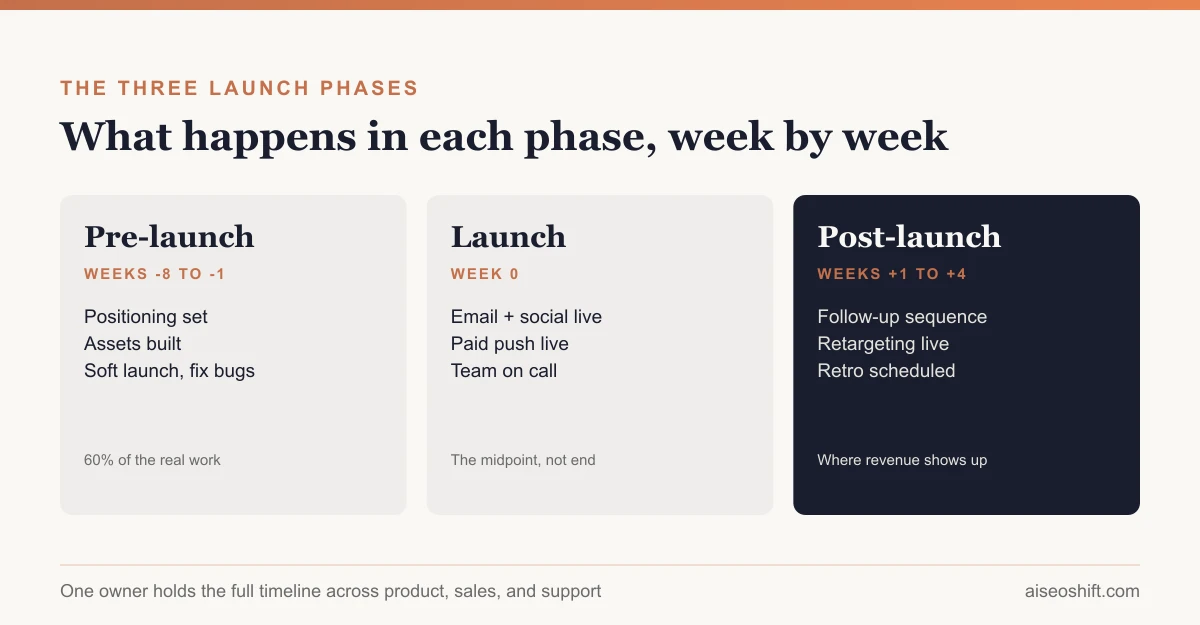
Pre-launch is where you build the audience, finish the assets, and brief every team that has to say something consistent on launch day. This is 60% of the real work and almost none of the visible excitement.
Launch is the announcement itself: the email, the social posts, the press if you have it, the paid push if you’re running one. It is a single event, but it only works if pre-launch did its job.
Post-launch is where leads either convert or go cold. This phase gets skipped constantly, because the team is exhausted from launch week and moves on to the next thing. It is usually where the revenue actually shows up.
Week-by-week timeline
| Week | Phase | Key tasks |
|---|---|---|
| -8 | Pre-launch | Finalize positioning, target customer, and core message. Lock pricing. |
| -7 | Pre-launch | Build the landing page. Draft launch email and social copy. Brief sales and support teams. |
| -6 | Pre-launch | Produce creative assets (screenshots, demo video, product photos). Start building a waitlist if using one. |
| -5 | Pre-launch | Line up any press, influencer, or partner outreach. Finalize onboarding flow for new users or buyers. |
| -4 | Pre-launch | QA the full purchase/signup flow end to end. Load testing if volume risk is real. |
| -3 | Pre-launch | Soft launch to a waitlist segment, beta group, or internal list. Fix what breaks. |
| -2 | Pre-launch | Finalize launch-day schedule: who posts what, when, and who is on call. |
| -1 | Pre-launch | Final asset review. Confirm tracking (UTM links, conversion events) is live and tested. |
| 0 | Launch | Announcement goes out across email, social, paid, and any press. Team monitors support queue and system load. |
| +1 | Post-launch | First follow-up email to anyone who clicked but didn’t convert. Review launch-day metrics. |
| +2 | Post-launch | Retarget ad campaign live for site visitors who didn’t convert. Collect early customer feedback. |
| +3 | Post-launch | Case study or testimonial outreach to first customers. Adjust messaging based on what’s actually resonating. |
| +4 | Post-launch | Full launch retro: what worked, what didn’t, what to change for the next one. |
The copyable checklist
Pull this into your own doc and strike items that don’t apply.
Pre-launch
- Positioning and core message signed off by product and marketing
- Pricing locked and communicated to sales
- Landing page built and tested on mobile
- Launch email drafted and scheduled
- Social posts drafted for each platform you’ll use
- Sales and support teams briefed with an FAQ doc
- Tracking (UTM parameters, conversion events, analytics goals) verified live
- Soft launch run to a small segment, issues logged and fixed
- On-call schedule set for launch day
Launch
- Announcement sent/posted across all planned channels
- Team monitoring support queue, comments, and system performance
- Any paid campaigns live and budget-capped appropriately
Post-launch
- Follow-up sequence sent to non-converting clickers
- Retargeting campaign live
- Early customer feedback collected
- Metrics reviewed against pre-launch targets
- Retro scheduled and run with the full team
Channels: picking the right mix
Don’t default to every channel on the list. Match the channel to where your actual audience spends time and how they buy.
| Channel | Best for | Weak for |
|---|---|---|
| Email to existing list | Any launch with an existing customer or subscriber base | New-to-brand audiences with no list yet |
| Organic social | Visual products, community-driven brands | Anything needing fast volume |
| Paid social | Fast reach, retargeting site visitors | Tight budgets, untested creative |
| Press / PR | Category-defining launches, funding news | Incremental feature updates |
| Influencer / creator seeding | Consumer products, visual demos | B2B software with a long sales cycle |
| In-app / product notification | Existing users for a feature launch | Net-new customer acquisition |
For the creator-seeding path specifically, see our guide on finding and briefing a UGC creator ahead of a launch window.
Who owns what on launch day
Launches that fall apart on the day usually fall apart because two people both assumed the other was handling something, or nobody was handling it at all. A simple ownership table fixes most of this before it happens.
| Task | Owner | Backup |
|---|---|---|
| Send the announcement email | Marketing | Growth lead |
| Post to social channels | Social/content lead | Marketing |
| Monitor support queue | Support lead | Whoever’s on call |
| Watch system performance / uptime | Engineering | On-call engineer |
| Answer sales questions from the field | Sales enablement | Product marketing |
| Decide if something needs to be paused | The single launch owner | N/A, this should not have a backup |
That last row matters more than it looks. If a bug shows up 20 minutes after the announcement goes out, someone needs the authority to pause the paid campaign or pull a claim from the landing page without convening a meeting first. Decide who that is before launch day, not during it.
What to do when something breaks
Something usually does. A checkout bug, a landing page that doesn’t render on mobile, a support queue that floods faster than the team can answer. The plan for this needs to exist before launch day:
- Know your rollback options in advance. Can you revert the landing page to the previous version in under five minutes? Can you pause the paid campaign with one click? Write down the actual steps, not just “we’ll figure it out.”
- Set a severity threshold for pausing the launch. A typo is not a reason to pull the announcement. A broken checkout flow is. Decide where that line sits ahead of time so nobody’s debating it while customers are hitting the error.
- Over-staff support for the first 48 hours, even if that means pulling someone off an unrelated project. A slow support response during launch week does more brand damage than the original bug.
- Communicate early if something’s broken. A short “we found an issue, fix incoming” post usually lands better than silence followed by a quiet fix.
A worked example
Say you’re launching a new $60/month tier of a project management tool aimed at freelancers. Here’s how the plan might run:
- Weeks -8 to -6: Positioning lands on “built for the solo freelancer juggling five clients,” not generic productivity language. Landing page and demo video get built.
- Week -3: Soft launch to 200 users on the waitlist. Three of them report the invoicing export is broken for one file format. Fixed before the full launch.
- Launch day: Email to the full list of 12,000 subscribers, one LinkedIn post, a limited paid push retargeting site visitors from the last 30 days.
- Week +1: 340 clicked the email but didn’t start a trial. A follow-up email addressing the top objection (price versus the free tier) goes out.
- Week +3: Two early customers agree to a short testimonial, which goes on the landing page for the next cohort.
None of these numbers are from a real company. They’re meant to show how the timeline and the decisions connect, not to be benchmarks you should hit.
The launch retro: questions worth asking
The retro in week +4 is the part most teams skip once they’re exhausted, which is exactly why it’s worth protecting on the calendar before launch week even starts. A few questions that actually surface something useful, rather than a generic “what went well”:
- Where did the timeline slip, and was that a planning problem or a dependency nobody flagged early enough?
- Which channel drove the cheapest qualified lead or sale, and would we have guessed that beforehand?
- What did the soft launch catch that would have been embarrassing in the full announcement?
- What did support or sales hear from customers in week one that marketing didn’t anticipate in the messaging?
- If we ran this exact launch again next month, what’s the one thing we’d change first?
Write the answers down somewhere the next launch owner will actually find them. A retro that lives only in a meeting nobody took notes in gets repeated as a mistake the next time around.
For the numbers you should actually be watching through this process, from CAC on the paid push to retention after onboarding, see our guide to marketing KPIs by funnel stage. And if Black Friday or another seasonal moment is anywhere near your launch window, check our Black Friday marketing ideas before you lock the date, since competing for attention against a major sale period changes the math.
The bottom line
A launch plan is mostly a scheduling problem with a single owner. Pre-launch takes the most time and gets the least credit. Launch day is loud but short. Post-launch is where the plan either pays off or quietly dies because everyone moved on to the next project. Build the follow-up weeks into the plan from day one, not as an afterthought once launch day is over.
If you’re building the underlying go-to-market plan rather than a single launch event, our marketing plan template covers the broader structure this launch plan sits inside.
Related guides
- Best Trending Product Research Tools in 2026: 14 Ways to Find Products Before They Peak
- Landing Page Best Practices: What Actually Converts
- LinkedIn Marketing Strategy: Pages, Posting and Ads That Work
- How to Build a Full-Funnel Performance Marketing System (Step-by-Step, 2026)